When I was first introduced to AI note taker Quill I couldn’t immediately see what it could add to my AI stack — currently a blend of ChatGPT, Perplexity, and Gemini. But after a week of using it to record all my meetings, the thing I ended up regretting most was not what I expected.
As a journalist, AI transcription software makes interviewing people way easier. If your job involves back-to-back meetings, it’s probably something you can benefit from too. But these tools can also be useful beyond the office, whether you want to record a club meeting, make your favorite podcasts searchable, or quickly capture your spoken thoughts when inspiration strikes.
If you’re just getting started with AI note takers, you may not have come across Quill yet, but here’s why it’s worth your attention.
What is Quill?
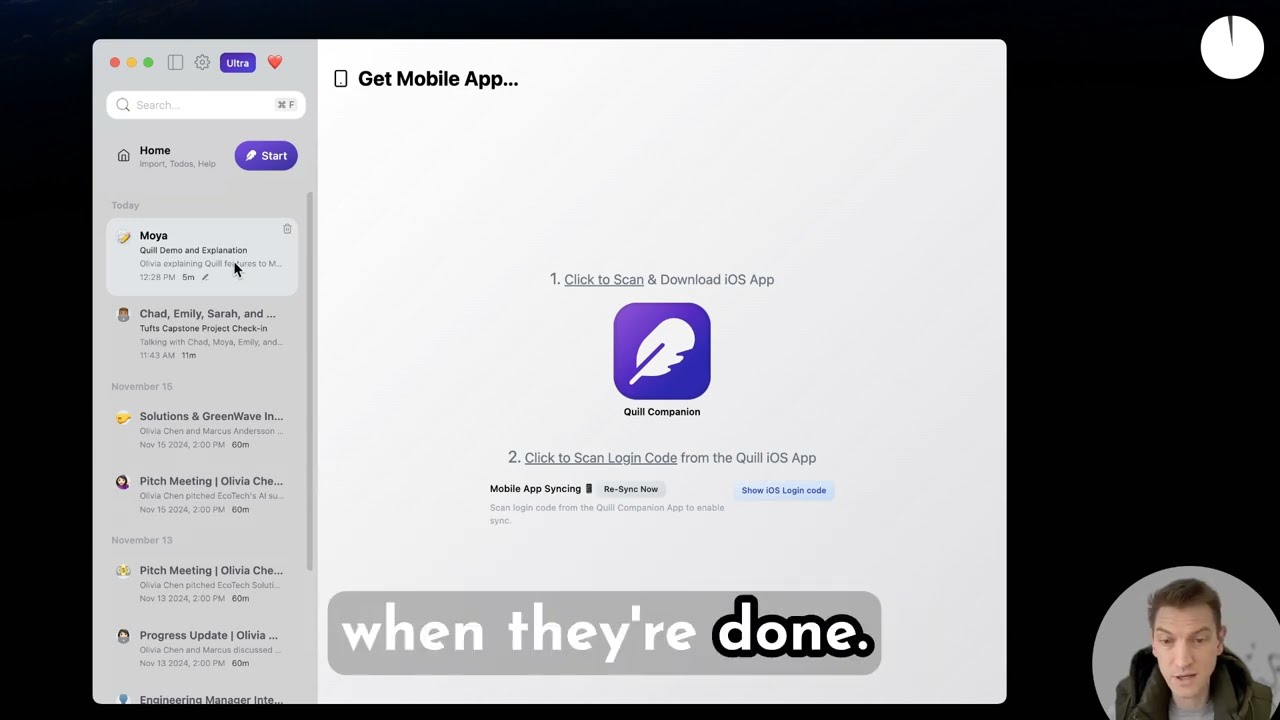
At its most basic level, Quill transcribes all the conversations you choose to record. You can capture audio directly through the app or by uploading your own files for transcription. There’s also a field that allows you to import YouTube videos, although I couldn’t get this feature to work.
One thing Quill does particularly well is capture system audio, meaning voices from online meetings sound just as clear in the transcript as they did live. All audio is processed and stored locally, which is great if you value privacy. Some of Quill’s rivals require their bot to join your calls online.
👍 Pros
- Easy for beginners, advanced users can set up automations and integrations
- Generates one-click actions you can run after your meeting
- Recordings stored locally with options to import your own audio
👎 Cons
- Occasional bugs can slow you down
- Paid iOS app limited to recording
Free vs paid
The free version of Quill gives you unlimited recording and transcription. But what makes Quill more than a glorified voice recorder is its AI agent capabilities, which feel like having a personal assistant sitting in on your meetings. It automatically does what would otherwise take me 10 separate prompts in ChatGPT to accomplish — though you’ll need a paid subscription to access these features.
A conversation I had with Quill founder and CEO Michael Daugherty is a good example. I recorded it using Quill and, within minutes, received detailed notes capturing the key highlights, a to-do list, and even a table providing context for every figure we discussed.
In a tab called “Actions,” I found four tasks ready to run. One offered to compose an email I could send to the Quill team with a link to the published article.
When I ran it, Quilliam — Quill’s AI bot, complete with a hedgehog mascot — sprang to life and produced a first draft within seconds. The email’s main purpose got lost in the first pass, but after a quick nudge, it quickly corrected course.
On Monday mornings, Quill also sends a weekly summary covering your meetings, along with a preview of the tasks you should focus on in the days ahead. Quill still feels a little rough around the edges. But it recently closed a $6.5 million seed funding round, and improvements to the user experience are likely already in the works.
Daugherty told me the app was built by a very small team and that, before this funding round, “it had to be a bit more limited.”Still, advanced users can create automations, integrate with Notion and Slack, and connect Quill to other AI tools like Claude Code.

One user-turned-investor logged over a thousand hours of recordings giving startups advice. He turned that archive into a phone line people can call, with an AI agent responding to their questions.
“It has his perspective on different challenges that startups encounter, and you can use him as a virtual advisor,” Daugherty said.
Quill says users can also safely use the app to record doctors’ appointments and therapy sessions. Daugherty himself is comfortable recording his own appointments and finds it useful to revisit those discussions months later.
“I’m actually totally fine with that in Quill because no one else can see it anyway and it’s just on my computer,” he said.
Would doctors and therapists be comfortable with people using AI to record them, though?
To explore that, I spoke with Lisa Chen, a licensed marriage and family therapist whose clients include senior leaders at Apple, Amazon, and Google. She said some of her clients already take notes during therapy to capture insights, remember tools discussed, and reflect on questions raised.
“If an AI note-taker helps someone stay more present, instead of splitting their attention between listening and writing, I can see how that could be beneficial,” she said.
“I'm actually totally fine with that in Quill because no one else can see it anyway and it's just on my computer"
Michael Daugherty
However, Chen caveated this, noting that therapy isn’t just about capturing information — it’s about being fully engaged in the moment. Recording, especially with AI, can subtly shift that dynamic.
“If it turns the session into something they’re documenting instead of experiencing, it starts to work against the process,” she said. “In practice, I’d approach it on a case-by-case basis, with an open conversation about intention, comfort, and privacy.”
Incidentally, my biggest regret during my Quill test run was not using it at my own doctor’s appointment. It was one of those convoluted conversations that leaves you walking out unsure what was actually decided. Had Quill been there, I’m convinced it would have turned that muddle into something clearer and more actionable.
Final thoughts
If you do want to give Quill a try, make sure you’re visiting the right website — there are several unrelated products with similar names. The free tier includes unlimited recordings and transcripts, but access to the AI features (one-click actions, AI chat with your meeting notes, and more), as well as the iOS app, requires a paid plan starting at $6.99 a month.
While Quill is less polished than some more established AI apps, the barrier to entry is low. You can keep things simple or dig deeper into its features, setting up automated workflows aligned with your goals.
My short trial with Quill did, however, convince me of its potential. So if you’re meeting me over the next few weeks, don’t be surprised if I point to my iPhone and ask if Quill can listen in.

Follow Tom's Guide on Google News and add us as a preferred source to get our up-to-date news, analysis, and reviews in your feeds.
More from Tom's Guide