




Google keeps finding new ways to make Gemini more useful, but this update might be the most meaningful yet. Instead of a flashier model or a redesigned interface, Google is tackling the problem users have complained about since the earliest chatbots: AI that doesn’t actually understand you.
Starting today, Google is rolling out Personal Intelligence in the Gemini app for U.S. users. The new beta feature lets Gemini reason across your Google ecosystem — including Gmail, Google Photos, Search history and YouTube history — to deliver responses that are more personalized, proactive and context-aware.
Powered by Gemini 3, the assistant can now connect information across multiple apps at once, surfacing insights you didn’t explicitly ask for — but that make sense in the moment. Instead of telling Gemini where to look, it understands context automatically, turning everyday questions into smarter, more relevant answers.
What Personal Intelligence actually does
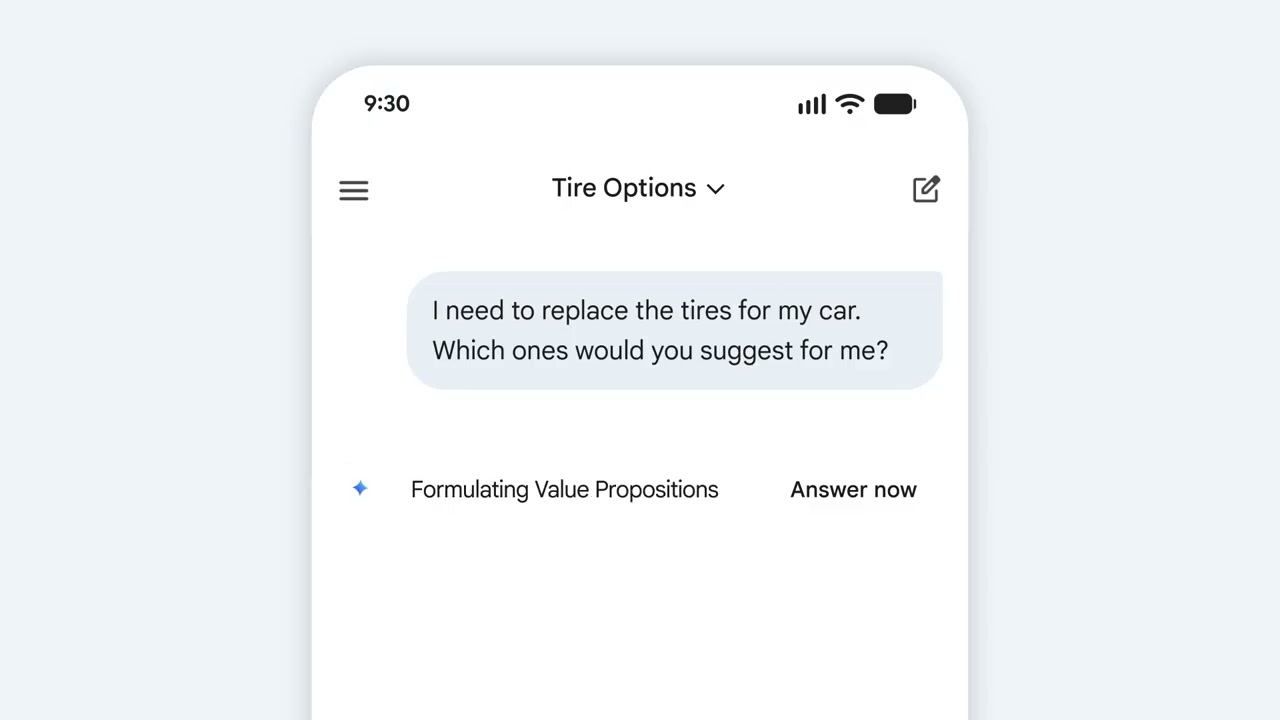
Once enabled, Personal Intelligence allows Gemini to understand relationships across your data — emails, photos, searches and videos — without you having to specify where to look.
For example, a question about a purchase can pull details from Gmail, product reviews from Search, and past preferences inferred from YouTube history. Similarly, a travel question can factor in past trips found in Photos, interests reflected in searches and bookings from email.
Now, Gemini can retrieve exact details — like numbers, dates or locations — from your personal data and combine them with broader reasoning
Google describes this as Gemini being able to “understand context without being told where to look.”
In other words, the assistant starts acting less like a search box and more like a personal aide.
A real-world example: the minivan test

During the pre-briefing, Google shared a practical example that highlights how far this goes.
While standing in line at a tire shop, a user asked Gemini for the tire size for their 2019 Honda minivan. Gemini didn’t just return generic specs — it suggested different tire options based on family road trips found in Google Photos, pulled ratings and prices, then retrieved the license plate number from a photo and identified the van’s trim using emails in Gmail.
Instead of digging through apps or sifting through tabs, Gemini got the info in one conversation — and in seconds. It's that kind of cross-app reasoning that no other AI assistant has ever fully delivered — until now.
How Gemin compares to other AI assistants
Plenty of chatbots have the ability to answer questions and even find solutions, but fewer can answer questions about your life without manual setup.
Gemini has technically been able to access Google apps for a while, but Personal Intelligence changes how that data is used. Instead of one-off retrievals, Gemini now reasons across sources to offer proactive suggestions — like book recommendations, travel ideas or shopping advice — grounded in your habits and interests.
Google says users are already using it to:
- Get tailored recommendations for books, shows and clothes
- Plan trips that avoid tourist traps
- Discover hobbies and experiences that align with their lifestyle
This is also why Google believes its approach is hard to replicate. Your data already lives inside Google’s ecosystem — Gemini doesn’t need you to upload it or connect third-party tools to get started.
Privacy and control: what Google says

Unsurprisingly, privacy is the biggest question on the minds of many users, and one Google says it takes very seriously, emphasizing control. Personal Intelligence is off by default and enabled only if you choose to connect apps. It's customizable app by app (you can connect Gmail without Photos, for example). And, even when turned on, Gemini won’t personalize every response. It only uses Personal Intelligence when it determines it will be helpful.
You can also:
- Regenerate a response without personalization
- Use temporary chats that don’t reference personal data
- Turn off or delete past Gemini chats at any time
- Give feedback if Gemini over-personalizes or makes incorrect assumptions
Google also says Gemini does not train directly on your Gmail inbox or Photos library. Instead, personal data is referenced to answer your question, while training focuses on prompts and responses after personal information is filtered or obfuscated.
In short: Gemini learns how to find things — not what your things are.
How to try it

Personal Intelligence is rolling out starting today to:
- Google AI Pro and AI Ultra subscribers
- U.S. users
- Personal Google accounts only (not Workspace, business or education accounts)
Once enabled, Personal Intelligence works across web, Android, iOS and all Gemini models in the model picker.
Google says it plans to expand to more countries and the free tier over time, and Personal Intelligence is also coming to Search in AI Mode soon.
How to turn it on:
- Open Gemini
- Tap Settings
- Select Personal Intelligence
- Choose which apps to connect (Gmail, Photos, YouTube, Search)
The takeaway
Personal Intelligence is Google’s clearest attempt yet to support you across every application.
By letting Gemini reason across the digital footprint you already have, Google is pushing AI from “smart” to situationally aware. If it works as promised, this could be the feature that finally makes an AI assistant feel less like a tool and more like a companion — without forcing users to hand over control.
Users should keep in mind that this update is still a beta, and Google admits mistakes and over-personalization will happen. But this launch makes one thing clear: Gemini is continuing its flex its dominance in the AI race.

Follow Tom's Guide on Google News and add us as a preferred source to get our up-to-date news, analysis, and reviews in your feeds.
More from Tom's Guide
- AI is quietly breaking the internet — and most people don’t even realize it yet
- I didn’t expect AI to help with the winter blues — but these 9 prompts actually work
- I just tested this app that turns your group chats into real plans — and it's the most practical AI tool yet

