If you're like me, you've got thousands of photos on your phone of your kids, parents, grandparents, loved ones, and friends. And they're likely to stay there, forgotten until you go digging through your photos app when your mom asks for that picture you took of the family at Thanksgiving.
But they needn't dwell in your phone forever — you can display them with one of the best digital photo frames. Our top pick is the Aura Aspen. Its 11.8-inch display is beautiful and has a resolution of 1600 x 1200 pixels, which is among the highest of the frames we’ve reviewed.
There are other options, too, at a range of different prices. If you're ready to dive into the best options for displaying all your photos on one shelf, read on for our top tested picks.
The best digital photo frames you can buy today
Why you can trust Tom's Guide Our writers and editors spend hours analyzing and reviewing products, services, and apps to help find what's best for you. Find out more about how we test, analyze, and rate.
Best overall


The Aura Mason was our previous top pick among the best digital photo frames, but Aura is discontinuing that model and replacing it with the Aura Aspen, which has everything we loved in the Mason — primarily, its beautiful 1600 x 1200 screen — and expanding it to a larger 11.8 inches.
Just like the Mason, the Aura Aspen delivers outstanding images that are crisp, vibrant, and colorful. Its anti-glare screen also enabled us to see pictures easily even when we were at extreme angles to the frame.
As before, it also supports both video (limited to 30 seconds each) and sound, as well as still images. It syncs seamlessly with iCloud and Google Photos; we especially liked that it can update automatically if you add photos to designated folders.
The Aspen is incredibly easy to set up, whether it's for yourself or as a gift for a parent or relative. Touch bars along the top and side of the frame let us switch between photos with just a swipe — and no touchscreen means your oily fingers won't mar the display.
While you can set the Aspen up in portrait or landscape mode, there's no option to mount it on the wall — you'll have to spring for the pricier Aura Walden for that. And, while you get unlimited cloud storage for photos, there's no local storage on the Aspen itself, which means that if your Wi-Fi connection goes down, you won't see any images on the frame.
Aura makes two other photo frames that we like: The Aura Walden ($249, Amazon) has a larger 15.6-inch, 1600 x 1200 display, and the Aura Carver ($139, Amazon) has a 10.1-inch display, but with a lower 1280 x 800-pixel resolution. The company will continue to sell the Aura Mason ($199, Amazon) until inventory runs out.
- Read our full Aura Aspen review
Best value digital photo frame


Our best budget pick among the best digital photo frames, the PhotoSpring 10 costs less than $100, but delivers a lot for the money. You can choose to either display it with its classic black picture frame, or remove it to reveal a more modern white frame.
In our PhotoSpring review, we were impressed by the build quality of the device and how nicely the plain white frame sets off our images. Currently, this frame is for tabletops only, but if you wanted to mount it to your wall, the company advises you purchase a separate power cable with a 90-degree magnetic connector.
While its resolution of 1280 x 800 is lower than the Aura Mason, we still found it pleasingly sharp and colorful enough for our photos and videos. High-resolution videos of up to five minutes in length (or 1GB file size) play automatically in an integrated slideshow, though the frame does not recognize Apple’s Live Photos as videos, only stills.
PhotoSpring’s flexibility extends to the various ways you can access photos, allowing the user to send up to 30MB of photos directly to the frame via email, proprietary app, text, photos app share button, or from a browser. All media uploaded to the frame is automatically stored on the device.
A subtle green dot at the upper right corner expands various on-screen controls and hides them when not in use. It's not the easiest to get to grips with at first, and it may require you to check the instructions. However, when you discover it and tap, it will show the current image zooming out to reveal handy on-screen controls. These will let you hide, delete, alter rotation, favorite, adjust formatting, or mail images to or from the frame. A settings menu facilitates the management of cloud accounts like Google Photos for sync or backup or Flickr for sync.
The interface also lets you invite friends to upload images to your frame, change brightness and volume levels, schedule the frame on and off, and set up parameters for viewing slideshows and onscreen EXIF info for each image. We tested the Premium version of the frame, which features four hours of battery life, as opposed to the standard version, which you must keep plugged in.
PhotoSpring is easy to use, with most tasks accomplished with a quick tap and simple on/off switches — ideal for non-technical folk. Image quality is high resolution for the frame’s size, and because you can schedule on-off intervals, a motion sensor is not sorely missed.
- Read our full PhotoSpring 10 Digital Photo Frame review
Best non connected

The Atatat Digital Photo Frame impressed us with the quality of its visuals, offering a vibrant display without artificially punching up the colors. While its screen is small, the widescreen format gives shots the impression of being bigger than they actually are. It’s quite a versatile design too, with calendar utilities and the ability to play images, movies and music over a slideshow.
This model comes with a separate remote control rather than a touch screen, so you don’t need to worry about fingerprints marring the screen. It’s also very easy to set up and intuitive to use, as there’s no software or app connectivity necessary; simply plug in a memory card or USB drive, and the Atatat frame does the rest. This makes it perfect for the non-tech-savvy members of the family.
Bear in mind that there’s no internal memory, so you’re limited by what your SD card or USB thumb drive can hold. Having said that, at less than $70, this is a great entry-level digital photo frame that will cover the basics and do it well. You can find it in 7, 8, and 10-inch sizes.
- Read our full Atatat Digital Photo Frame review
Highest resolution

Our smartphone cameras can take pictures at increasingly high resolutions, so it's about time that digital photo frames caught up. The Pexar by Lexar has a resolution of 2000 x 1200 pixels, which is one the highest among the frames we've tested, and it really showed off our photos well. Not bad for the price.
We also liked that you don't need to subscribe to any service to use the device, although some features, like batch upload files, does require a subscription. Still, with 32GB of onboard storage, plus an SD card slot and USB, you can load decades worth of photos onto the device locally. And, that also means it will continue to show photos, even if you're not connected to the cloud.
We were really impressed not just with the resolution, but also the colors displayed on the Pexar's 11-inch screen. However, despite it being a matte finish, it was susceptible to glare, and its touchscreen was a real fingerprint magnet. If you have a stylus, we suggest using it, as we did. We also wish it could connect to either Google Photos or Apple Photos, to make it easier to upload our favorite pics.
The Pexar is available with either a black or a Sand frame, and the company also makes a smaller 10-inch model, albeit with a much lower resolution of 1280 x 800.
- Read our full Lexar Pexar 11-inch Digital Frame review
Best for hanging on a wall

The Aura Ink is one of the first digital photo frames to use an ePaper display, which means you can mount it on a wall — wire free — for months at a time, without having to recharge it. We were impressed with the look of the Aura Ink - images on the device looked closer to an actual printed image than on a digital photo frame that uses LCD technology.
That being said, photos aren't nearly as bright, and the Aura Ink (as well as the Aluratek ePaper digital photo frame) also struggle with high-contrast images. If you look too close, you'll notice a general loss of quality, despite their high resolutions. And, these displays are meant to cycle through photos far less than an always-plugged-in digital photo frame — if you want to preserve the Aura Ink's battery life, you should set it to change photos once a day or less.
As with Aura's other digital photo frames, the Ink uses the company's intuitive app, which you can link to Google Photos and Apple Photos, so it was super-simple to add photos, as well as family members who wanted to share images.
If you are looking for a photo frame that you want to mount on your wall as you would a traditional picture — and you don't mind its high cost — then the Aura Ink is worth your look.
- Read our full Aura Ink review
Best for grandparents

The Skylight Frame is one of the best you can get for those who are not particularly tech-savvy, especially the grandparents. It provides all of the high-end specs you would expect, including a detailed 1280 x 800 resolution display, Wi-Fi connectivity, touchscreen control, and video playback, while still being easy to access and use. We reviewed the 10-inch model, but the company also offers a 15-inch version (with the same resolution) for $299. Considering the higher price — but not crispness — the 10-inch version is the better buy.
Photos can be uploaded via email or through the Skylight app. Organizing the images once they’re in your library is straightforward too. You can create albums, rotate images and even crop shots by pinching the screen. It also saves images to the internal 8GB of storage so you can keep viewing them should the Wi-Fi stop working.
Keep in mind that there’s no ambient light sensor and no motion sensor. That means it’s not exactly energy-efficient. You will have to adjust the screen's brightness manually and rely on the sleep setting to switch it off.
Unlike most other digital photo frames, you won't have access to every feature unless you pay for a subscription, which costs $39 per year. That means you can’t upload and view videos, store and back up photos in the cloud, or add photo captions.
These restricted features are why the Skylight Frame is lower on our list. However, if you won't miss them, this frame offers a brilliant balance of image quality and ease of use.
- Read our full Skylight Frame review
Best AI frame

Photos are known for two things. One: a great way to store memories in a visual format, so that you can come back to that place and time whenever you want. Two: being completely static, with no movement or any kind of animation. Homture took this weakness and decided to inject some AI into the equation, removing the otherwise static drawback of photos with the Magic Frame.
It uses artificial intelligence to animate what are otherwise static images, making your friends wave, your cat meow, and otherwise immobile objects move. I called it like magic when I reviewed the frame, as I watched images of my family come to life on the frame. It can be slightly odd-looking at times, but it uniquely modernises the digital photo frame.
In terms of screen quality, you’ve got a nice hi-res panel, ensuring everything looks colorful and clear. I’m also a big fan of the internal storage and how easy it is to use, so you won’t have any problems getting it set up and displaying your favorite images.
There are some issues with the Magic Frame. I wish you could wall mount it, but you're otherwise stuck with the table-stand that comes attached to the back. It also lacks any kind of cloud syncing, so you can’t connect to Google Photos or Apple Photos. If you look past those issues, though, the Magic Frame is a unique and fun way to remember vacations, family get-togethers, and other important events.
- Read our full Homture Magic Frame review
Also tested

This frame has a built-in AI that lets you create images out of whole cloth, or modify ones you have. It's also an ePaper frame, so while photos aren't as vibrant, you can hang it on a wall for a long time without any dangling cords. However, it isn't cheap.
Read our full Switchbot AI Art Frame review.
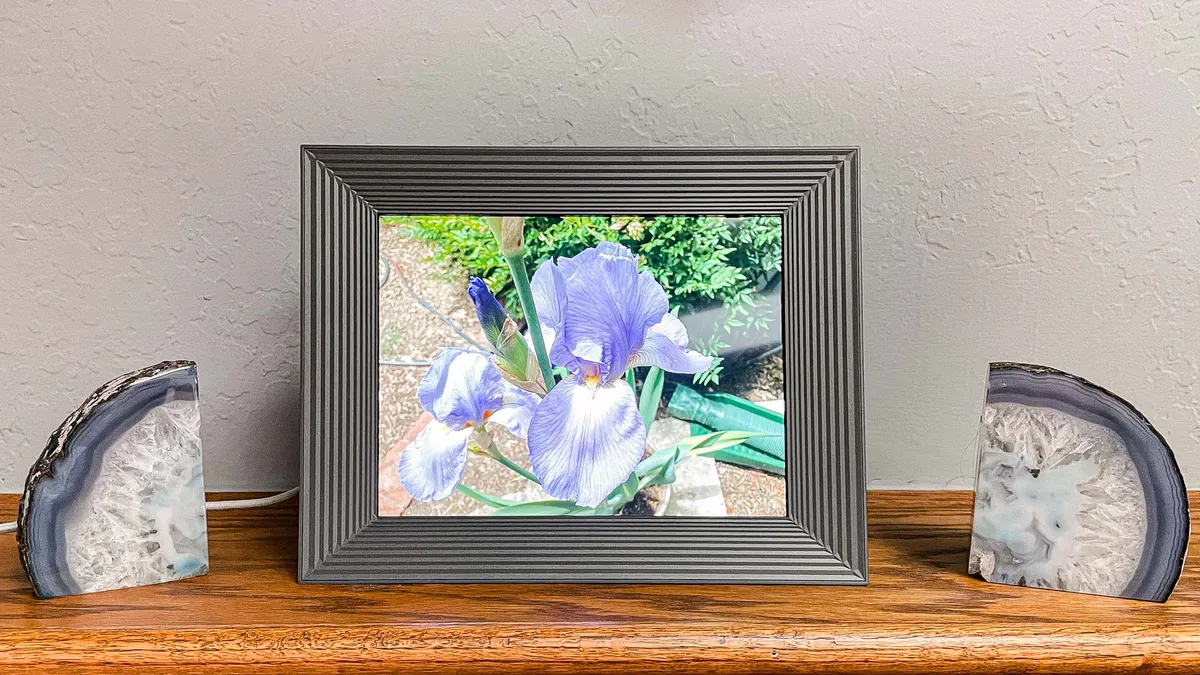
Our previous top pick among, the Aura Mason is being discontinued by the company, so get it while supplies last. This model has a 1600 x 1200 resolution but in a smaller 9-inch screen size. At $199, it's $30 less than the Aura Aspen.
Read our Aura Mason review.

A strong competitor to the Netgear Meural, this 15-inch photo frame has a comparable 1600 x 1200 resolution and comes in a variety of finishes. It didn't make the list due to its high price and hefty weight, but it's still a fantastic frame performance-wise.
Read our Aura Walden review.

This stunning 15-inch 1080p display gives you a virtual art gallery in your home. We were impressed with its anti-glare coating, and found its gesture controls to be very responsive. Meural offers an expansive library of art (some 30,000 pieces) and a suite for creating collaborative photo albums. However, you'll have to sign up for a subscription, which costs $69 per year.
Read our full Meural WiFi Photo Frame review.

The Aura Carver is the least expensive photo frame in the company's lineup, but it has a lower resolution of 1280 x 800, compared to 1600 x 1200 on the Aura Aspen and Walden.
Read our full Aura Carver review.

Photos and videos pop with lifelike hues and texture detail thanks to its 1280 x 800 pixel display and 16:10 aspect ratio. It can sit on a table or be mounted on a wall. Because it works via Wi-Fi, there’s no physical data inputs such as SD cards or USB sticks, but the frame does have 8GB of onboard memory for direct storage of photos and video.
Read our full NixPlay 10.1-inch Smart Digital Picture Frame review.

This frame’s 10.1-inch (1280 x 800), 16:10 touch screen allows you to view static images and slideshows with special effects transitions, to 30-second video clips. It comes with a headphone jack for audio, and multiple ways to upload images, including an SD card, USB thumb drive, and Wi-Fi modes. Additionally, it also has an alarm, calendar, and local weather. However, the frame seems a bit flimsy.
Read our Dragon Touch Classic review.
How we tested the best digital photo frames
We test the best digital photo frames on a variety of criteria.
Image quality
First, we assess at image quality and aspect ratio. The digital recreations of photos must look sharp and realistic, while maintaining a natural-looking crop. We look for a high resolutions with colors that ‘pop’.
Ease of use
Ease of use is another element we consider while reviewing the best digital photo frames. If a frame is simple and intuitive to set up and navigate, it often has more value. However, an expansive offering of connected features is important, too. For instance, does it offer motion sensors and , if speakers are included, how is the sound quality? We think most of the photo frames on this list strike a solid balance.
We didn’t forget about the basics either. When is comes to uploading and removing images from the gallery the process should be seamless, ideally with compatible Cloud services.
Storage
Additional specs we look at are storage and sensors. Some digital photo frames feature onboard memory, while others rely on Wi-Fi streaming, USB thumb drives or camera SD cards. If you must use a camera card or a USB stick, be sure that the frame's body adequately keeps them out of sight.
Meanwhile, a motion sensor is practically a must. Digital photo frames do not need to waste energy by playing all day long if no one is in the room to view them.
Design
Apart from the images themselves, a photo frame has to look good on its own. Higher-end models have a more refined finish, while cheaper ones tend to look plasticky. We even assessed the stability of the frame and the likelihood of a messy display if it features a touchscreen.
Extra features
Many frames offer calendar, clock, reminders, games, calculators, weather app widgets and speaker ports. These features aren't expectations, but make nice extras.
How to choose the best digital photo frame
Resolution
First of all, you need to consider how crisp you'd like your photos to be. Regardless of how much you're looking to spend, the images should look realistic and appear of a high quality on your display. You should be aiming for a high resolution. We recommend 1280 x 800 as a bare minimum, but 1920 x 1080 or 1600 x 1200 will get you much nicer-looking images.
Size
Digital photo frames are generally the size of a regular photo frame, typically ranging from 5-6 inches to upwards of 10 or 11 inches. You're not necessarily getting a higher-quality frame if you invest in a larger one, though you may appreciate a larger display that's easier to view from a distance.
If maximizing visibility is paramount, we recommend pre-measuring the spot on your shelf or mantle where the frame will go and opting for the largest size that can fit into that space.
Your (and your parent's) technical know-how
You should also take account of how technical you — of your parents or grandparents are — and where your photos are stored. If you don't want to spend hours on the phone playing tech support because they don't know how to connect the frame to Wi-Fi, you may want to go with a simpler model.
Non-connected frames tend to be the easiest to use because you don’t have to set up accounts or networks to transfer the images. Instead, you can insert camera cards or USB thumb drives directly into the frame and load up to 32GB of footage.
However, if you do opt for a connected frame, these offer much more flexibility in sourcing and sorting your images, whether from social media sites or directly from your phone. If your images are scattered on social media rather than concentrated on thumb drives, you will be better off with a connected digital photo frame.
Should you pay for a subscription?
While most of the best photo frames can be used without a subscription, others will require them to use some of their features. For instance, Nixplay offers two subscription plans, starting at $19.99/year, which lets you connect its frames with Google Photos and Dropbox.
Similarly, Skylight's photo frame requires a $39/year subscription to use many of its features.
Digital photo frame FAQs
How much should you spend on a digital photo frame?
Digital photo frames can start from as little as $40, and go as high as $300, so there’s quite a difference in price depending on the brand and the design that you choose. Generally speaking, the more you’re willing to spend, the more features you will have access to. Premium features include video playback along with built-in speakers. To get the best display resolution, you need to be prepared to spend a little more as well. Although, as our test results show, you don’t have to spend a fortune to get one of the best digital photo frames.
You shouldn’t be tempted by special features which add to the price tag. Unless you intend to specifically use those extras, it's a waste of cash. Instead, we recommend that you have a solid budget in mind as well as a list of the key specifications you’re after before you start browsing. That way, you can stay on target and ensure that you don’t overspend. Even if you know what you’re looking for, there are so many options on the market that it can be intimidating to search. If you want a hand finding the best digital photo frame for you, check out our list above. We’ve considered every circumstance and budget.
How many photos will a digital photo frame hold?
Most digital photo frames will offer in the region of 4-8GB of internal storage, which equates to storing approximately 30,000 photos, depending on their quality and size. However, many offer cloud storage, so you can store all the images you need without having to worry.
How do you clean a digital photo frame?
Just like any other photo frame, a digital photo frame will become dusty over time, and it will also collect a few fingerprints if you tend to pick it up. Before giving it a clean, unplug the device and then carefully wipe away any dust and fingerprints with a soft cloth. You can also use a specialist LCD cleaner designed for electronic screens. Although don’t apply the cleaning solution directly to the screen, apply it to a soft cloth first.
Digital photo frame deals