




It’s easy to forget that extreme cold can have a noticeable effect on your phone, especially when excessive heat seems like the more pressing issue. However, the cold can create some major issues for your device that you need to be aware of.
There are several issues that extreme cold can have on your phone, but the most pressing is how it affects your battery. Lithium-Ion batteries tend to struggle in colder weather, creating excessive battery drain and inaccurate charge level measurements. The cold can also lead to your touchscreen responding sluggishly, or even turning off at random. On top of that, there's also the risk of permanent damage to your phone via the buildup of condensation.
In the past, I worked as a phone engineer for Samsung, and I saw a lot of devices that were suffering due to a myriad of reasons. I have been using my prior knowledge to offer suggestions for keeping your phone safe. The following advice is focused more on dealing with extreme cold, especially considering the arrival of Winter Storm Fern.
3 tips to keep your phone safe from the cold
1. Make the most out of body temperature

It’s common practice to keep your phone accessible, which means most people will usually place it in an easy to reach pocket. However, most winter coats do not insulate the main pockets sufficiently compared to the rest of the body. One possible solution available is to make the most out of your body heat to keep your phone functioning properly.
Consider instead keeping your phone in an inner pocket of your coat. The advantage here is that these pockets usually rest underneath your coat's lining. The additional insulation, combined with your body heat, can helps to keep your phone at its optimal temperature.
On top of utilizing your body heat, it's also recommended that you don't leave your phone out or in your car. While you might think that the inside of a car will remain warm, they tend to become cold quickly after you get out, so it's better to keep your phone with you at all times.
2. Do not charge your phone while it is cold

You also want to make sure that the phone isn't too cold when you place it on charge. The problem is that if your battery is too cold, it doesn’t charge properly and can end up damaging the battery's cells. So what do you do if your phone is low and charge and you just spent the afternoon shovelling your drive?
Essentially, what you need to do is get the phone back to room temperature before you place it on charge. Now, it can be a bit tricky to tell sometimes if your device is at the right temp, but usually you’re looking at around 20 to 30 minutes for your device to reach a comfortable temperature. However, in an ideal situation, you’ll want to take as much time as possible.
While you might be tempted to speed up the process by using a radiator or hot air, I would caution against doing this. The issue with using any heat source is that it results in condensation building inside the phone, which can damage the internal circuits and connections. So, I am afraid that you are going to have to wait, while keeping the phone in a room temperature environment.
3. Invest in an insulated case

One good way to help keep your phone warm wherever it is would be to invest in a thermal carrying case. These small satchel-like bags are designed to hold your phone and help to keep the device warm.
They’re often designed using NASA-inspired materials that help to regulate your device's temperature compared to the outside environment. Not only that, they usually feature a handy strap that allows you to attach them to your belt, as well as some drop protection in case you slip up on the ice. One brand that I would recommend is Phoozy, a brand that designs specialist cases designed for this very reason, plus they're currently on sale at Amazon, so it's a great time to grab one.
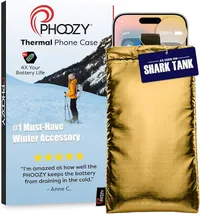
One thing I would recommend when it comes to these cases is to do your research before you buy. You want to look at the rated temperatures for the case, for instance, buying a phone case that’s rated for 140°F isn’t going to do you any good in 5°F winds and vice versa. On top of that, when it comes to cold weather and snow, you want to make sure that the case is water-resistant, as that can create more issues than the bag would solve.
If you take these suggestions and implement them, then you should be able to keep your phone safe from the cold. However, let us know any tips or tricks you might have for keeping your phone protected in colder environments.

Follow Tom's Guide on Google News and add us as a preferred source to get our up-to-date news, analysis, and reviews in your feeds.
More from Tom's Guide

