



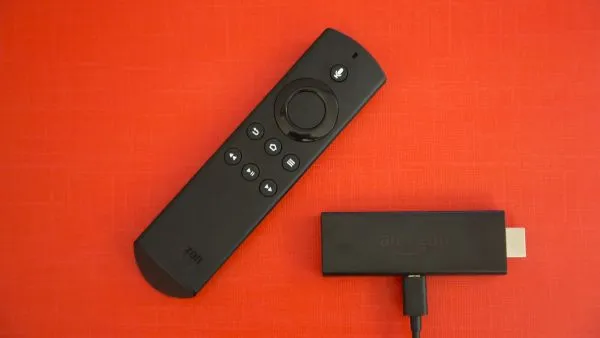
Amazon Fire Sticks are just one of the many devices discounted this Black Friday weekend and Cyber Monday. If you've picked one up, a VPN is the perfect companion.
Cyber Monday VPN deals will remain live for a few more days and almost all the best VPNs have slashed their prices – including some of the best Fire Stick VPNs.
Downloading a Fire Stick VPN is an ideal way to protect your data and unlock a ton of geo-restricted streaming libraries. You can access your favorite shows only available in other countries or watch shows from abroad as if you were at home.
All Amazon Fire Sticks support VPNs. But if you've purchased the new 4K Select, only two VPN providers are currently available – IPVanish and NordVPN. This is because the 4K Select runs on the new Linux-based Vega OS and most providers haven't yet developed compatible apps.
You may be wondering how you go about installing a VPN on an Amazon Fire Stick. If you are, read on and I'll guide you through each step.
Signing up for a VPN
If you haven’t already, your first step will be to sign up to a VPN of your choice – probably on your computer or on mobile.
We rate NordVPN as the #1 Fire Stick VPN but IPVanish is also a very popular option. Both are available on the new 4K Select, as well as older models.
For older devices, Surfshark is a great choice thanks to its cheap monthly price and excellent streaming performance.
Whichever VPN you go with, double check it's available on your Amazon Fire Stick app store before purchasing your plan. However, nearly all leading VPNs come with at least a 30-day money-back guarantee – so you claim a full refund if you encounter any problems.
Follow the sign-up steps on the VPN’s site, and choose your desired plan. Two-year deals always work out cheaper per month but you do pay more up front. Once you’ve purchased your plan and set up your login details, it’s time to head over to your Fire Stick to get it downloaded.

Installing a VPN on Fire Stick
Open up the Amazon Appstore and search for your VPN provider. Select the application, and hit download and install.
Once done, open the app and you should be faced with a login screen. Enter your account login details and away you go.

Changing your location with a Fire Stick VPN
After logging in, you’ll be able to choose a server. It’s likely that a location near to where you physically are will be the default, so if you want to change your location to access geo-blocked content you’ll have to access the server list.
The server list should be fairly easy to spot on your VPN home page. You can scroll down the list of countries or search for your desired location.
The best streaming VPNs performed very well in our latest round of testing. You should have no trouble unblocking global Netflix libraries – including those in the US, Japan, UK, and Canada. Amazon Prime Video, Disney+, and Hulu can all be unblocked.
You should also see success in unblocking regional services like BBC iPlayer, ITVX, and Channel 4 in the UK or 10Play in Australia.
Not every VPN is 100% effective first time, every time. If you find yourself unable to access content, trying a few different servers usually does the trick.
My VPN isn’t working – what do I do?
If your VPN isn’t playing ball on your Fire Stick, your best option is to get in contact with support on your provider’s website. Providers offer a mix of live chat – sometimes 24/7 – and email support.
You’ll also be able to search through articles and guides (you may find a Fire Stick guide on your VPN’s site) which will also help you get up and running.
We test and review VPN services in the context of legal recreational uses. For example: 1. Accessing a service from another country (subject to the terms and conditions of that service). 2. Protecting your online security and strengthening your online privacy when abroad. We do not support or condone the illegal or malicious use of VPN services. Consuming pirated content that is paid-for is neither endorsed nor approved by Future Publishing.

