




I don’t think anyone is purposely trying to spend more time on their smartphone these days. Instead, we’re all trying to use them less, even as social media algorithms, vertical videos, and online shopping conspire to draw us back in. I’m just as guilty as anyone — but I may have finally found a way to keep my doomscrolling at bay. All it took was a teensy, tiny e-reader.
Now I’ll admit, I was caught up in an endless scroll through YouTube Shorts when I first discovered Xteink’s X4. This small, surprisingly simple, single-use device immediately captured my attention. A few days later, Amazon Prime Day was in full swing. While looking for deals to cover, it popped up right in my feed, on sale no less.
I’m no stranger to trying out new devices. Just like with the Playdate handheld, I decided to buy an Xteink X4 ($70, Amazon) just to experience this now-viral gadget for myself. I’m glad I did. It wasn’t just a fun piece of tech to play around with; it actually got me reading again, albeit in small spurts when I normally would have been scrolling.
Here’s what it’s been like using a tiny, open-source, barebones e-reader for a week — and why it just might be the missing puzzle piece to break your endless scroll.
Trading smarts for buttons

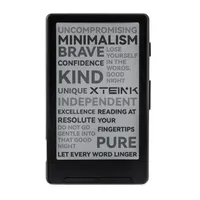
Unlike one of the best Kindles or even TCL’s NXTPAPER tablets, Xteink designed the X4 to be as simple as possible. It doesn’t have a touchscreen, and you can’t even read in the dark since there’s no backlight. Instead, you’re getting an incredibly simple e-reader that’s for reading and nothing else. Heck, you can’t even make annotations or look up unfamiliar words using a built-in dictionary.
At 4.49 x 2.72 x 0.23 inches, the X4 is an incredibly small device. Sure, it’s slightly bigger than its predecessor, the X3, but compared to a modern day smartphone, it’s light as a feather at just 74 grams. Unlike many of the best smartphones, you actually get a few accessories in the box, including a microSD card reader for your computer, a screen protector, and a few magnetic rings in case, like me, you’re not using an iPhone. Surprisingly, it also comes with a microSD card pre-installed. Even at 16GB or 32GB, this is still more than enough space for thousands of ebooks.

Given the lack of a touchscreen, the X4 relies on a series of physical buttons on the front and sides to navigate. Underneath the screen, you'll find navigation buttons used to scroll through the menus on the home screen or flip pages while reading. Then on the right side, in addition to another dedicated set of page-turn buttons, there’s a sleep button and a recessed reset button sitting right above the device’s microSD card slot.

The left side of the X4 is button-free. Instead, it houses a USB-C charging port, a tiny LED charging indicator light, and a lanyard loop cutout. Meanwhile, the top and bottom edges of the device are completely bare.
That initial YouTube video I saw was impressive enough to convince me to pick up my own X4, but after holding it in my hands, I’m even more impressed with its simple, understated design. With my unboxing out of the way, it was time to power the X4 on, load up some ebooks and start reading.
A page at a time

Now with the X4, you won’t be heading to Amazon's Kindle Store or another ebook shop on the device itself to load up some books. Instead, this is a BYOB — bring your own books — situation. You can certainly buy your own ebooks and put them on the X4 if they’re in the EPUB format. However, you can also download free ones and load them onto the device.
I read through all of the classics available from Project Gutenberg back when I first started e-reading on my old iPod touch. However, one of my favorite modern sci-fi authors, Cory Doctorow, also offers several of his novels for free under Creative Commons licenses. So I downloaded the novel Eastern Standard Tribe to try re-reading it on the X4 along with one of his books I hadn’t read yet, Makers.

From there, I just copied the EPUB files onto the X4’s included microSD card, powered the device on, and I was good to go. Since I had a medical appointment downtown, I decided to bring the X4 with me to do a bit of reading in the waiting room. Once that was done, I took it outside to see how well its 4.3-inch screen handled direct sunlight. It did so surprisingly well, remaining perfectly legible even in direct glare.

Since my wife and I were already downtown and planned on cooking Korean BBQ at home this weekend, we swung by H Mart to pick up all the ingredients we needed. Just for fun, I pulled the X4 out while we grocery shopped to see if I could squeeze in a few paragraphs here and there. On the compact screen, those paragraphs turned into pages incredibly fast, and before I knew it, I was a full chapter in.
A trip to H Mart is always a good excuse to pick up your favorite ramen alongside a bowl or two of flavors you haven’t tried before. While my wife browsed through some of the more outrageous options, I woke up the X4 and got back to reading. While you can’t read at night unless you get one of those old-school, clip-on reading lights, this little e-reader was incredibly clear under the harsh, overhead lights of a supermarket.
Before I knew it, we were at the register checking out and I had made serious progress in my book. That’s really the beauty of the X4. Since it isn’t bogged down with loads of extras, it wakes up from sleep instantly. There is nothing to distract you; one second it's in sleep mode, and the next, you’re right back into the paragraph where you left off.
Magnetic to a point

Now, before you rush out and pick up an Xteink X4 after watching a vertical video like I did, there are some limitations you need to be aware of. Yes, the device itself is magnetic and you can attach it to the back of your smartphone to bring this tiny e-reader everywhere you go. However, your mileage can — and likely will — vary.
For instance, in the video I watched, the person filming had the X4 attached perfectly to their phone. Since I’m still daily driving a Nothing Phone 2, I borrowed my wife’s iPhone 14 Pro Max to test this out. As you can see, the X4 does magnetically attach to her phone, but not in the way you’d think.
On that older Pro Max model, it only attaches sideways, which is less than ideal for slipping both devices into your pocket. I tried this with a standard iPhone 15 later on, and it aligned perfectly. Surprisingly, just like with the Google Pixel Tablet, I was also able to stick my X4 directly onto the front of my fridge without any modifications. Then again, you do get a two-pack of adhesive magnetic rings in the box, so regardless of what phone you use, you should be able to make things work.
Besides the lack of a backlight, the other big limitation is the X4’s stock software. Fortunately, there’s a very easy fix for that. The community that’s sprung up around this tiny e-reader has created its own custom firmware called CrossPoint, which drastically improves the reading experience. Flashing it onto my device took less than five minutes. Afterward, I even went back onto my computer and loaded some custom wallpapers onto the SD card. Let me know in the comments below if you’d like a step-by-step walkthrough on how to install CrossPoint and customize the X4.
There is an X4 Pro on the horizon that adds a touchscreen, but for me, that defeats the purpose of this tiny e-reader’s charm. I like not accidentally turning pages. The tactile, analog feeling of pressing a physical button to flip to the next page is something I’m sure users of older Kindles still miss to this day.
At its $70 full price — or the $55 discounted price I paid — the Xteink X4 is an absolute steal that could very well reignite your love for reading just like it did for me. Just don’t go into it expecting a tiny Kindle Scribe, and I bet you’ll be incredibly pleased with this little, single-purpose device too.

Follow Tom's Guide on Google News and add us as a preferred source to get our up-to-date news, analysis, and reviews in your feeds.

