




Everyone knows how much I love MagSafe wallets. While some of them have integrated trackers that let me keep tabs on my phone and wallet, they’re often bulky and use proprietary chargers. That’s why I switched back to one of those credit card sized Bluetooth trackers to see if they’re any more practical.
For more than a month now, I’ve been using the Rolling Square AirCard Pro to make sure I’m not leaving behind my backpack or iPhone 16 Pro Max. Similar to some of the best key and wallet finders, the AirCard Pro is razor thin and fits inside any ordinary wallet — but it has two features that make it stand above other trackers I’ve used.
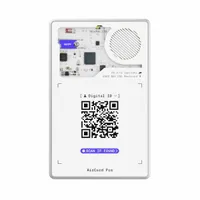
First of all, there are two versions of the AirCard Pro: a white one specifically for Android’s Find Hub network and a black one that supports Apple’s Find My service. You’ll want to make sure to get the right one, but regardless of which you choose, they both let you track their locations and even set them to lost mode.

The AirCard Pro is the shape of a credit card, but it’s about the same thickness as two normal cards. I know most MagSafe wallets I use allow up to three cards at most, so this would essentially hit that cap — which is why I recommend something like the ESR Aura MagSafe Wallet or Supcase MagFlip Stand because they accommodate more cards.

What I love most about the Rolling Square AirCard Pro is its see-through design and sturdy build quality. It’s not just some flimsy plastic here, but rather, a CNC machined aluminum frame with epoxy fiberglass resin. There’s even an integrated speaker that plays a tone to better track down my phone and wallet if I forgot where I put them last.
Obviously, it’s been perfect at letting me know where I’ve left my wallet through the app, but it has two features that make it better. Unlike other wallet trackers that rely on proprietary charging, the AirCard Pro features wireless charging. When I initially got it, I just let it charge on my 3-in-1 MagSafe charger — and that’s pretty much all of the charging it needed.

That’s because more than a month since then, it still shows a full charge. Rolling Square says that the 220 mAh battery inside can last upwards of 12 months. And since it’s rechargeable, it’s much less of a hassle than other trackers that use watch batteries.

Secondly, the AirCard Pro doubles as my business card because the QR code on the outside has all of my details. You’ll have to sign up for a Sherr.it account, which shares my email address, phone number, bio and more. Luckily, you can choose what you want to share — including the ability to redirect the QR code’s link to something else.
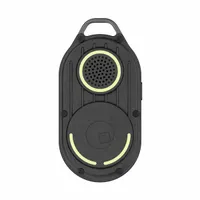
Due to its credit card size, you can use the AirCard Pro to track just about anything. I’ve put one in my backpack as well, but I can definitely see it coming in handy if I ever need to fly somewhere and make sure my luggage’s getting to my destination. If you need a key tracker, there’s also the Rolling Square AirNotch Pro. It does require the batteries to be replaced, but it’s rated to last for an even longer 20 months.
More from Tom's Guide
- I don't like the iOS 26 Camera redesign — but it does make sense
- Pixel 10 phones are launching this week — here's 5 things I'm looking for at the Made by Google event
- New leak could have spilled all the Pixel 10 Pro Fold specs — here's what to expect

