I've been testing the MacBook Neo for 2 weeks — here's 7 accessories I recommend to elevate this budget laptop

MacBook Neo accessories
(Image credit: Amazon edited with Gemini)

The MacBook Neo is one of the best MacBooks for anyone who needs a reliable and affordable laptop for everyday work. It has pretty much everything you need out of the box, including a vivid 13-inch display, a responsive keyboard and touchpad, and a sharp webcam. Still, with the right accessories, you can make this MacBook even more useful.

We recently uploaded a TikTok video detailing some of the best MacBook Neo accessories you can get right now. While some of the items here can be a bit pricey, most are generally around $30 or less. This includes the Anker USB-C 7-in-1 hub ($21), the Logitech Pebble Mouse 2 ($19), and the NuvoGrain Vertical Laptop Stand ($17), among others.

Quick Links

MacBook Neo accessories

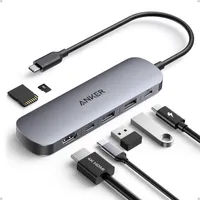
Anker 7-in-1 USB-C hub
Anker 7-in-1 USB-C hub: was $25 now $21 at Amazon

Get more ports for your MacBook Neo with the Anker USB-C 7-in-1 Hub. This hub features an HDMI port, 2 USB-A ports, and a USB-C port with 5Gbps transfer speeds. There’s also a USB-C PD input port for charging up to 100W and dual SD and TF card slots. Other features include 4K@60Hz video with HDMI and 85W charging. This USB hub can turn your MacBook Neo into your primary work machine.

Read moreRead less
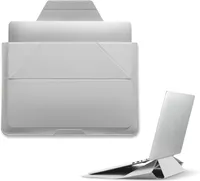
Moft Laptop Carry Sleeve
Moft Laptop Carry Sleeve: $64 at Amazon

The Moft Laptop Carry Sleeve is worthwhile if you want to keep your Neo protected. Designed for 14-inch laptops, this sleeve can convert into a sturdy laptop stand, is ultra-thin at 0.28 inches, has dedicated compartments for other accessories, and guards against everyday wear. Its size makes it ideal for the 13-inch MacBook Neo.

Read moreRead less
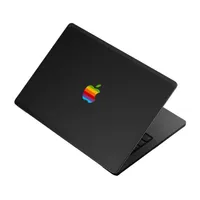
DBrand MacBook Neo 1984 Skin
DBrand MacBook Neo 1984 Skin: $31 at dbrand

If you want additional protection against scratches and bumps while giving the Neo a more retro look, DBrand’s MacBook Neo 1984 Skin is the way to go. It has a cool 3D-printed logo and is hue-matched to eight modern MacBook colors.

Read moreRead less
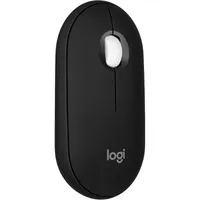
Logitech Pebble Mouse 2
Logitech Pebble Mouse 2: was $24 now $19 at Amazon

The Logitech Pebble Mouse 2 pairs perfectly with the laptop and the Moft carry sleeve, thanks to its slim design. This Bluetooth mouse comes in multiple colors, has a comfortable round design, offers connectivity with up to 3 devices on various operating systems, simple customization, and a promised 2 years of battery life.

Read moreRead less
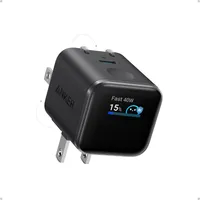
Anker Smart Display Charger
Anker Smart Display Charger: was $39 now $29 at Amazon

The Neo ships with a 20W charger, but it can actually charge up to 30W. The Anker Nano 45W charger is not only smaller than a lot of 30W chargers, but it can boost your charging speeds if you need to top off the Neo in a hurry. The built-in screen that shows charging speeds and can rotate up to 180 degrees is a nice bonus.

Read moreRead less
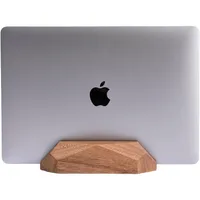
Nuvograin Adjustable Vertical Laptop Stand
Nuvograin Adjustable Vertical Laptop Stand: $17 at Amazon

The Nuvograin Vertical Laptop Stand is perfect if you plan to make the Neo your main work computer, but don’t want it taking up too much space on your desk. This stand is crafted from 100% natural wood, features an adjustable single slot mechanism, and is fairly compact. It’s easily one of the most elegant-looking vertical stands out there.

Read moreRead less
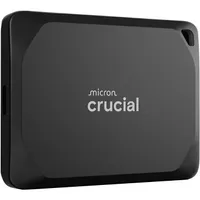
Crucial X10 Pro 1TB Portable SSD
Crucial X10 Pro 1TB Portable SSD: $199 at Amazon

Even if you get the $699 MacBook Neo 512GB model, it still might not have enough storage space for your needs. You can remedy that with the Crucial X10 Pro 1TB SSD. It offers fast data access with up to 2,100MB/s read and 2,000MB/s write speeds and a durable design that can withstand falling 7.5 feet. It also has broad compatibility with laptops, tablets, and gaming consoles.

Read moreRead less

Google News

Follow Tom's Guide on Google News and add us as a preferred source to get our up-to-date news, analysis, and reviews in your feeds.


Tony Polanco
Senior Computing Writer

Tony is a computing writer at Tom’s Guide covering laptops, tablets, Windows, and iOS. During his off-hours, Tony enjoys reading comic books, playing video games, reading speculative fiction novels, and spending too much time on X/Twitter. His non-nerdy pursuits involve attending Hard Rock/Heavy Metal concerts and going to NYC bars with friends and colleagues. His work has appeared in publications such as Laptop Mag, PC Mag, and various independent gaming sites.

You must confirm your public display name before commenting

Please logout and then login again, you will then be prompted to enter your display name.