







Instagram just added another way to share photos, and this one feels different. No filters, no editing, no carefully curated aesthetic. Just open the camera, snap what's in front of you, and send it to close friends or mutuals. They view it once, then it's gone.
Instants live in your DMs rather than your main feed or Stories. They're designed for the moments you'd text a photo to a friend but don't want permanently attached to your profile. Think of it as Instagram's answer to Snapchat or BeReal, but built directly into the app you're already using.
The feature sits tucked in the bottom corner of your inbox where most people haven't noticed it yet. Here's what Instants actually are and how to use them.
What makes Instants different from Stories
Instants disappear after your friends view them, similar to how Snapchat works. Unlike Stories that stay visible for 24 hours to all followers, Instants vanish once opened — but only for the people viewing them. You keep a private archive of everything you share for up to a year.
You can only send Instants to Close Friends or mutuals (people who follow you that you follow back). This makes them more intimate than Stories broadcast to everyone. It's photo-sharing for your actual friends, not your entire follower list including coworkers, distant relatives, and that person from high school you barely remember.
Instants also live in your inbox, not on your profile. Friends can react with emojis or reply, and responses go straight to your DMs as regular messages. It's designed to start conversations rather than collect likes or views counts.
How to send an Instant
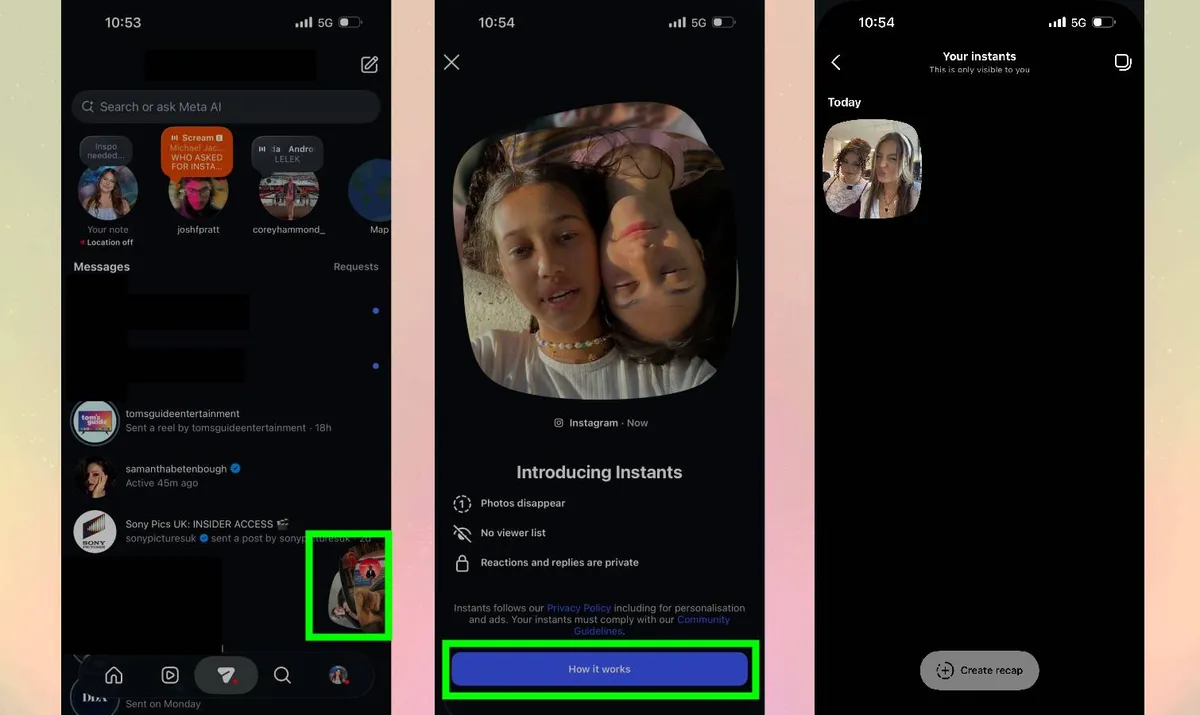
Open Instagram and go to your inbox by tapping the messenger icon in the top right. Look for a small stack of photos in the bottom right corner of your inbox —this is where Instants live.
Tap the photo stack to open the Instants camera. Write your caption first in the text box at the top. This feels backwards if you're used to Stories, but you caption before shooting.
Take your photo by tapping the camera button. You can't edit it afterward, so what you capture is what sends. If you don't like the shot, retake it before sending. Then choose your audience: Close Friends or Mutuals.
Tap the white button below the camera to share. You can share as many Instants in a row as you want, the camera stays open for rapid-fire sending.
If you immediately regret sending, you can tap the "Undo" button that appears right after sharing. This deletes the Instant before anyone sees it. Once someone opens it, though, you can't take it back.

Follow Tom's Guide on Google News and add us as a preferred source to get our up-to-date news, analysis, and reviews in your feeds. Subscribe to Tom's Guide on YouTube and follow Tom's Guide Entertainment on TikTok and Instagram. Finally, you can visit our dedicated Tom's Guide Savings Squad hub for expert help on getting the best products for less.
More from Tom's Guide

