




Never in my journalism career did I think I would be submerging a keyboard underwater, but it's my job to check every single feature of a product when I'm reviewing it — yes, including throwing liquids at it.
Keyboards aren't always the most durable, especially if they're membrane ones. Your best bet is getting a mechanical keyboard whose switches can be replaced if you've got butter fingers.
Even so, I'd still recommend being careful with your drinks and liquids when you're working at your desk. Keyboards don't usually have IP ratings in the same way that the best waterproof Bluetooth speakers or wireless earbuds do, and this week was the first time I actually saw a board carrying an IP rating. Not just any IP rating. IP57. Yep, the Asus TUF Gaming K3 Gen II is IP57-rated.
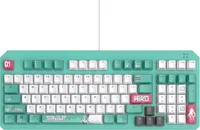
The K3 Gen II is a well-built, sturdy keyboard that uses optical-mechanical switches. Its switches are an utter delight to type and (casually) game on, and I even received my best type test score on it yet. But its biggest selling point, to me, is the IP57 waterproof rating, something I've never seen on a keyboard before. Here's how I tested it — and how it managed to survive.
What does IP57 mean?

If you're familiar with speakers and earbuds, you'll have seen them having IP ratings. "IP" stands for Ingress Protection, and it classifies how resistant electrical devices are to solids (dust) and liquids (usually water). IP ratings have two numbers: the first indicates solid protection and is measured on a scale of 1-6, while the second indicates water protection and is measured on a scale of 1-8. The higher the numbers, the better the protection.
The Asus TUF Gaming K3 Gen II is IP57-rated, which means it has level 5 protection against dust and debris, and level 7 protection against water. It also means that the keyboard can withstand immersion in water up to 1 metre depth for 30 minutes. This is an excellent rating for a keyboard, and while I can't imagine many users will be dunking it underwater for that long, it's good to know that it can withstand water spills if you accidentally knock over a glass.
Putting it through the wringer

I left the tap running on full force, and the water fell directly on top of the keyboard — it remained unscathed
Like I said earlier, it is my job to test a manufacturer's claims to the best of my abilities, and as and when I can, so of course I had to test the Asus TUF Gaming K3 Gen II's IP57 waterproofing. And how did I do that, you ask? The first thing I did was splash water droplets on it. An easy test, really, and one that many other mechanical keyboards I've tested have passed with flying colors.
So I put the K3 Gen II through a harder test: submerging it in water. I filled up our office's kitchen sink and once it was full, I put the keyboard in, left it there for 15 minutes, and then plugged it into my computer. And it worked!
I'll be honest, I wasn't expecting it to, but every key still worked just as well as it did when I first unboxed the keyboard. I also got some strange looks from others working in my building who didn't know I was doing that. I even left the tap running on full force and the water fell directly on top of the keyboard — it remained unscathed.
My final test involved me dropping some lemon soda onto the keyboard, which feels like the most likely scenario to happen because we all like a cool drink when we're gaming for hours, right?
The lemon soda I used would make anyone's fingers sticky, and I was expecting the same to happen to the K3 Gen II. Lo and behold, the keyboard was absolutely fine, and even after drying it completely, it didn't feel too sticky or unusable. Great success!
What else is good about it?

There are a few things to like about the Asus TUF Gaming K3 Gen II. First of all, its optical-mechanical switches are highly responsive and easy to actuate, making them great for gaming and productivity alike. In fact, they're so good to type on that I got my highest type test score (105 words per minute) and accuracy (96.5%) on this keyboard!
In addition to that, the keyboard is built very well. The ABS plastic used in its construction feels high quality and premium, which is fantastic for a keyboard that costs $99 / £95. And of course, I love the IP57 waterproofing which, as you can see, works as intended.

But the K3 Gen II isn't perfect as it has significant drawbacks — hence why I rated it 3 out of 5 stars. While the keyboard is lovely to type on, the sticky ABS keycaps take away from that experience, as my fingers felt like they were sticking when I was lifting them.
The USB-A wired connectivity and janky companion software are also disappointing, as is the keyboard's divisive design. I'm not an anime fan so perhaps I'm not the target audience, but personally, I don't understand the obsession with a Vocaloid that takes the form of a 16-year-old girl.
Of course, if you can look past these, then the K3 Gen II is excellent. It's personally not for me, but I'll take those optical-mechanical switches any day.

Follow Tom's Guide on Google News and add us as a preferred source to get our up-to-date news, analysis, and reviews in your feeds.
More from Tom's Guide
- The Asus TUF Gaming K3 Gen II has the best switches in its class, but its design and dodgy software are a tough sell
- Best mechanical keyboards in 2026
- The Asus TUF Gaming H1 Gen II is a good headset that could have been great — here’s what I’d change

