




Since I started as a reviews writer at Tom's Guide in April 2024, I've tested nearly 80 of the best keyboards. That includes mechanical decks for productivity, Hall Effect keyboards for gaming, and even membrane boards that remind me of the ones I used in my school's computer lab. While I love Hall Effect keyboards for gaming (even as a console player), nothing comes close to beating mechanical decks for productivity.
This week just gone, I've tested three mechanical keyboards spanning the price range: the Turtle Beach Vulcan II Max ($229), the Keychron V1 Ultra 8K ($119), and the Royal Kludge L75 ($79). All three brands are known for making good keyboards, but is one better than the others? I certainly think so. If I had to buy just one with my own money, I'd pick the Royal Kludge L75 — and no, it's not just because it's cheaper than the others.
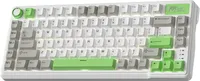
Don't get me wrong. Both the Vulcan II Max and the V1 Ultra 8K are competent keyboards in their own right, and I even rated the latter 4.5-stars compared to the L75 getting a 4-star rating from me. So why would I choose the L75? The answer lies in the typing experience, creamy sound profile, and long battery life.
It sounds oh-so-gooooood

When I first started reviewing keyboards, I didn't care much about how they sounded. After all, they were meant for typing, right? But as the years have gone by, I've realized just how much of a pre-purchase condition a deck's sound profile is for many people. And you're spoilt for choice, really, as you can get thocky, clacky, silent, creamy, poppy, and so on and so forth.
My usual preference is thocky but I'm also a big fan of a creamy sound profile (even though I detest that word) — and the Royal Kludge L75 sounds oh-so-sweet. The L75 is packed with five layers of internal padding, including two layers of thick sound-absorbing foams, an IXPE switch pad, silicone dampener and PET sound-enhancement film. Combined with the Cream linear switches I tested, the double-shot PBT keycaps, and the gasket-mount design, the L75's sound profile could make anyone drool.
The Cream linear switches are downright fantastic too. If they aren't your speed, you can also choose from Beige tactiles and Silent ones. The Cream linears are a joy to type on as they are pre-lubed and very smooth. They require 45g of force to activate and have a 2mm pre-travel distance, so you don't need to press them all the way down for your commands to register, and they aren't fatiguing to type on either. Thanks to the wonderful typing experience, the L75 is a powerful productivity keyboard... and that's not all.
Macro management

If, like me, you spend your 9 to 5 typing away at your desk, you need a keyboard that can enhance your workflow — and the Royal Kludge L75 is just that. On the left-hand side of the keyboard, you'll find a set of five dedicated macro keys, labelled M1 through M5. These can be customized via the web-based RK Driver Hub, and you can assign different actions to them. Trust me when I say these are a boon to productivity.
I'll give you a quick example. I copy and paste lots of specs from product pages into Google Docs, and more often than not, they're in a different font that doesn't match up with the style in my Google Doc. That's why I use Paste Special which is executed using Cmd + Shift + V on macOS machines. While it doesn't take that long and my muscle memory never lets me down, it's nice to be able to do it with just one key instead of three — and that's what I did as I programmed M1 to that chain of actions.
You can program these however you like, and it's worth spending some time in the software trying different key combinations. Macro keys can take a while to get used to if this is your first time using them, but once you get to grips with them, they provide a massive boost to your productivity — it has to mine.
Why the other two don't cut it

So what's wrong with the Turtle Beach Vulcan II Max and the Keychron V1 Ultra 8K? Well, it depends on what you're looking for, really. Both these keyboards are primarily gaming keyboards, with the Vulcan II Max having a 1,000Hz polling rate and the V1 Ultra 8K boasting an 8,000Hz polling rate. 1,000Hz is more than plenty for most gamers because it's faster than anything the human eye or mind can perceive.
8,000Hz feels like a gimmick and like Keychron is trying to introduce something, anything, to convince consumers to buy their shiny new product, when the OG Keychron V1 is still very much fine. Better than fine, even, because it's the only keyboard I've ever given a full 5-out-of-5 star rating to! Sure it's got 660 hours of battery life, but the L75's got 700 hours to upstage the V1 Ultra 8K.
And the Vulcan II Max? Well... it costs $229, its keycaps tend to get shiny really quickly, switch choice is very limited, and it can't be used wirelessly. Why would you spend that many doubloons on a keyboard that simply fails to justify its premium price tag?
Granted the L75 doesn't have 1,000Hz polling (Royal Kludge doesn't specify any polling rate, in fact), it's still far better to type on, and it sounds so much better. Of course, the purchasing power is entirely in your hands. I know which one I'd buy, but which one would you go for?

Follow Tom's Guide on Google News and add us as a preferred source to get our up-to-date news, analysis, and reviews in your feeds.
More from Tom's Guide
- Keychron upgraded my favorite mechanical keyboard and packed 8,000Hz polling and 660 hours of battery into it — here’s my verdict after a week of testing
- The Turtle Beach Vulcan II Max’s optical switches and bright RGB are a delight — but at this price, I expected more
- I just tested the Royal Kludge L75 mechanical keyboard — and it offers one of the best typing experiences for less than $80

