







The HP EliteBoard G1a is the most unique computer I’ve tested. That’s because it’s basically like a modern Commodore 64 since it’s both a PC and a keyboard. It’s certainly unusual, but that same unique form factor is what makes it a perfect product for me to talk about.
As HP describes it, the EliteBoard G1a is a “complete, desktop-grade computer integrated into a professional keyboard.” Yes, it looks like a normal keyboard, but inside, it packs a CPU, storage, memory, and connectivity. All you have to do is plug it into a monitor, and you’re good to go. HP says this PC is for workers who frequently move between different workspaces and who often keep their laptops closed when connected to a monitor.
The HP EliteBoard G1a is a business computer and isn’t targeted at general consumers. It isn’t the kind of PC we normally review at Tom’s Guide, but it’s so distinctive that I wanted to share my experience with it. While I think you’re better off with one of the best laptops, the EliteBoard G1a could be useful even outside of an office setting.
Right now, it's available for $1,549 on HP's website. That’s a steep ask for something so niche, but it could be worth it if you're one of the customers HP is aiming for. That said, let me tell you about the HP EliteBoard G1a.
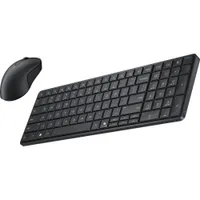
HP EliteBoard G1a: Specs
| Header Cell - Column 0 | HP EliteBoard G1a (starting) |
|---|---|
Price |
$1,549 |
CPU |
AMD Ryzen 5 Pro 340 |
GPU |
AMD Radeon 840M |
RAM |
16GB |
Storage |
256GB |
Connectivity |
Wi-Fi 7, Bluetooth 6 |
Ports |
1x USB-C (USB4), 1x USB-C (USB4), 1x USB-C 3.1/3.2 Gen 2 |
Dimensions |
14.1 x 4.7 x 0.7 inches |
Weight |
1.49 pounds |
Accessories |
1x wireless mouse |
Design

If you didn’t know it, you’d assume the EliteBoard G1a was an average (if thick) everyday work keyboard. Its keycaps are fairly standard, and its all-black design helps it blend in with similarly colored devices. You can even tell it’s a keyboard design for Windows, thanks to its dedicated Copilot key that lets you instantly launch Microsoft’s AI.
Measuring 14.1 x 4.7 x 0.7 inches and weighing 1.49 pounds, the EliteBoard G1a doesn’t take up much space in your backpack and certainly won’t weigh you down. I traveled with it in my bag from the office to my apartment and almost forgot I had it. It even comes with a thin travel case for additional protection.

Port-wise, it packs three USB-C ports: two USB4 and one USB3. The ports let you connect to an external monitor and other peripherals. Of course, if you run out of ports, you can always connect peripherals via Bluetooth. Again, this is a full-on PC, so you’re free to connect whatever you might need to it.
The EliteBoard G1a also comes with a dongle, which has an HDMI port, an Ethernet port, and two USB-C ports. The dongle not only provides essential ports for connecting to a monitor and wired internet, but also connects to a wall adapter to keep cable management manageable.

The full keyboard itself is good, with plenty of space for your hands to travel. Since this is effectively an office keyboard, it has membrane switches instead of mechanical switches. While that’s a bummer if you like mechanical or magnetic switches as I do, the membrane switches do keep your keystrokes relatively quiet. The rubber bottom ensures that the EliteBoard stays in place even if you’re vigorously typing.
HP says this keyboard is meant to be repairable, so it’s easy to take it apart in case you need to replace keys or other components. This was a smart design choice for office work, as you can swap whatever needs replacing instead of being forced to buy an entirely new unit.
Performance

Our HP EliteBoard G1a review unit is the high-end model, packing an AMD Ryzen 7 Pro 350 CPU, integrated AMD Radeon 860M graphics, 32GB of RAM, and 512GB of SSD storage. That’s enough power for the kind of everyday work this PC was designed for.
With my average workflow, which usually has me juggling around 20 Chrome tabs, Slack, GIMP, and the occasional YouTube video, the EliteBoard G1a never slowed down or stuttered. Because of that, I almost forgot that the computing was happening within the keyboard I was using. I also never felt it get warm or hot, which is a plus.
| Header Cell - Column 0 | HP EliteBoard G1a |
Lenovo ThinkPad X1 2-in-1 Gen 10 Aura Edition |
Microsoft Surface Laptop Gen 7 |
|---|---|---|---|
Geekbench (single / multi-core) |
2793 / 11424 |
2748 / 10956 |
2849 / 11203 |
25GB file copy |
16.8 (seconds) / 1592MBps |
16.6 / 1591MBps |
44.2 / 606MBps |
Handbrake (mins:secs) |
5:41 |
7:48 |
7:08 |
Since it’s a PC, we put the EliteBoard G1a through our usual suite of benchmark tests to see what it could do. It posted solid numbers on the Geekbench CPU test and copied a 25GB file relatively quickly. Transcoding a 4K video to 1080p on Handbrake does take a decent amount of time, however.
| Header Cell - Column 0 | HP EliteBoard G1a |
Lenovo ThinkPad X1 2-in-1 Gen 10 Aura Edition |
Microsoft Surface Laptop Gen 7 |
|---|---|---|---|
3D Mark (Night Raid) |
20336 |
29682 |
31771 |
Sid Meier’s Civilization 6 |
40 fps (@ 1080p) |
50 fps |
33 fps |
This isn’t a gaming machine, but we ran it through some graphics tests to see what it could do. It performed as well as a modern ultraportable on the 3DMark Night Raid test and even managed to run Civilization 6 at 40 frames per second at 1080p. Again, this isn’t a gaming machine, but you can enjoy some lighter titles with the right settings.
Note that this PC has a processor designed for business laptops, which we don’t generally test at Tom’s Guide. I say that so you know the comparisons above are the closest equivalents we have tested. I wanted to at least let you see how the EliteBoard stacks up to PCs with the relatively comparable Intel Core Ultra 258V.
Battery

Our review unit has a built-in 32Wh battery. To be clear, the battery exists so that you don’t have to shut down and restart the EliteBoard when you’re transferring from one workstation to another. There’s a battery-free model that’s meant to stay stationary like a desktop PC.
| Header Cell - Column 0 | HP EliteBoard G1a |
|---|---|
Time (hours:mins) |
2:26 (unplugged 1080p portable monitor) |
Since the Eliteboard G1a has a battery, we ran it through our battery test. When connected to an unplugged 1080p portable monitor, the board lasted for 2 hours and 26 minutes. Granted, this isn’t a situation you’d experience since you’ll have the PC plugged into the wall, but it’s still interesting to see how much the battery lasts in case you wanted to take it to a shop.
Bottom line
The HP EliteBoard G1a is built for workers who share workstations and available monitors, work in hybrid environments with monitors at both home and office, or work in space-constrained offices that need clutter-free desk environments. For those purposes, this PC makes sense.
However, if you need an integrated screen at all times, work somewhere without reliable access to external monitors, never have to change your desk, or are simply looking for a more budget-friendly solution, you’re better off getting a traditional laptop.
While the EliteBoard G1a is admittedly unusual, I appreciate that HP designed it for its intended purpose. And as the company told me, some of the retail partners they showed the board to are interested in purchasing this PC for their employees, which shows there’s demand for it. If the official price is right, it could be something you see at hotel lobbies, security guard stations, and more.

Follow Tom's Guide on Google News and add us as a preferred source to get our up-to-date news, analysis, and reviews in your feeds. Subscribe to Tom's Guide on YouTube and follow us on TikTok.
More from Tom's Guide

