




If you had told me years ago that I’d still be using the same Logitech keyboard a decade later, I wouldn’t have believed you. Despite being a mechanical keyboard enthusiast that types for a living, I just keep coming back to the Logitech K400 Plus. At its recent Framework [Next Gen] event in San Francisco though, the company known for its modular and repairable laptops might have finally given me a reason to retire that keyboard for good.
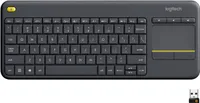
So what’s so special about Logitech’s K400 Plus keyboard? Well, it and the original K400 were the first widely available wireless keyboards to have a built-in trackpad. With the included 2.4 Ghz USB dongle and a pair of AA batteries, you could set up one of the best mini PCs or even your big old gaming desktop in the living room and comfortably use your computer from the couch.
I bought the K400 initially and then upgraded to the K400 Plus while living in Korea. Then when I finally moved back to the U.S., I packed the latter in my suitcase both out of necessity and as a keepsake since, underneath its Latin characters, it also has Hangeul ones. Eight years later and I’m still using it on my couch or when setting up new computers to this day.
Alongside the new Framework Laptop 13 Pro as sort of a “one more thing” moment at the end of its presentation, Framework also unveiled its first ever standalone keyboard. While I haven’t personally tried the new Framework Wireless Touchpad Keyboard yet, my colleague Scott Younker did and it already looks like a promising alternative to the K400 Plus.
From classic to Pro

Right off the bat, there’s an elegance to the Framework Wireless Touchpad Keyboard that you just don’t get with Logitech’s K400 Plus. That makes sense; one is a premium device with a rumored $99 price point, while the other is a budget peripheral that has been sitting on store shelves since 2015. Logitech hasn’t released an updated model in the eleven years since its debut, so naturally someone had to step up. Personally, I’m glad it was Framework.
On the right side of the company’s new wireless keyboard, you get a 3.37 x 2.71-inch trackpad. While it lacks the dedicated physical left and right click buttons found on the bottom of the K400 Plus, the entire surface is a clickable Windows Precision Touchpad. It feels significantly more modern and, more importantly, it gives you roughly 65% more room for multi-finger gestures.
Another neat modern feature is support for up to four devices and a dedicated Link button to easily switch between them. Out of the box, this keyboard supports both Windows and Linux, and because it is powered by open-source ZMK firmware — just like the Keychron Q1 Ultra 8K I recently tested — you could theoretically use it with a Mac and remap its keys accordingly.

Then when you flip the keyboard over, you’ll find a USB-C port and a power switch. Besides using this keyboard wired over USB-C, it can also connect wirelessly over Bluetooth or with the included 2.4 GHz USB dongle that’s stored on the back of the device. One other thing worth noting is that by combining the highly power-efficient Nordic nRF54 radio with ZMK firmware, you can pair this keyboard with four devices over Bluetooth or even by using four separate USB dongles if you prefer to avoid Bluetooth altogether.
The Framework Wireless Touchpad Keyboard already has a lot going for it, but there’s one big catch that makes typing on it feel a bit different than doing so on one of the best mechanical keyboards.
Not quite mechanical (but repairable)

The Framework Wireless Touchpad Keyboard is certainly a massive upgrade over the Logitech K400 Plus. However, there’s just one thing stopping it from being my endgame couch keyboard: actual mechanical switches. Just like with Framework’s laptops and even the best MacBooks, the company’s Wireless Touchpad Keyboard uses scissor switches with 1.5mm of travel.
Coming from the soft and mushy feel of the K400 Plus, this is a massive improvement. If you’re used to a standard or even a low-profile mechanical keyboard at your desk, this may feel like a step back, but Framework’s scissor switches are known for being crisp and consistent. They provide a clear tactile sensation that mimics the responsiveness of a mechanical board far better than a budget membrane one ever could.
I won’t know for sure how I feel about the typing experience until I get one in for testing, but Framework’s scissor switches have a proven track record and loads of people love them.

Around back is where the repairability Framework is known for really shines. Under the translucent black plastic case, there’s a rechargeable 1,000 mAh battery. Since it isn't glued down, when this battery eventually dies, you can remove a few screws and simply replace it yourself.
The same is true for the modular Control Board powering the device. If the USB-C port wears out or the Nordic nRF54 wireless chip fails, you don't have to get a whole new keyboard. Instead, you just swap in a new Control Board and you’re good to go. While the K400 Plus is essentially designed to be disposable, the Framework Wireless Touchpad Keyboard is built to be brought back to life again and again.
My new couch companion

Despite the fact that it still sells very well, the K400 Plus has long been in need of an upgrade. In fact, back at CES in January, I pitched an updated mechanical version as part of its MX Master Series to Logitech when checking out the MX Master 4 for the first time. Who knows, maybe they took my advice and I could be hearing from them soon.
In the meantime, the Framework Wireless Touchpad Keyboard is the exact kind of upgrade long-time users of the K400 Plus like myself have been waiting for. It has a more premium build overall with a larger trackpad and, most importantly, a rechargeable battery with a USB-C port. After using the Framework Desktop to play PC games out in my living room last year, this new Wireless Touchpad Keyboard would have been the perfect accessory for navigating Steam and making quick tweaks to AMD’s FSR upscaling tech.
Given that Framework has also open-sourced this keyboard’s design, we could see a ton of cool mods for it eventually. However, a mechanical switch mod likely isn't in the cards, as the Wireless Touchpad Keyboard actually uses the keyboard and touchpad structure from the Framework Laptop 12. This means you won’t be able to swap in modular mechanical switches like you can on the Framework Laptop 16.
Who knows, we might see a Pro model of Framework’s new wireless keyboard down the line if it ends up being anywhere near as popular as the K400 Plus. Personally, I can’t wait to put my old Korean K400 Plus up on display where it belongs and take the Framework Wireless Touchpad Keyboard out for a spin on my couch.

Follow Tom's Guide on Google News and add us as a preferred source to get our up-to-date news, analysis, and reviews in your feeds. Subscribe to Tom's Guide on YouTube and follow us on TikTok.
More from Tom's Guide
- I’m using a trackpad with one hand and a mouse with the other on desktop and I can’t recommend it enough
- I tried the Minisforum G1 Pro and this console-sized mini PC works just as well in the living room as it does at your desk
- I paired a pocketable mini PC with a pair of AR glasses and even I was surprised when it became my go-to travel setup

