OLED TVs are among the best TVs you can buy, but like all TVs, they’re not everlasting. I’ve been covering OLEDs since LG’s first 4K OLED TV hit the market, and while they’re much more durable now than they were over a decade ago, even the best OLED TVs are liable to wear down over time.
Why does it happen? OLED displays harness organic material. This material plays a huge role in what makes OLED technology so stunning, but it’s also why these TVs tend to fail in distinct ways.
When it comes to the telltale signs of an aging OLED — dead pixels, color tinting, dimness and the dreaded OLED burn-in — I’ve seen it all. Here’s what to look out for if you’ve got an aging OLED TV on your hands.
1. Dramatically diminished brightness

For years, the hit on OLED TVs was that they’re not nearly as bright as LED-based TVs. In the decade I’ve spent covering the industry, massive strides have been made in pushing OLED brightness to levels comparable to many high-end LED TVs — at least when it comes to small highlight detail. In terms of full-picture brightness, LED TVs still lead the pack.
Nevertheless, on average, OLED TVs are plenty bright for most living spaces these days. But they’re also susceptible to dimming over time, and because of the organic material in play, it’s likely to be one of the first signs that your OLED is wearing down.
This should not be confused with your OLED’s Automatic Brightness Limiter (ABL), a built-in function that protects the display and prevents burn-in by subtly dimming the picture on occasion. On most OLED TVs, you can often clock the ABL function switching on when there’s a sustained, still image on the screen. It also tends to activate during long sequences in which on-screen content remains relatively unchanged.
2. Dead pixels
While this problem isn’t specific to OLED displays, it’s still a sign of hardware failure. Dead pixels happen when one or more of a display’s millions of pixels stop working.
On OLED TVs, dead pixels appear as dull, gray- or black-colored specks across the image. You’re more likely to spot them during bright scenes.
If dead pixels materialize relatively early on in your OLED-owning tenure, you might be covered under a brand or retailer warranty. That said, they’re more likely to appear with age.
3. Lines of failing pixels

Similar to dead pixels, this issue often manifests as entire columns or rows of failing pixels. In my experience, these lines are brightly lit or off-color rather than completely dead. I should know, since it happened to my OLED TV.
From what I understand (and what I’ve been told), lines like this are often the result of component failure at a deeper level than the screen itself. In my case, the issue had more to do with the hardware inside the motherboard.
In any event, this problem led to the replacement of the entire OLED panel — screen, chassis and all. I was able to do so by way of a warranty, but if you're not covered by a warranty, you might find that replacing the TV is easier and possibly less expensive than repairing it.
4. Color tinting
If certain content appears reddish, bluish or otherwise oddly tinted, you might be looking at a deteriorated panel. Fortunately, this issue is far less prevalent in newer OLED TVs right out of the box, but it’s still one to look out for in OLED TVs that are getting up there in age.
In my travels, OLED color tinting is at its most obvious when muted or gray-colored images are on screen. It’s often quite noticeable during black-and-white content and can appear in large, blotchy columns.

The image above has been specifically photographed and edited to exaggerate the issue, but it was taken while this OLED displayed what was supposed to be an entirely gray screen. It’s also worth noting that the OLED in question is the LG C1, a 2021 model. Since then, I’ve encountered this odd, magenta-colored tinting less and less.
In addition, there’s an altogether separate type of OLED color tinting that isn’t a cause for concern, and that’s a green- or pink-colored tinting during off-axis viewing. If you own an OLED TV from the past several years that shifts white objects into a subtle green- or pink-colored tint when viewing the TV from off to the side, don’t worry about it. This is likely the result of a coating and not a sign for concern.
If your OLED’s color tinting is coming with some interesting shapes or shadows, you might have another issue to contend with: burn-in.
5. Burn-in
Burn-in is a catch-all term that describes the ghostly impression of previously viewed content, now embedded within the display after several hours of use. It's an issue that affects OLED TVs but not LED TVs on account of OLED's use of organic material.
This very real issue has been something of a boogeyman since OLED technology first hit the scene. Fortunately, I have two pieces of good news. The first is that most people don't need to worry about burn-in on account of their viewing habits. The second bit of good news is that, over the last decade, brands have developed plenty of hardware- and software-based defenses to guard against burn-in.
Over the last decade, brands have developed plenty of hardware- and software-based defenses to guard against burn-in.
On that first point, unless you spend several hours every day watching the same type of content (or using your OLED TV as a computer monitor), you really don't need to worry about static images burning their way into the screen. You should be on the lookout for things like on-screen logos, news chyrons, sports tickers and the Windows taskbar. If this stuff is on screen for long periods of time, you might have an issue.
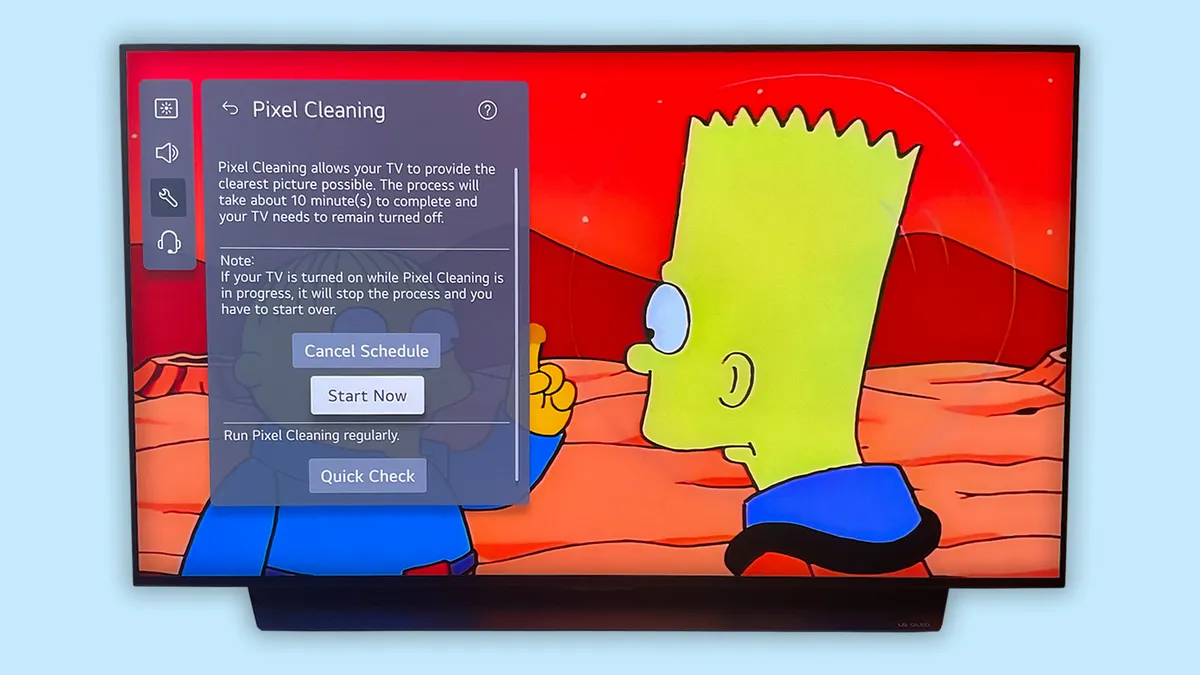
And then there are the preventative measures. LG OLEDs, for instance, offer the following options in the OLED Panel Care menu: Pixel Cleaning (which can be run manually or set to an automatic timer), Screen Move (which subtly shifts the display occasionally in order to shake up the pixels) and Adjust Logo Brightness (which automatically detects on-screen logos and throttles their brightness).
You can find similar settings on Samsung and Sony OLEDs, and all of the major OLED-makers come with screensavers, too. The Automatic Brightness Limiter function I mentioned earlier also plays a major role in protecting your OLED TV.
Replacing your OLED TV
If you've determined that the time has come to replace your OLED TV, I'll give you the same piece of advice I give my friends, family and colleagues: If you can't find a good deal on a brand-new TV, shop last year's models.
At the time of publishing, nearly all of the biggest TV brands are rolling out their latest lineups. This means that last-year's sets are at (or close to) their lowest price to date.
For instance, you could spring for the all-new LG C6 OLED and shell out between $2,000 and $2,700 for a 65-inch version. Alternatively, you could pick up the 65-inch LG C5 for $1,299 at Amazon . According to our test results, the C6 is only marginally better than its five-star, award-winning predecessor.
The main takeaway here ought to be that, while OLED TVs are engineered to address their potential weaknesses in a very specific way, they're not more at-risk for failure than LED-based TVs.
Yes, even the best OLED TVs rely on organic material and are more susceptible to overheating than LED TVs. But to put this into perspective, some of the best Mini-LED TVs on the market (and especially newer RGB LED TVs) are packed with all sorts of intricate components that can fail at anytime.
All TVs, regardless of type, get old and eventually fail. The hope is that you're able to extract a good, long life out of them before it's time to move on.

Follow Tom's Guide on Google News and add us as a preferred source to get our up-to-date news, analysis, and reviews in your feeds. Subscribe to Tom's Guide on YouTube and follow us on TikTok. Finally, you can visit our dedicated Tom's Guide Savings Squad hub for expert help on getting the best products for less.
More from Tom's Guide