Samsung has confirmed iPhone owners will be able to AirDrop files to the Galaxy S26 series over Quick Share this week. The company has also stated that "additional Galaxy devices" will get AirDrop through Quick Share support at a later date, but hasn't given a timeline.
AirDrop over Quick Share first appeared on the Pixel 10 devices late last year and is also available on the Pixel 9 series. But the wider adoption of the Galaxy S26, S26+ and S26 Ultra phones is sure to push our harmonious Android/iOS future further into the mainstream.
Samsung says the rollout is beginning today in Korea, with the U.S. set to follow later this week. Other regions, including Europe, Latin America and Japan are also set to receive the feature.
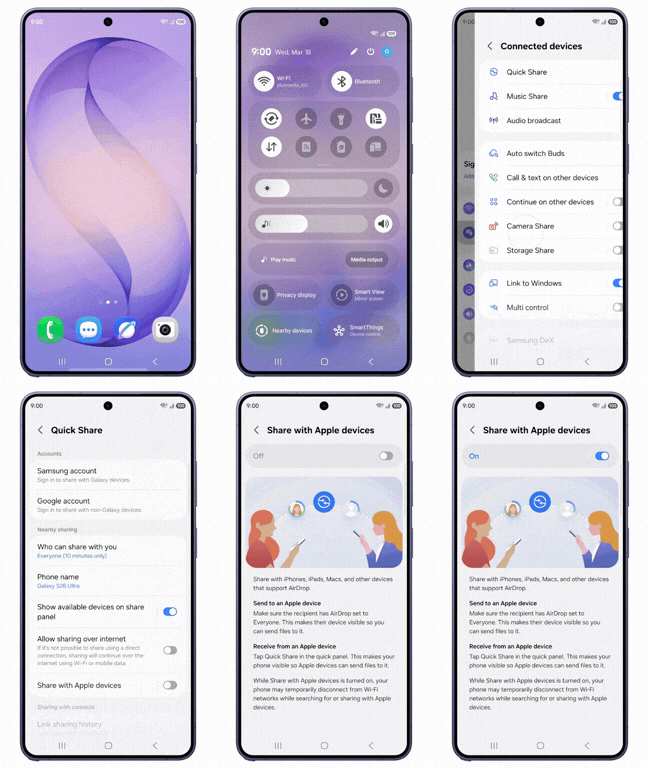
Once the update has been received, users will find a dedicated 'Share with Apple devices' switch under the Quick Share option in their Settings menu
Unlike on the Pixel, Samsung has confirmed that AirDrop support won't be enabled by default. Instead, once the update has been received, users will find a dedicated "Share with Apple devices" switch under the Quick Share option in their Settings menu.
Samsung explains that Galaxy users will need to tell their iPhone-using friends to ensure "Everyone" mode is enabled. From there, files should be able to be sent back and forth between the two handsets.
When the feature was unveiled, Google explained that Quick Share utilizes AirDrop’s “Everyone for 10 minutes” mode to enable sharing for a direct peer-to-peer connection.
"This implementation using "Everyone for 10 minutes” mode is just the first step in seamless cross-platform sharing, and we welcome the opportunity to work with Apple to enable “Contacts Only” mode in the future," Google wrote.
The expansion is continuing apace though, with Chinese phone maker Oppo saying recently that it planned to offer the feature on its phones before the end of the month. If you're an Android user and you've never experimented with this feature before, follow our simple How to use Quick Share on Android guide to get started.

Follow Tom's Guide on Google News and add us as a preferred source to get our up-to-date news, analysis, and reviews in your feeds.
More from Tom's Guide