Two simple words sold me on the new Evercade Nexus: Banjo-Kazooie. The new retro handheld from Blaze Entertainment comes with a host of improvements over previous Evercade devices, such as the Evercade EXP-R or the first-generation Evercade, but for me, it’s all about the bear and bird.
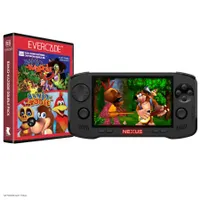
Banjo-Kazooie on the Nintendo 64 was the first video game I ever played as a youngster, kickstarting an obsession with gaming that shows no signs of dissipating even as I enter my 30s. The Evercade Nexus, releasing October 30 for $199 / £169, comes bundled with a copy of the Banjo-Kazooie Double Pack (containing the 1998 original and its sequel, Banjo-Tooie). Consider me sold.
I’ve now got my hands on the Evercade Nexus, and have started my umpteenth playthrough of Banjo’s legendary first adventure — I’ve lost track of how many times I’ve 100% completed this classic 64-bit platformer. I still need to put the portable through its paces a little more before I can deliver my full review, but I’m already eager to gush about the Nexus. So, these are my first impressions of the latest Evercade after spending two days with it.
Evercade Nexus might be the perfect retro device

Described as “the vinyl of retro gaming,” Evercade’s mission is to return gaming to its roots, to the time before mandatory installs, always-online requirements, and purchasing a digital license. The latter point is particularly compelling in the wake of Sony’s announcement that it plans to stop producing physical discs for PlayStation consoles in January 2028.
Evercade already has several devices under its belt, including home consoles, portables and tabletop arcade cabinets. But in steps the Evercade Nexus which is quite possibly the company’s most appealing handheld yet. For starters, it’s the first Evercade portable with dual analog sticks and comes sporting a high-resolution 5.89-inch IPS display, which, while not OLED levels of beauty, still catches the eye.

When you first boot up an Evercade system, you’ll notice there is no digital storefront. Evercade hardware and the new Nexus are built to exclusively play physical cartridges. There are more than 80 available. Beyond Banjo, there are cartridges for classic Tomb Raider, Doom, Duke Nukem, and a host of retro collections from Atari, Activision, Interplay, Neo Geo and more.
Each cartridge works on any Evercade device, from the entry-level Super Pocket to the shiny new Nexus. And once you buy a cartridge, it’s yours. There’s no digital license that can be revoked, or requirement to download most of the game from a server that could be shut down. Your collection is a tangible thing to treasure. Or loan to a friend. Or sell to someone else. The choice is yours. Evercade Nexus puts you in complete control of your library.
Banjo is back and better than ever on Evercade

Less than two minutes after booting up the Nexus for the first time, I was pottering around the lush green fields of Spiral Mountain, Banjo-Kazooie’s starting level. Unlike booting up a current-generation console/handheld, I didn’t have to create an online account, install new firmware, and then wait what feels like an age for software to download and install. I just switched the Nexus on, plugged in the Banjo cartridge, and off I went on my adventure.
It’s a deeply nostalgic throwback to a simpler — to many, better — era of gaming. And the version of Banjo-Kazooie brought to the Evercade range of devices is perhaps the best port of the N64 classic to date. Developed directly by the team at Blaze Entertainment, in collaboration with Rare, the British studio that birthed Banjo, this is no rushed emulation job.
On a technical level, you’ll find improved resolution and a smooth 60 fps framerate, alongside a host of quality-of-life features. These include deeper control options — key if you’re playing on an older Evercade device that lacks dual sticks — and useful QoL additions like the ability to return to the hub area from the pause menu. Plus, there's bonus content like new cheats, and the (in)famous Stop 'n' Swop feature actually functions in this port.

Evercade’s Banjo-Kazooie Double Pack has clearly been crafted with great reverence for the original games, and while boosted resolution and minor QoL updates smooth out some rough edges, these two platforming greats have not been dramatically overhauled. That’s no criticism. Evercade’s cartridge library is about celebrating past games, not remaking them.
I still want to spend more time with the Evercade Nexus before delivering my final verdict — look out for my full review on Tom’s Guide shortly — but my first impressions of this nifty retro device are very good. It helps that the portable is launching with an excellent collection of two games close to my heart. However, even when looking beyond the powerful pull of nostalgia, the Nexus makes a strong initial impression. It might be a retro gamer's dream.

Follow Tom's Guide on Google News and add us as a preferred source to get our up-to-date news, analysis, and reviews in your feeds.
More from Tom's Guide