The PlayStation (or PS1) was the very first console I owned, or should I say shared, as it belonged to my brother and me. It’s a video game system steeped in nostalgia, and what better way to bring back all those fond memories than building a PlayStation made out of Lego?
Last week, Sony sent me a Lego PlayStation, and over the weekend, I spent five hours putting it together brick-by-brick. Assembling the 1,911-piece set was a surprisingly calming experience. Certainly more relaxing than my youthful experience trying to beat some of the best PS1 games. As a young kid, my gaming skills were pretty appalling.
Once the final piece was in place — I made one mistake, which forced me to backtrack and redo a section — I admired my work and spent several minutes trying to find the perfect place to display the finished Lego model. My partner point-blank refused to have it in the living room, and so it’s taken up a spot on my home office windowsill instead.
Available for $179 / £139, it’s a great pick-up for any long-term PlayStation fan, particularly those who discovered their love of gaming in the PS1 era. But best of all, it’s not just a boxy Lego model; there are a few nifty little surprise features hidden within its iconic grey exterior.
Press to open

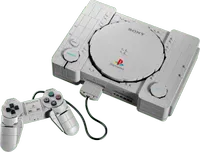
Modeled after the original PS1 (rather than the 2000s slim redesign), the Lego PlayStation does an admirable job replicating the real thing. This includes the top buttons actually functioning (well, “Power” and “Open” do; “Reset” is just a static plastic piece). Click “Power” and a small green piece will lift, simulating the console’s power indicator. However, it’s “Open” that is most novel; press it down, and the Lego PlayStation’s lid will rise just like the real thing. The buttons have a clickiness that feels very close to the actual console as well.
Two hidden PS1 dioramas

Obviously, the Lego PlayStation can’t play PS1 games; it’s just a plastic model. So underneath the lid you won’t find a disc tray. Instead, there are two dioramas depicting scenes from fan-favorite PlayStation games, Gran Turismo and Ape Escape.
GT was an obvious choice; it’s the best-selling PS1 game of all time, but Ape Escape is a strange one. I’m not questioning its storied place in the PS1 library, but it was released specifically for the DualShock controller, which added dual analog sticks. The PS1 console given a Lego makeover is the launch model, with a pad lacking sticks.
Still, these miniature dioramas are a nice touch and can be pulled out of the console to be admired or displayed separately, if you wish.
Remember wired controllers?

Anybody who grew up in an HD console world doesn’t know how good they’ve had it. Back in the day, wireless controllers were the stuff of science fiction movies.
The Lego PlayStation displays this; it comes with an original PS1 controller model connected via a rubber wire. Fortunately, the cable is short, so it won't get tangled and twisted as all my controllers did back in the 2000s.
Even better, the controller can be detached from the main model; just like the real thing, you can even swap it between the two front-facing ports. This reminded me of the (in)famous Psycho Mantis boss battle in Metal Gear Solid, which required you to swap the controller from Port 1 to Port 2 to prevent the telepathic foe from reading your button inputs.
An Astro Bot extra

As part of the Lego PlayStation’s launch, early buyers were able to get a small Astro Bot set for free, as part of Lego’s “gift with purchase” program. This model might be even cooler than the PlayStation console. The already-charming PlayStation mascot looks even more adorable in plastic brick form.
Sadly, as of now, the promotional period has ended, and the Lego Astro Bot is no longer available on Lego.com. However, your nearest physical Lego store might still have stock, and the Astro Bot set was made available for purchase separately on PlayStation Direct for $24.
It sold out super fast (no doubt scalpers are partially to blame), but I’m hoping Sony will restock, as I definitely want one of my own.
Should you buy the Lego PlayStation?

So, after spending most of my Sunday building a Lego PlayStation and a couple of days admiring it from my desk, is it a set worth picking up?
If you’re a dedicated PlayStation fan with heaps of nostalgia for the console that started it all, then probably. I should also note that the actual building process was intricate, but enjoyable throughout.
However, as a display piece, it’s perhaps not the most eye-catching model Lego has ever made. Remember, the PS1 was a console designed to sit underneath a television, so its grey box appearance is hardly striking. The Lego version faithfully recreates the machine’s iconic look, but to the uninformed eye, it just looks like a grey box.
Lego has definitely made some PlayStation-themed sets that are more aesthetically pleasing, like the awesome Horizon Forbidden West: Tallneck set (since retired, it's harder to find these days). But still, if you ever owned a PS1 console, this new set is a dose of pure nostalgia.

Follow Tom's Guide on Google News and add us as a preferred source to get our up-to-date news, analysis, and reviews in your feeds.
More from Tom's Guide