2025 was the year I finally started using the best fight sticks, and it all began when I purchased the Mayflash F700 Elite. Since then, I’ve officially reviewed other arcade sticks like the Victrix Pro FS and Qanba Obsidian 2. While those two might have more features and better designs, the Mayflash F700 Elite remains my go-to fight stick, so much so that I had to buy one.
In my article titled I swapped my controller for an arcade stick — and fighting games will never be the same, I gave my initial impressions after using the Mayflash F700 Elite for a week. Nearly a year later, I can provide a fuller account of why this is one of my favorite controllers. Not only does it make playing fighting games and 2D beat ‘em ups more fun, but the Mayflash F700 Elite also has features that even more expensive controllers lack.
Whether you’re an arcade stick master or novice, the Mayflash F700 Elite is worth checking out for all it provides. Here’s why it’s my favorite product I purchased myself in 2025.
Excellent design

The Victrix Pro FS and Obsidian 2 are arguably the best arcade sticks out there, but they’re both large and heavy devices, which aren’t always convenient to pull out whenever I want to use them. Storing them after playing isn’t fun either.
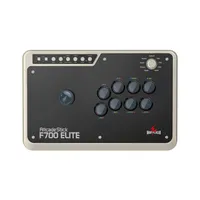
Measuring 14.7 x 9.6 x 2.4 inches, the Mayflash F700 Elite is big enough to comfortably use but small enough not to take up much space when I store it. And while this arcade stick weighs 7.4 pounds, its even weight distribution makes it feel light on my lap when I don’t want to place it on a table. The anti-slip rubber mat covering the entire bottom of the arcade stick keeps the device firmly in place, too.
Cable management can be a pain with arcade sticks. Thankfully, that's not an issue here since the Mayflash F700 Elite has a handy compartment for storing the cable and even a smaller compartment for the USB dongle (which I’ll discuss shortly). Though I wish the cable were braided, I appreciate that it’s long enough to reach my PS5 and is relatively easy to tuck back into the arcade stick.

One unique thing about the Mayflash F700 Elite is that it comes with an 8-way restrictor gate that you can swap out for the 4-way gate inside the controller. Typically, you don’t get extra gates at all, let alone 8-way gates.
For me, this was important for my first arcade stick because it’s a reminder of playing old North American arcade cabinets, which mostly used 8-way restrictors. I know modern arcade game purists are all about 4-way restrictor gates like those found in Japanese cabinets, but I’m all about 8-way.
Besides these features, the Mayflash F700 Elite has the basics, including genuine Sanwa parts like the joystick and buttons. You can swap these parts for others, but I like the stock parts well enough. Not only can you change the joystick and buttons, but you can also slip in custom artwork underneath the acrylic clear panel.
Wireless connectivity

The Mayflash F700 Elite delivers excellent performance and doesn’t take up much space. These aspects alone make it worth buying, but the biggest selling point for me is the fact that you can use it wirelessly. Yes, taking the cable out and storing it is simple, but when I don’t want to do that (which is most of the time), I appreciate that I can just connect wirelessly to my PS5 or PC as I would with a standard controller.
I’m sure some of you might find it odd that I’m yammering on about wireless connectivity for a controller, since it’s been common since the PS3/Xbox 360 era. However, keep in mind that most arcade sticks, even the most expensive ones, are wired-only. Yes, wired play all but eliminates input lag, but since I’m not a pro player, I don’t notice input lag when I’m playing wirelessly.

You can connect wirelessly via Bluetooth or with the included 2.4GHz dongle. Bluetooth connectivity isn’t an option for PS5/PS4, but I prefer using the dongle anyway. However, Bluetooth is the best (or only) option if you want to connect to devices running on Android, macOS/iOS/iPadOS. Unfortunately, this controller is not compatible with the Xbox Series X/S.
Bottom line
The Mayflash F700 Elite helped me experience fighting games in a more immersive way. And thanks to this controller, it also opened up the world of arcade sticks. Thanks to that, I’ve confidently challenged others whenever I visit my local Barcade or when I attend events where arcade sticks are available.
If you’re looking to get a new fight stick or get one for the first time, the Mayflash F700 Elite is worth considering!

Follow Tom's Guide on Google News and add us as a preferred source to get our up-to-date news, analysis, and reviews in your feeds.
More from Tom's Guide
- Our favorite gaming accessories, consoles, controllers and more
- I tried a leverless controller for the first time — it’s both weird and awesome
- This is the fightpad I’ve wanted for years