Despite being remote play only, the PlayStation Portal ended up being a surprise hit thanks to how convenient it was to use and how comfortable it was to hold. As someone who’s tried over half a dozen of the best mobile game controllers — from the Razer Kishi to the Backbone Pro — I can definitely see why. But what if PlayStation isn’t your platform of choice?
Instead of reinventing the wheel with the PlayStation Portal, Sony essentially cut its DualSense controller in half and put an 8-inch screen in the middle. This way, you got the same larger handles PS5 players were already used to without having to adapt to something smaller and ultimately less comfortable.
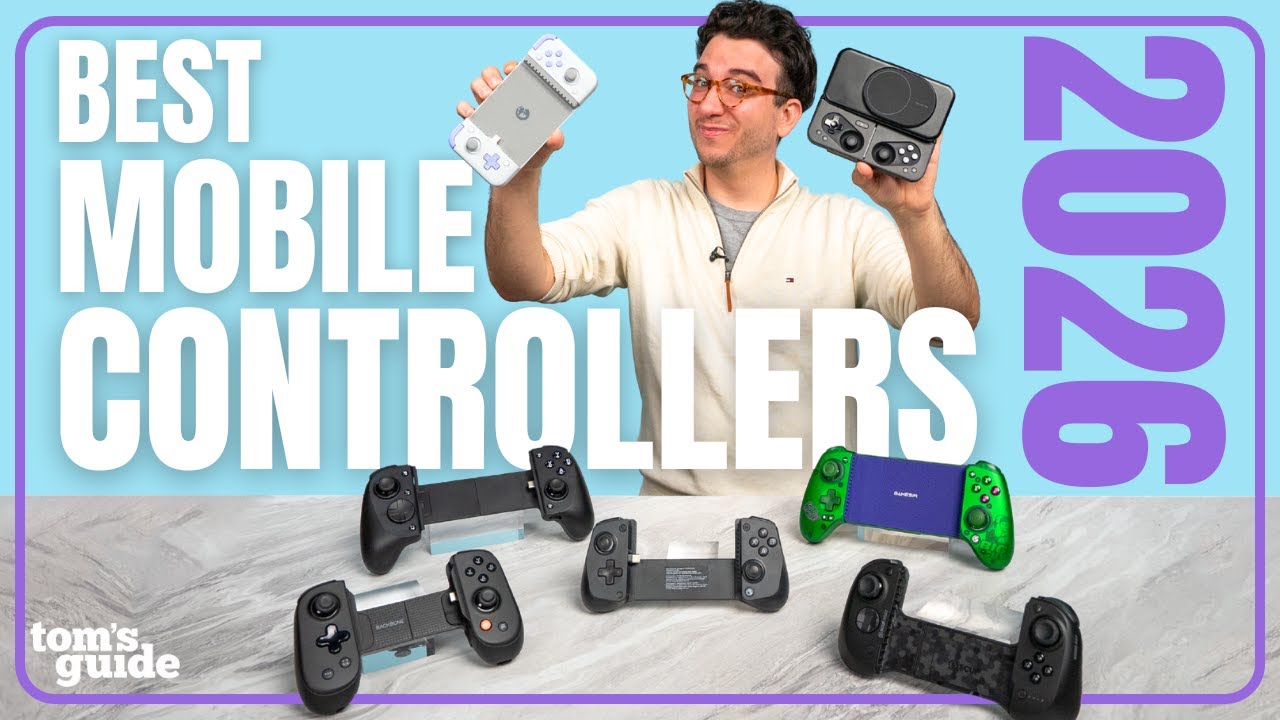
While portability heavily influenced the design of the first crop of mobile game controllers, companies quickly realized that comfort trumps compactness. This is why the Razer Kishi Ultra has full-sized buttons and longer handles, and you could say the exact same thing about Asus’ upcoming ROG Xbox Ally X20 too.
Just when I thought I was done testing out mobile game controllers, I finally found one that gives me that PlayStation Portal feel — but with all my favorite pro controller-style features packed in too. Meet the Elo Vagabond.
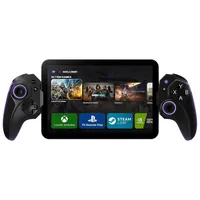
Pro controller meets mobile

After reaching out to Elo about testing the Vagabond, the company sent over the controller along with its full lineup of accessories. Right out of the box, I was impressed by how many rubber inserts Elo includes. While Razer typically gives you three pairs, I found six pairs packaged alongside the controller.
The Vagabond is built for the long haul, with tactile microswitch buttons instead of standard membrane ones, plus magnetic Hall Effect joysticks to combat stick drift. There’s a dedicated purple capture button sitting next to ABXY, and the joysticks feature purple anti-friction rings around their bases. Once plugged into your phone, they also give off a subtle purple RGB glow by default.

Around back, you get two customizable rear buttons — something I love to see on any controller, as mapping them to my most-used face buttons gives my right thumb a much-needed rest. However, if you’re the type of gamer who never uses back paddles, there are dedicated toggle switches on either side to physically disable them. Even though I would have preferred true rubberized grips, the micro-textured, cross-hatched pattern molded directly into the back of the handles makes the Vagabond exceptionally easy to hold onto.

When connecting your smartphone, the Vagabond features a flexible USB-C connector that tilts up and down, making it far easier to dock and undock your phone without worrying about damaging its charging port. While many other mobile controllers have a headphone jack on one handle and a USB-C passthrough charging port on the other, I really like that Elo placed both ports right along the center bridge. This keeps the handles clean and comfortable in your hands while protecting both connections.

Elo also sent over its official hard carrying case. Though I would have preferred to see it bundled in the box, the case is exceptionally well-built and worth the extra investment to protect your setup on the go. Underneath where the controller rests, there's a clever storage compartment designed to hold accessories like those extra rubber adapters — a massive plus if you swap devices or cases often.
Alternatively, you could easily use that space to store a pair of wired earbuds or a short charging cable. Unfortunately, I found the compartment was just a bit too tight to comfortably hold Elo’s 240W Link USB-C to USB-C cable. Still, having built-in accessory storage is a huge win for a mobile controller built for travel.
Console-quality controls on the go

To test out the Elo Vagabond, I first plugged in a Galaxy S24 FE smartphone. Much to my surprise, I didn’t even have to take off its case. This is a massive selling point, as the Vagabond works with everyday phone cases right out of the box without requiring you to slice away rubber or physically modify the controller — something I've had to do with both the original Razer Kishi and older GameSir models in the past.
Eager to start customizing those rear inputs, I downloaded the free Elo Unleashed companion app. While most mobile controllers come with an app these days, I found Elo’s interface to be remarkably clean and intuitive. Better yet, unlike Backbone’s companion software, none of the Vagabond's advanced features are locked behind a paid subscription. With a few quick taps, I mapped the right rear button to A and the left to X — my go-to layout when playing the skateboarding sim Session.

Since native console ports are still relatively rare on Android compared to iOS, I primarily used the Vagabond for remote play to stream my Steam library around the house. Even during multi-hour sessions, the ergonomic handles kept my hands entirely cramp-free.
That comfort was especially noticeable while playing Session, where you rely heavily on the triggers to steer your skateboard and rotate mid-air. The Vagabond features full-travel, analog-style Hall Effect triggers rather than the shallow, digital on/off switches found on cheaper mobile game controllers. That extra control depth is equally vital for feathering the gas in racing games or metering aim in shooters. Speaking of which, I also put in some time with Ratchet & Clank: Rift Apart, and blasting through waves of evil robots felt fantastic on these sticks and triggers.

My longest play sessions came while cozied up on the couch making deliveries in Death Stranding 2. Whether traveling on foot and using the triggers to balance heavy cargo or zipping across the terrain in a vehicle, the Vagabond delivered a superb remote play experience as I worked to connect the continent of Australia while dodging BTs.
At just $99, I’ve been quite impressed with the Elo Vagabond so far. Unfortunately though, there was one device I didn’t get to test it with.
Phone only (for now)

From massive slates to foldables, the Vagabond works with all of the best phones. In fact, the controller extends far enough to support devices just over 8 inches long — meaning you can also clamp in an iPad mini to get a big-screen remote play experience that rivals the PlayStation Portal. There was just one problem: I didn’t have an iPad mini on hand to test it out.
Last year, I borrowed an iPad mini from work for a story, and it reignited my love for small tablets — a passion I've had since the days of the Nexus 7. I generally prefer Android over iOS, so when Lenovo unveiled its 8.8-inch Legion Tab Gen 3 with Wi-Fi 7 support for a better remote play experience, I bought one with my own money. However, while the Vagabond stretches up to 8.03 inches to accommodate Apple’s iPad mini, the Legion Tab Gen 3 is slightly too long at 8.2 inches. The same held true for the RedMagic Astra 2 gaming tablet I’m currently reviewing.
I was hoping to pick up a discounted iPad mini specifically to use with the Vagabond, but thanks to RAMaggedon, finding one anywhere under $500 has proven tough. Who knows — maybe I’ll grab an iPad mini 7 once Apple’s long-rumored OLED iPad mini finally hits store shelves.
For now, though, I’m more than content streaming my favorite Steam games on the Vagabond using my phone or the Razer Edge 5G, which gets you pretty close to that mini-tablet experience anyway. If you’ve tried the Backbone or the standard Razer Kishi and found them uncomfortable over long play sessions, the Elo Vagabond just might surprise you the same way it did me.

Follow Tom's Guide on Google News and add us as a preferred source to get our up-to-date news, analysis, and reviews in your feeds. Subscribe to Tom's Guide on YouTube and follow us on TikTok.
More from Tom’s Guide
- I tried the Sonic the Hedgehog office chair — and it actually makes ergonomics fun (and fast)
- I used the world's first mobile game controller with AR glasses support — and it completely transformed my 16-hour flight
- I tested the Minisforum G1 Pro and this console-sized mini PC works just as well in the living room as it does at your desk