




I haven’t used a Razer gaming keyboard for a while, so testing the new Razer Huntsman V3 TKL 8KHz feels like reuniting with an old friend. Since the company uses proprietary switches, its keyboards feel different from competitors that use third-party parts. This remains true for the Huntsman V3.
This more affordable variant of last year’s Huntsman V3 Pro TKL 8KHz packs several competitive gaming-focused features, such as super-fast 8KHz polling and adjustable actuation points. While the keyboard is relatively thin, its aluminum build makes it sturdy and safe to travel with. And while it’s a gaming keyboard at its core, it’s also great for typing.
If you’re a competitive gamer who needs a keyboard that can keep up with you and won’t break the bank, the Razer Huntsman V3 Tenkeyless 8KHz is one of the best gaming keyboards that's worth checking out. Here’s why.
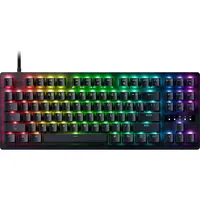
What's this Razer Huntsman V3 all about?

The Razer Huntsman V3 TKL 8KHz is a competitive gaming keyboard built for fast-paced first-person shooters and other genres that demand quick reflexes. It utilizes the company’s proprietary analog optical switches, 8K “HyperPolling,” adjustable actuation, and a slew of RGB customization options.
Magnetic switches have been all the rage in recent years, but Razer has remained true to its optical switches. Both switch types provide faster response times than traditional mechanical switches, which is why competitive gamers tend to gravitate toward them. I won’t debate whether optical or magnetic switches are better for gaming, but I will say Razer’s optical switches are insanely responsive.

Like with magnetic switches, you can set multiple actuation points on a single key—two actuation points in this case. For example, you can have an actuation point of 2.0 mm on the W key to walk and 4.0 to run. Here, you can set actuation points between 0.1 mm and 4.0, which is standard for both magnetic and optical keyboards.
Then there’s the 8K polling (the speed at which the keyboard sends signals to your computer), which Razer says is faster than other keyboards claiming such a high polling rate. According to the company, most keyboards with 8K polling have a 1.6ms response time, but the Huntsman V3 has a faster 0.48ms response time.
So, how does all of that translate to real-world use? Though I’m nowhere near a competitive gamer, even I could feel the overall smoothness and fast response when playing a first-person shooter like Doom: The Dark Ages. I especially like setting a faster actuation point for shooting since I could lightly brush the key instead of pressing it down all the way. And in case you’re wondering, you can set the actuation points right on the keyboard, though I still preferred doing so via the Razer Synapse app on PC.
The experience

While I’m not the target customer for a competitive gaming keyboard, I enjoy using them because of their fast response time and smooth keystrokes—which the Razer Huntsman V3 has in spades. While the blazing performance and high customization are fantastic, there’s more to this keyboard than those selling points.
The elevated keys, with their PBT-coated keycaps, are a joy to type on. One thing I especially appreciate as someone with a heavy touch is how the keys have more resistance the further you press them. The tenkeyless layout is also ideal for me since I don’t need a numberpad, making the board unnecessarily larger.
The thocky sound the keys produce also makes using the keyboard more enjoyable. Sure, the sound isn’t as deep as you’d find on mechanical keyboards, but it’s still good. While not a clicky board, it’s definitely noisy, so you might not want to use it in an office or anywhere that could annoy others (though I used it in the office anyway!).

The aluminum frame not only helps give the keyboard a richer sound, but also makes it sturdy and durable. That’s important if you need to travel with the Huntsman V3. The brushed aluminum is a nice touch that gives the keyboard a more premium look without being overbearing. And while this is a gaming keyboard, it doesn’t look like one thanks to its overall subdued design.
Of course, if you want more of a gamer aesthetic, there is no shortage of RGB options to toy around with. I’m somewhat neutral on RGB lighting, but I like that folks can customize the lighting to their exact preference. This is Razer, so the company isn’t skimping on that front.
Lastly, this isn't a wireless keyboard, so you'll need to use a USB-A port on your PC. That said, the braided cable is detachable, which is good if you need to take the keyboard on the road.
Outlook

The Razer Huntsman V3 Tenkeyless 8K is an excellent gaming keyboard thanks to its robust, competitive gamer-focused features. Outside of gaming, it also delivers a nice typing experience thanks to its durable build and responsive keys. It’s a bit pricey at $169, but for what it offers, you’re definitely getting your money’s worth.
Again, I'm a fan of Razer keyboards, and this one has everything I've come to expect from the company's peripherals. While the Pro versions of this keyboard might have more features, I like the simplicity of this board, as it still delivers excellent performance. At $169, it's worth considering.

Follow Tom's Guide on Google News and add us as a preferred source to get our up-to-date news, analysis, and reviews in your feeds.
More from Tom's Guide

