There’s no shortage of small, colorful accessories to give your desk setup a pop of personality — but when it comes to full-on, retro flair, I think I might have just found the fastest upgrade yet.
As someone who tests the best office chairs for a living, sometimes I feel like I’m lost in a sea of black and gray. That’s why whenever I get the chance to try out a more colorful chair, I’m all for it — especially when it’s a new take on one we’ve previously reviewed.
While Branch Furniture is no stranger to more colorful, ergonomic seats for work — like my personal favorite, the Branch Verve Chair — this time around, the company is doing something completely different by partnering with SEGA.
Instead of slapping a logo on a chair and calling it a day, Branch completely reimagined the look of its already excellent Branch Ergonomic Chair Pro, drawing designs from SEGA’s rich 66-year history. SEGA wouldn’t be SEGA without Sonic, so of course there’s a Sonic the Hedgehog Edition chair — but there are also two more designs centered around its most iconic consoles: the SEGA Genesis and SEGA Dreamcast.
Given I had a Super Nintendo at home and grew up playing Sonic on the Game Gear, I decided to check out Branch’s Ergonomic Chair Pro: Sonic the Hedgehog Edition ($569, Branch). Not only did it make my desk setup look as stylish as the Blue Blur himself, it also kept me as supported in my seat as Tails backing up Sonic during a face-off against Dr. Eggman.
Gotta build fast

The Ergonomic Chair Pro: Sonic the Hedgehog Edition chair Branch sent over arrived in a single large box. With everything unpacked, I was left with the chair’s backrest, headrest, armrests, seat, frame, casters, and everything else I needed to put it together.

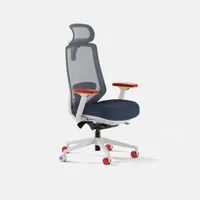
The assembly process started with installing the casters into the frame — I just had to push down on them to pop them in. With those four red casters in the back and that Sonic-themed accent one front and center, Branch’s vision of SEGA’s iconic mascot — albeit in ergonomic office chair form — was already beginning to come together.

Next up was installing the seat mechanism and getting the rest of the chair ready to drop onto its base. With the included Allen wrench, tightening those four bolts and the two on either side for the armrests was a breeze.
With that done, it was time to put the two halves of this one-of-a-kind office chair together and take this new version of the Branch Ergonomic Chair Pro for a spin.
Ergonomics with a splash of Sonic

Just like with Branch’s original Ergonomic Chair Pro, you get a full mesh backrest and headrest along with a comfy, high-density molded foam seat cushion. While I often sport an all-mesh office chair to beat the heat, I consider this pairing to be the sweet spot, giving you the ideal combination of airflow and lower-body support.

In addition to its Sonic-blue main colorway, Branch has worked in plenty of red, white, and gold throughout the frame to give you the full Green Hill Zone experience. For instance, the pads on the armrests aren’t just racing red — they feature a subtle checkerboard pattern that stands out in the best possible way.
Even though this is a themed edition of the Ergonomic Chair Pro, you still get all the same adjustments. There are 5D armrests you can position to your liking, you can adjust the seat depth to bring it closer or farther away from the backrest and you can even tilt the chair forward for those times when you’re really focused on the task at hand — whether that be back-to-back meetings or trying to make your way through Sonic 2’s notoriously frustrating Chemical Plant Zone.

That single caster emblazoned with the Sonic logo really pops on a hardwood floor, but there’s another great easter egg right above it: Branch printed a series of gold rings on the frame so you know where to install it. As I wheeled this special edition over to my desk, it almost looked like Sonic was speeding along collecting them.
All-day support meets gaming flair

Now I’ll admit, I haven’t tried the Branch Ergonomic Chair Pro before, but I am familiar with its predecessor, the Branch Ergonomic Chair. Essentially, this is an upgraded version of that chair that’s more adjustable and comes with a more densely packed seat cushion.
I’ve been using the Sonic Edition of the Ergonomic Chair Pro for the past few weeks, both while working and, of course, while gaming. One thing I really appreciate about this version is that it comes with a headrest included, instead of being an optional add-on like with the standard model. As I expected, the chair’s seat cushion is even comfier, and I like how you can now adjust both the height and depth of its lumbar support mechanism.

Speaking of the lumbar support, it’s been given a nice, Sonic-themed redesign too. The checkerboard pattern brings back fond memories of playing Sonic & SEGA All-Stars Racing — which was the series’ first kart racer. To adjust the vertical position of the Ergonomic Chair Pro’s lumbar support, you pull up on those two yellow handles. For depth, you just push the checkered lumbar cushion in or pull it back.
Ordinarily, I would have preferred making these adjustments with a knob like on the LiberNovo Omni SE chair I just reviewed. Here though, interacting with the lumbar support manually reminds me that yes, I am sitting in the only official Sonic the Hedgehog-themed office chair.

Although I spent a lot of my time in this chair working my way through the various islands in Splatoon Raiders on the Nintendo Switch 2, of course I had to play some Sonic too. Even though I’ve been "this close" to finishing Sonic Frontiers for ages now, I decided to go back to the classics with a modern twist by playing through Sonic Mania for the umpteenth time.
Branch’s Ergonomic Chair Pro worked just as well while gaming as it did during my workday. During more action-packed games, I sat upright with excellent posture thanks to its lumbar support mechanism. Then during slower moments and cutscenes, it was nice leaning back since the chair features a synchronized recline mechanism. Basically, the backrest and seat move together so as you lean back, the seat gently tilts upward — keeping your feet planted firmly on the ground and both halves of your body in alignment.
As I mentioned before, you can also tilt the seat forward. This lets you get a bit closer to your display — like during a challenging boss fight in Sonic — without doing "The Gamer Lean." Think Tech Neck when looking at your smartphone, but with your monitor or laptop instead.
Overall, it’s been great trying out Branch’s new take on its Ergonomic Chair Pro. You get sound, solid ergonomics and comfort with just enough gaming flair to add a bit of nostalgia-filled fun to your workday.
Why should gaming chairs have all the fun?

Whether you’re a die-hard Overwatch, League of Legends or World of Warcraft player or even if you prefer single-player games like The Witcher 3 or Fallout, you can easily go out and pick up a themed-version of one of the best gaming chairs from companies like Secretlab, noblechairs or AndaSeat. However, the same can’t be said for those who prefer a more ergonomic office chair for all-day support.
This isn’t the first gaming-themed office chair I’ve tried out as that honor goes to Haworth’s Xbox chairs. Still, I really appreciate how the company took the Haworth Fern and Very Gaming Chair and gave them both Xbox and Halo-inspired redesigns. Now with its collaboration with SEGA, it’s Branch’s turn.
Branch has taken things a step further by incorporating elements of Sonic the Hedgehog as well as SEGA’s Genesis and Dreamcast consoles into every part of the design of these chairs. While Haworth still paid homage to Xbox and to the Master Chief excellently, Branch’s take on SEGA’s most iconic character and consoles is slightly more in your face while also being significantly cheaper.
Granted, the Sonic the Hedgehog Edition is the least expensive at $569 which is the same price you’d pay for that standard edition of the Branch Ergonomic Chair Pro with a headrest. With their vegan leather backrests, headrests and seats, both the Genesis and Dreamcast editions of this chair are slightly more at $629. However, we’re still very much in mid-range office chair territory here.
I’ve always been very impressed with the more vibrant colorways Branch offers with its office chairs, especially as the company typically adds more after a new chair is released. With its SEGA edition chairs though, you now have even more options if you too don’t want to drown in a sea of black or gray every time you sit down at your desk while working from home or in this case, gaming with your posture in mind.

Follow Tom's Guide on Google News and add us as a preferred source to get our up-to-date news, analysis, and reviews in your feeds.
More from Tom's Guide
- I ditched my office chair for the Razer Iskur V2 NewGen and it finally sold me on gaming chairs
- 12 ergonomic home office upgrades: Here's my top picks for the best desk, chair, laptop and more for a strain-free workstation
- I tested a NASA-inspired office chair used by a former US President — and it’s the most comfortable chair I’ve tried yet