




I’ve been podcasting for the better part of 14 years, and the one piece of gear I’ve invested in more than anything else is one of the best microphones. After all, people will forgive so-so or even boring visuals as long as the audio is solid. I ran a Samson C01U Pro for years before switching to my current Elgato Wave 3, and I’m still happy with it. That said, I’ve been testing a pretty strong rival lately — the Razer Seiren V3 Pro.
Razer’s latest Seiren is a studio-leaning dynamic mic aimed squarely at podcasters and creators who want cleaner sound without a ton of extra gear. It has a solid, Shure-inspired look and comes packed with built-in processing tools that actually help you sound better right out of the box. At $249, it’s not cheap, but you’re getting dual USB-C and XLR connectivity, a 30 mm capsule, and some useful onboard features for the money.
So, will I ditch my beloved Wave 3 for the Seiren V3 Pro? Read on for what this mic is all about and how it held up after a week of real use.
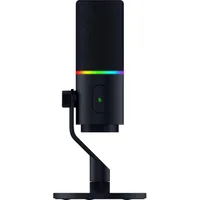
Razer Seiren V3 Pro: What is it?

Before I dig into my experience with the Seiren V3 Pro, here’s a quick look at the features so you know what you’re dealing with.
The Seiren V3 Pro is built to deliver the warm, broadcast-style sound many podcasters and streamers are after. Its cardioid pickup pattern means you speak into the top of the mic, which focuses on your voice while rejecting noise from the sides and rear. That’s especially useful if you’re recording in a regular room rather than a treated studio. It also includes a built-in shock absorber and a removable pop filter to minimize noise and plosives before they reach your recording.

One of the standout features is the dual connectivity. You get USB-C for simple plug-and-play use, plus a full XLR connection when you want to run it through a proper audio interface or mixer. That flexibility means the same mic can sit on a basic streaming desk one day and move into a more serious recording setup the next — no need to buy two different mics!
On the software side, Razer includes onboard DSP tools such as a compressor, expander, limiter, and an AI noise remover. There’s also 32-bit float support in the Razer Synapse app, which gives you more headroom and less chance of clipping when you get loud.
Between the processing and the extra dynamic range, much of the cleanup happens before the audio even reaches your computer. A physical gain dial sits right on the mic for quick adjustments, and the Chroma RGB ring serves as both a status indicator (mute, levels, etc.) and a bit of customizable flair.

Overall, the Seiren V3 Pro feels like the best of both worlds: easy enough for more casual users like me to set up and start using, but with enough depth and customization to keep the more serious audio folks happy.
Razer Seiren V3 Pro: My experience

I was impressed the second I pulled the Razer Seiren V3 Pro out of the box. It’s a slick-looking piece of kit. Objectively, it doesn’t look all that different from other cardioid mics, but it’s a design style I’ve always liked and rarely had the chance to use. Inside the box, you get the mic, its stand, and a long USB cable. One end is USB-A, and Razer includes a USB-A-to-USB-C adapter, a thoughtful little touch.
Once you plug it into your PC and open the Razer Synapse app, it guides you through a quick setup. You speak into the mic at a normal volume, record a bit of ambient noise, tell it what you’re using it for (podcasting, in my case), and how far the mic is from you. That’s it. The whole process takes less than five minutes and does much of the heavy lifting for you.
I’m generally happy with the recording quality. My voice comes through full, and there’s almost no background noise. The only real issue is specific to my setup: the mic sits about two feet away from me, and because I live in a pretty bare studio apartment, it can pick up a bit of that empty-room sound. I don’t have that problem with my Elgato Wave 3 since it’s on an arm and I can pull it right up to my mouth. I can’t do that as easily with the Razer, but even at a less-than-ideal distance, the audio still sounds solid.

I’m not an audiophile, and I don’t like fussing with settings, so the preset options in Synapse work perfectly fine for me. You can dig in and tweak everything if you want, and I’m sure I could squeeze out even better results with some fine-tuning. For most people, though, the out-of-the-box presets are more than good enough.
The one real annoyance I encountered is how easy it is to accidentally mute yourself while adjusting the mic. The mute “button” is a large, sensitive target area, and it’s almost impossible not to graze it when repositioning the mic. A proper physical button that requires a bit of force to press would have solved this easily.
Razer Seiren V3 Pro: Bottom line

This is my first time using a Razer microphone, and I have to say that I’m pretty impressed. Between the clean design and the solid set of features, the Seiren V3 Pro feels like a real step up for anyone looking to take their podcasting or content creation more seriously. Yeah, $249 is a chunk of money, and there are cheaper options out there. But if you decide to spend it, I don’t think you’ll walk away disappointed.
So, back to the question I asked at the start: will I switch from my Elgato Wave 3 to the Razer Seiren V3 Pro? Right now, no. I’d get a lot more out of this mic if I had it on a proper arm so I could keep it closer to my mouth. That said, it’s compact enough that I’ll definitely be tossing it in my bag for podcasting on the road. It’s a fantastic microphone that can make you sound like a pro, and at the end of the day, that’s exactly what I’m after.

Follow Tom's Guide on Google News and add us as a preferred source to get our up-to-date news, analysis, and reviews in your feeds.
More from Tom's Guide

