Spotify has been my default music app for years, and I thought I knew it well. I'd built my playlists, followed my favourite artists, and let the algorithm do its thing.
Then, almost by accident, I started poking around in corners of the app I'd never bothered with — and found features that completely rewired my listening habits. Not minor tweaks, but things that changed the way I discover music, revisit old favourites, and fall into new ones.
If you've been using Spotify on autopilot, these three features might do the same for you.
1. Spotify search goes deeper than you think
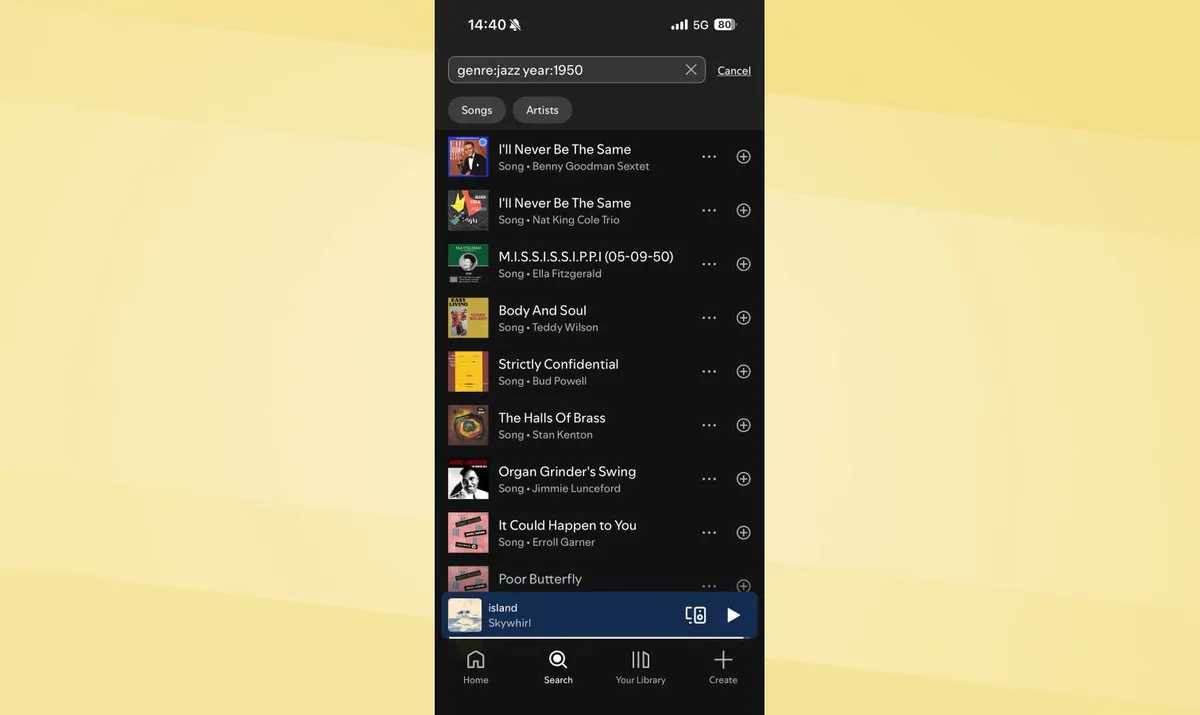
Spotify's basic search works fine when you know exactly what you're looking for, but it fails when your memory is vague or when you want to filter results by specific criteria. Advanced search tags solve this by letting you narrow results with precision.
Spotify supports seven hidden search operators:
- year: filters by release year
- genre: searches within specific genres
- label: finds music from particular record labels
- track: searches song titles only
- album: searches album titles only
- artist: searches artist names only
- tag: searches by mood or theme tags
Combine operators for specific queries. Type "genre:jazz year:1950" to find jazz released in 1960, or stack genre and year together to surface music you'd never stumble across through normal browsing.
You can search by label, mood tag, or drill into a specific artist's output from a particular era. Once you start using it, the search bar stops feeling like a basic lookup and starts feeling like a proper discovery tool.
2. Exclude playlists from your taste profile
Spotify's algorithm generates Discover Weekly, Daily Mix, and Release Radar based on your listening history. This works great until you regularly play music that doesn't reflect your actual taste — white noise for sleeping, lo-fi beats for working, or playlists for specific activities that skew recommendations.
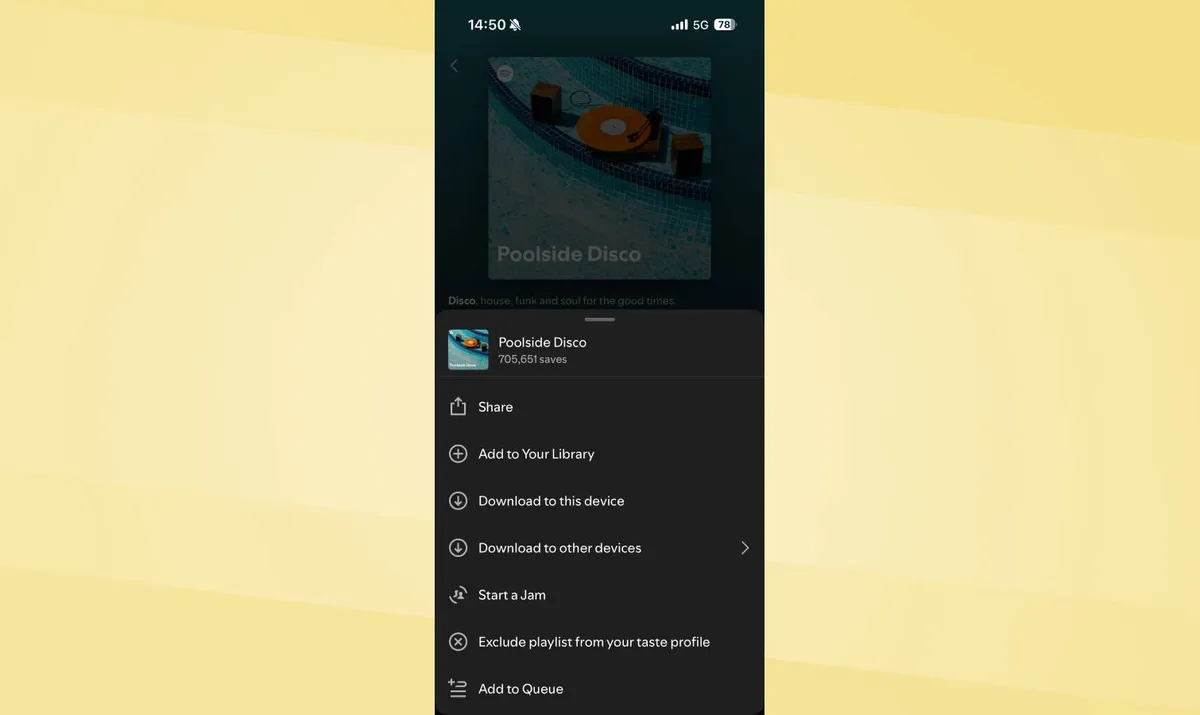
Excluding playlists or tracks from your taste profile tells Spotify to ignore them when generating recommendations and Wrapped summaries.
Tap the three dots next to any playlist or track and select "Exclude from your taste profile" or "Exclude track from your taste profile."
Your Discover Weekly starts suggesting music you'd actually choose to listen to instead of more ambient noise or workout instrumentals.
3. Start a Jam and add songs in real time

Spotify's Jam feature lets multiple people add songs to a shared queue in real-time, perfect for parties, road trips, or any situation where multiple people want input on what plays next.
Anyone nearby on the same Wi-Fi network can join your Jam and add tracks from their own devices. No one needs to pass their phone around or fight over playlist control.
Spotify Premium subscribers start a Jam by tapping the device icon, then selecting "Start a Jam." You can invite others via QR code, shared link, or by holding phones close together.
Participants add songs to the queue from their devices. The host controls playback, but everyone contributes to what plays. It's a small thing, but handing everyone a stake in the soundtrack makes any hangout feel a little more collaborative and a lot more fun.
Let me know in the comments which one you're trying first, or if there's a hidden Spotify feature I missed that deserves a spot on this list! 🎧🎶

Follow Tom's Guide on Google News and add us as a preferred source to get our up-to-date news, analysis, and reviews in your feeds. Make sure to click the Follow button!
More from Tom's Guide
- This Spotify mixing feature lets you DJ your own playlists — here's how it works
- Spotify's Lossless Listening makes music sound amazing — here's how to enable it
- Your earbuds are disgusting — here's the right way to clean them