If you’re on the hunt for a professional monitor, chances are you’ve considered Apple’s Studio Display or even the new mini-LED Studio Display XDR. They’re both great options if you’re looking to give your home office a major upgrade.
At $1,599 for the standard Studio Display and $3,299 for the Studio Display XDR though, neither of these premium monitors comes cheap. Then when you factor in useful add-ons from Apple like glare-free, nano-texture glass or a tilt-and-height-adjustable stand, you’re looking at a very serious investment.
This is why at Tom’s Guide, we’ve been testing out different Studio Display alternatives. From the BenQ MA270S to the MSI Pro Max 271UPXW12G, there’s a growing number of creative and professional monitors that give you a similar experience at a fraction of the price. However, while these two options are more affordable, they have the same 27-inch display size as Apple’s Studio Display.
While 27 inches is the sweet spot for many, once you go up to a 32-inch monitor, it’s hard to go back. That’s why I’ve spent the past month trying out the Innocn CB32U1. Not only is it larger, but it also sports a faster 160Hz refresh rate along with dual HDMI 2.1 ports, which makes it a more work-friendly option than one of the best gaming monitors.
Here’s what it’s been like using this budget-friendly Studio Display alternative as my daily driver — and why I might not be going back to my Apple monitor anytime soon.
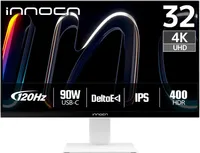
Part art, part gaming monitor

This is the third Innocn monitor I’ve checked out and one thing that continues to impress me is the sheer amount of cables and accessories in the box. If there’s a port on the monitor, you get a cable for it so you don’t have to scrounge through your box of cables while trying to set up your new display. One surprising addition with the CB32U1 was a USB hub with a USB-C connector on one end and a USB-A one on the other, but more on that in a bit.

When it comes to ports, there’s a nice selection of them around back. You get two HDMI 2.1 connections, DisplayPort 1.4, USB-C with 90W of power delivery, and a power port.
While the previous two Innocn monitors I tested used a standard PC power plug, this one uses a barrel connector and an external power brick. Normally, this would be a downside, but here it works because instead of being tucked on the underside of the display, all of this monitor's ports are located flat on the back — just like on Apple’s Studio Display.
With its clean white look with silver trim, you wouldn't think you’re dealing with a display capable of handling high refresh rate gaming just as well as photo or video editing.

Given I often prefer using one of the best monitor arms with my desk setups, I always look for standard VESA mounting options when shopping for a new display. While the CB32U1 uses a quick-release mount for its included stand, Innocn does include a VESA adapter plate right in the box if you want to go that route.
Speaking of the stand, it has a metal base and metal post which makes it feel quite sturdy on your desk. There isn’t a cable cutout on the post, but to be honest, I kind of prefer it that way. With a cutout, you're forced into routing cables a specific way, but here, I was able to cleanly strap all my cables behind the post without any of them peeking out from the front.
With the Innocn CB32U1 unboxed and set up, it was time to start putting the display through its paces.
MacBook-ready but built for more

As I usually do when trying out a new monitor, the first thing I did was connect my 16-inch MacBook Pro M5 to the CB32U1. I was immediately impressed with the display’s color reproduction and just how close it was to my MacBook’s screen — even without switching to its dedicated Mac Mode. With 90W of Power Delivery over USB-C, I was able to use and charge the laptop with a single cable too.
From there, I decided to build a full desk setup around the CB32U1, utilizing the rest of its ports to connect one of the best mini PCs and my Nintendo Switch 2. With its ports flat on the back instead of tucked on the underside, I didn’t have to worry about cables poking out underneath the display, which made cable management an absolute breeze. However, I was curious about that included USB hub I mentioned earlier, so I decided to set it up too.

Even though the CB32U1 doesn’t have a built-in KVM switch like the 5K2K Innocn ultrawide I previously tried out, this USB hub does a great job of making up for it. You plug the primary end into the USB-C port on the back of the monitor and plug the upstream USB-A end into your computer. Once that's done, you get three extra USB ports and a 3.5mm audio jack you can use with a pair of the best computer speakers.
Although a built-in KVM switch would have let me switch seamlessly between devices while using the same peripherals, this USB hub — and the way that I installed it — did let me hotswap computers on a whim. For instance, I first used the CB32U1 with the Minisforum G1 Pro as I wanted to put its gaming capabilities to the test but then I ended up swapping that PC out for Apple’s new Mac mini M6 while working on my review. Thanks to having the 2.4 GHz USB dongles for my mechanical keyboard and trackball mouse installed behind the monitor, I didn’t have to unplug or pair anything. Instead, I just used a USB-A to USB-C adapter on the back of the new Mac mini and voila, I was instantly typing away on Apple’s upgraded Mac desktop.
Editing photos and doing other creative work on the CB32U1 was an absolute joy. While it wasn’t quite as impressive as back when I reviewed the Studio Display XDR, its IPS panel was clear, sharp and most importantly, glare-free. Even though it’s not as advanced as Apple’s etched nano-texture glass, the matte anti-glare coating Innocn used on this display definitely does the trick.

As for gaming on the CB32U1, that was a surprisingly good experience as well. Even though it doesn’t have a 240Hz or 360Hz refresh rate like you often see on high-end gaming monitors, this display has a 144Hz one out of the box, though you can overclock that all the way up to 160Hz. This is more than enough for non-competitive players and it also has AMD FreeSync on board for tear-free variable refresh rate (VRR) gaming.
One thing that stands out here too is the inclusion of not one but two HDMI 2.1 ports. While most PC players chasing maximum frame rates and performance go with DisplayPort, to play above 60Hz on either the PS5 or Xbox Series X, you need HDMI 2.1.
I could easily see someone using the CB32U1 for work during the day and then having a console next to it to get in a play session at night. You really do get the best of both worlds here for a lot less than you’d typically spend on a professional monitor from brands like MSI or BenQ and of course, Apple.
Not quite an all-in-one display

Now what do you lose out on when going with a more affordable Studio Display alternative like the Innocn CB32U1? For starters, you don’t get an integrated webcam and will need to bring your own. At the same time, unlike with the previous two Innocn monitors I tried out, this one doesn’t have built-in speakers. Now I know monitor speakers leave a lot to be desired, but I still like having them as they can be quite useful in a pinch.
With this desk setup, I went with the BlueAnt Soundblade for audio as this under-monitor soundbar helped me free up valuable desk space. However, it also gave me a place to put Flipper’s BUSY Bar – yes, the same Flipper behind the Flipper Zero — which I’m currently testing out. I initially went without one of the best webcams as I mainly used the CB32U1 for more focused work sessions and some gaming at night. However, I eventually put Logitech’s MX Brio webcam on top of my monitor light bar to join a few meetings out here in my game room.
Adding a pair of speakers — or a soundbar in my case — and a webcam to the CB32U1 is still a whole lot cheaper than what you’d pay for the base model of the Studio Display. While this monitor doesn’t have the same first-party integrations you get with Apple’s premium display, you do get a lot more flexibility when it comes to how you want to set it up. While I would have preferred having a built-in power supply over an external power brick, it’s still better than the hardwired power cable on the Studio Display. Likewise, you’re not just limited to Thunderbolt and can plug whatever you want into this monitor, from your Mac to your consoles to your gaming PC.
At $549, the CB32U1 is on the expensive side when compared to your standard 32-inch monitor. However, this is a professional monitor for creatives that need a wider and more accurate range of color profiles. You also get high-refresh rate gaming built-in as a nice extra.
Having used the Innocn CB32U1 for a month now, I haven’t once felt the need to swap it out for my Studio Display or my gaming monitor. If you’re looking for a monitor that’s suitable for both work and play and want one in white without spending a fortune, it could earn a spot on your desk too.

Follow Tom's Guide on Google News and add us as a preferred source to get our up-to-date news, analysis, and reviews in your feeds. Make sure to click the Follow button!
More from Tom's Guide
- I ditched my dual-monitor setup for a single 40-inch ultrawide and two screens aren’t better than one
- I tried this futuristic monitor light bar and now my desk lights itself every time I sit down
- I spent a week with dual Apple Studio Displays and realized I’ve been lying to myself about glossy screens for years