



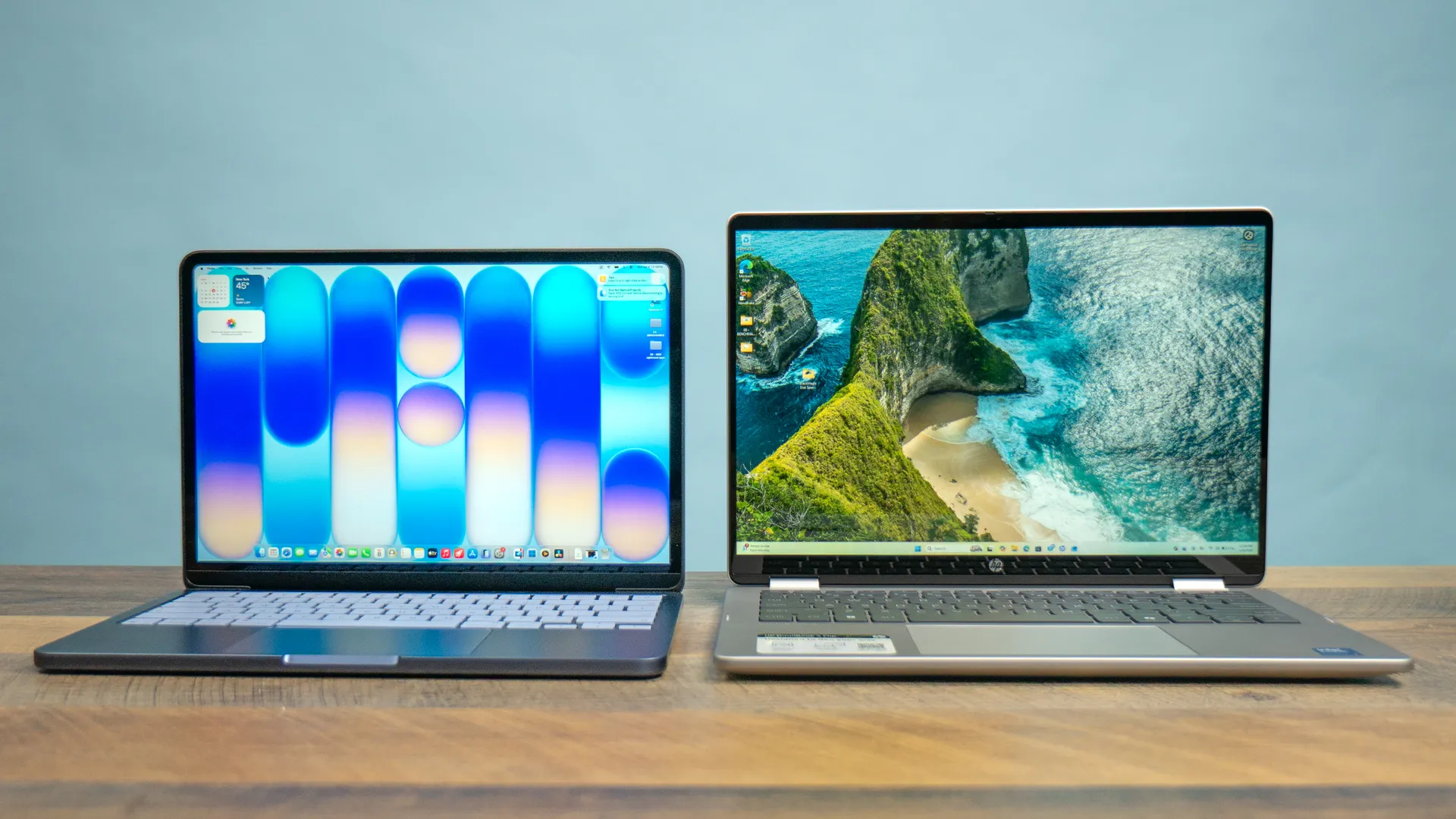
The MacBook Neo represents a real threat to the best budget Windows laptops thanks to its $599 starting price. Not only is it affordable, but its aluminum chassis, fast performance, and epic battery life make it feel like a premium product. Right now, it’s arguably the best laptop for light productivity work and casual entertainment.
But how does the MacBook Neo directly compare to Windows laptops in the same price range? We benchmarked the MacBook Neo vs budget Windows laptops and found that Apple’s entry-level laptop can hold its own, or even exceed its competitors. The results were illuminating, but they tell us what it’s like actually using these laptops in everyday use.
To that end, we bought an HP Omnibook 5 Flip to see how it compares to a MacBook Neo. The model we purchased, which is a Best Buy exclusive, cost $599 at the time, but it's now $778 (maybe due to the RAM crisis). While this is a 2-in-1 laptop, its specs and sale price puts it in the same category as the Neo, so it’s fair game in our estimation.
Below, I’ll detail the key differences between the MacBook Neo and the HP Omnibook 5 Flip, and which one I’d prefer to use as my main laptop. Spoiler: it's not close.

MacBook Neo vs. HP Omnibook 5 Flip: Specs
| Row 0 - Cell 0 | MacBook Neo |
HP OmniBook 5 Flip |
Price (starting) |
$599 |
$599 (originally) |
Display |
13-inch (2408 x 1506) Liquid Retina, 60Hz |
14-inch (1920 x 1200) touch screen, 60Hz |
Chipset |
Apple A18 Pro chip |
Intel Core 7 150U |
Memory |
8GB |
16GB |
Storage |
256GB |
512GB |
Connectivity |
Wi-Fi 6E, Bluetooth 6.0 |
Wi-Fi 6E, Bluetooth 5.3 |
Ports |
2x USB-C, 1x headphone jack |
2x USB-A, 2x USB-C, 1x HDMI, 1x 3.5mm headphone jack |
Colors |
Silver, Blush, Citrus, Indigo |
Silver |
Battery (tested) |
13 hours 28 minutes |
9 hours 57 minutes |
Dimensions |
11.7 x 8.1 x 0.5 inches |
12.32 x 8.66 x 0.73 in |
Weight |
2.7 pounds |
3.58 pounds |
MacBook Neo vs. HP Omnibook 5 Flip: Design

Unlike most sub-$600 laptops featuring plastic designs, the MacBook Neo has an aluminum chassis. Its rounded corners and light 2.7-pound weight also make it comfortable to carry. It also comes in four colors, which is also something you don’t always get in this price range.
Conversely, the HP Omnibook 5 Flip has everything you’d expect from a budget Windows laptop. While the lid and bottom are made of recycled aluminum, it doesn't feel as premium as the Neo. The keys are thick, with nice travel distance. However, the squeaky sound the touchpad makes when you press down on it isn’t pleasing to the ears.
Since it’s a 2-in-1 convertible, the Omnibook 5 Flip is much thicker and heavier than the MacBook Neo. It measures 3.58 pounds and measures 0.73 inches thick, compared to 0.5 inches for the Neo.
The HP makes up for that girth somewhat with its greater port selection. Whereas the Neo only has two USB-C ports and a headphone jack, the Omnibook 5 Flop has a pair of USB-C ports, which are both USB 3.2 Gen 2, compared to the Neo’s USB 3.2 Gen 2 and slower USB 2.0. The Flip also has two USB-A ports, an HDMI port, and a headphone jack.
I give the edge to the Neo here since I prefer its thinner, lighter all-aluminum shell.
MacBook Neo vs. HP Omnibook 5 Flip: Display

I’ll cut right to the chase: the MacBook Neo’s Liquid Retina display literally and figuratively outshines the screen on the HP OmniBook 5 Flip. It’s the first thing that really stands out when you open the 2-in-1. Even when you boost the brightness to the maximum, the display remains very dim. The desaturated colors that make everything look lifeless don't help matters.
| Row 0 - Cell 0 | MacBook Neo |
HP Omnibook 5 Flip |
Nits (brightness) |
452 (SDR) | 480 (HDR) |
266 (SDR) |
sRGB |
110.9% |
65% |
DCI-P3 |
78.6% |
46.1% |
Delta-E |
0.22 |
0.28 |
As you can see in the table above, our lab results corroborate what my eyes experienced. The Omnibook 5 Flip doesn’t support HDR, but even its SDR brightness is close to half that of the Neo’s.
Color representation also falls behind the target 100% in both the sRGB and DCI-P3 color spaces. Color accuracy (Delta-E) isn’t terrible, but that’s small compensation when taking the bland colors into account.
Display-wise, the main advantage the Omnibook 5 Flip has over the MacBook Neo is that it features a touchscreen. However, when speaking purely about how things look on one display over the other, the MacBook Neo wins with its sharper resolution, vibrant colors, and overall higher brightness.
MacBook Neo vs. HP Omnibook 5 Flip: Performance

To be clear, you won’t get mind-blowing performance from either of these laptops. They do best under light or average workflows, such as web browsing, word processing, or streaming videos. I can keep around ten open Chrome tabs on each without experiencing slowdown. For regular work, neither laptop will let you down.
| Row 0 - Cell 0 | MacBook Neo |
HP Omnibook 5 Flip |
Geekbench (single/multi-core) |
3535 / 8920 |
2666 / 9112 |
Handbrake |
9:57 |
9:09 |
SSD speeds (write/read) |
1440 / 1585 |
118.4 / 3493.5 |
Gaming (Borderlands 3) |
9 fps |
10 fps |
Getting into specifics, the MacBook Neo has better single-core performance, so it's generally better for individual tasks. The Omnibook 5 Flip has better multi-core performance, which means it should be better for multitasking.
The HP also finished our video transcoding test faster than the MacBook Neo, turning in a slightly faster time.
On the Blackmagic SSD speed test, the Neo has much faster write speeds, but HP’s 2-in-1 more than doubles the Neo’s read speeds. Lastly, neither of these is a gaming powerhouse, as you can see by Borderlands 3’s abysmal frame rates. However, many Apple Arcade games run surprisingly well on the MacBook Neo.
MacBook Neo vs. HP Omnibook 5 Flip: Battery life

In our battery test, which involves continuous web surfing over Wi-Fi with the display set to 150 nits of brightness, the MacBook Neo lasted for an astonishing 13 hours and 28 minutes. The HP Omnibook 5 Flip endured for close to 10 hours, which is pretty solid for a mid-range Windows laptop.
| Row 0 - Cell 0 | MacBook Neo |
HP Omnibook 5 Flip |
Time (hours:mins) |
13:28 |
9:57 |
The Omnibook 5 Flip can heat up pretty fast. With just ten minutes of use, the underside becomes noticeably warm. It hit 98 degrees Fahrenheit in our heat test, which is three degrees hotter than we deem comfortable. The Neo can get warm too, especially if you’re trying to run a game like Resident Evil 4 Remake on it, but that’s an extreme example, as the laptop doesn’t get very warm under normal use.
Lastly, the Omnibook 5 Flip takes an inordinate amount of time to charge. From around 10% battery life, it took around 4 hours to get to 90%. If you need to top out fast, this machine won’t make the cut. To be fair, the Neo also takes a long time to charge.
MacBook Neo vs. HP Omnibook 5 Flip: Webcam

If you’re frequently in video calls, then you want a webcam that helps you look your best. If that’s a priority, then you’ll want the MacBook Neo for that job.
The photo above was taken on the Neo’s 1080p FaceTime HD camera. As you can see, the webcam does a good job of capturing colors and details. Everything also appears fairly sharp. You’ll get better results from one of the best webcams, but the Neo’s clicker won’t disappoint.

Then we have the Omnibook 5 Flip’s 5MP webcam. While a 5MP webcam generally has higher raw resolution (1080p is equivalent to 2MP), the color accuracy and software processing of the Neo’s camera are clearly better, as you can see by the comparatively desaturated and blurry camera on the Omnibook 5 Flip.
MacBook Neo vs. HP Omnibook 5 Flip: Bottom line
In this specific contest, the HP Omnibook 5 Flip’s main advantage over the Neo is its 2-in-1 design that gives you the functionality of a laptop and tablet. It also has more ports and comparable performance to Apple’s affordable laptop.
However, the MacBook Neo blows away the HP in other ways, offering a more premium design that's thinner and lighter, a much brighter display and a lot more battery life.
At $599 on sale, the Omnibook 5 Flip was certainly worth a look, but now that there's nearly a $200 price gap versus Apple's laptop, there's a clear winner. The MacBook Neo takes this contest.

Follow Tom's Guide on Google News and add us as a preferred source to get our up-to-date news, analysis, and reviews in your feeds. Subscribe to Tom's Guide on YouTube and follow us on TikTok.
More from Tom's Guide

