Tom's Guide Verdict
The Innocn E49M1R delivers massive, dual-27-inch screen real estate in a unique flat form factor, backed by punchy Mini-LED backlighting and plenty of ports. The lack of USB-C Power Delivery and edge wash-out from sitting too close hold it back slightly — though if you have a deep desk and run a desktop PC, there’s no monitor quite like it.
Reasons to buy
- +
Impressive SDR and HDR brightness
- +
Dual HDMI 2.1 and DisplayPort 1.4 inputs
- +
Widest, flat super ultrawide monitor available
- +
Deep blacks thanks to Mini-LED backlighting
Reasons to avoid
- -
No USB-C input
- -
Noticeable washout at display edges
Why you can trust Tom's Guide Our writers and editors spend hours analyzing and reviewing products, services, and apps to help find what's best for you. Find out more about how we test, analyze, and rate.
The Innocn E49M1R isn’t your standard super ultrawide monitor. Instead of a curved panel like on other popular massive displays, it’s completely flat and gives you the screen real estate of two 27-inch, 1440p monitors running across your desk.
When connected to your PC or Mac, you can have two full-sized browser windows or apps running side by side. This makes the E49M1R an excellent choice for productivity, though with a 165Hz panel, Mini-LED backlighting, and AMD FreeSync Premium, it also provides a very immersive gaming experience — granted you have a PC powerful enough to run games at this monitor’s native resolution.
I’ve been using the E49M1R as my daily driver for a month now, and it’s definitely changed how I work. While I’ve used a standard 21:9 ultrawide display for almost a decade, jumping to 32:9 and all that extra screen space has made a real difference while multitasking. Still, it has its trade-offs. While this monitor offers dual HDMI and DisplayPort connections, it’s missing a USB-C port for a one-cable connection to your laptop. Likewise, due to its VA panel and sheer width, colors can appear washed out at the edges if you’re sitting too close.
My Innocn E49M1R review will help you decide if this is the best monitor for your workflow and your desk, or if it’s worth going with something smaller or slightly curved instead.
Innocn E49M1R: Cheat Sheet
- What is it? A massive 49-inch, Mini-LED super ultrawide monitor that’s flat instead of curved.
- Who is it for? Those who prefer flat displays over curved ones and want a very wide screen for productivity-focused work or gaming.
- What does it cost? The Innocn E49M1R costs $999 but is currently on sale for $849 at Amazon and on the company’s site.
- What do we like? The Mini-LED backlighting, the generous port selection, its impressive SDR and HDR brightness, and that it’s the widest flat super ultrawide monitor available.
- What don’t we like? That content at the edges looks washed out due to its size and VA panel, and the lack of a USB-C port for easily connecting a laptop.
Innocn E49M1R: Specs
Price |
$999 |
Display |
49 inches |
Resolution |
5120 x 1440 |
Aspect ratio |
32:9 |
Refresh rate |
165 Hz |
Response time |
8ms |
Adaptive sync |
AMD FreeSync Premium |
Panel type |
VA |
Backlight |
Mini-LED |
Local dimming zones |
1760 |
HDR |
HDR 1000 |
Color depth |
8-bit |
DPI |
109 PPI |
Inputs |
2 x HDMI 2.1, 2 x DisplayPort 1.4, 1 x audio out, 2 x USB-A, 1 x USB-B |
Speakers |
2 x 5W |
VESA |
100 x 100mm |
Dimensions |
47.82 × 1.99 × 14.43 inches (without stand), 47.82 × 9.31 × 21.44 inches (with stand) |
Weight |
29.32 pounds with stand (13.3kg) |
Warranty |
1-year |
Innocn E49M1R: The Ups
The Innocn E49M1R is truly one of a kind, as there’s no other flat super ultrawide display this large. It takes up the full width of most desks, but in return, you get an impressively bright picture, plenty of screen real estate, enough input ports to connect four devices at once, and built-in speakers for the complete package.
A massive (yet flat) display

At 47.82 x 1.99 x 14.43 inches, the E49M1R is the largest monitor I’ve ever unboxed. Just like with a large TV, I’d recommend having someone help you unpack it and install the included metal stand. In addition, you also get a power cord, an HDMI 2.1 cable, and a DisplayPort cable in the box. Unfortunately, there isn’t a USB-B cable included, which you’ll need if you want to take advantage of the E49M1R’s built-in USB hub — more on that later.

Just like with the other Innocn monitors I’ve tested, installing the metal stand is a breeze. It simply snaps into the back of the monitor, and a single thumb screw attaches the arm to its sturdy metal base. If you’d rather use one of the best monitor arms instead of the included stand, there are 100 x 100 VESA mounting holes on the back of the display.

One thing I really appreciate about the E49M1R is that instead of tucking all the ports on the underside like you often see on other monitors, they’re all positioned on the back. Along with being height-adjustable, the stand features a cutout near the bottom to make routing cables up to the display easier.

Port-wise, you get dual HDMI 2.1 inputs and dual DisplayPort 1.4 connections, alongside an audio jack. There’s also a USB-B upstream port that, when connected to your computer, lets you use the two USB-A ports next to it for wireless dongles or a webcam. This isn’t a KVM (keyboard, video, mouse) switch, though, as you can’t share those peripherals across two separate computers. At the same time, there’s no USB-C port with Power Delivery, which feels like an odd omission on a premium, super ultrawide monitor like the E49M1R.
Full-desk productivity

With the E49M1R unboxed and the stand installed, it was time to get it set up on my desk. Now a word of warning here — if you have a desk that’s 48 inches wide, you likely won’t have room for a full desktop PC, though you could tuck one of the best mini PCs underneath this massive display.
I set the E49M1R up on a desk shelf attached to the back of the Secretlab Magnus Evo, and even though that desk is 60 inches wide, things still felt a bit cramped. Fortunately, I’m in the process of reviewing the GMKtec Evo-X3, which is quite thin and designed to be used vertically.

So what’s it like sitting in front of a massive, 49-inch flat super ultrawide? It was definitely daunting at first, but after a few hours, my eyes and neck adjusted to the larger display. By default, you can position one app or browser window on either side, and this felt a lot like the dual-monitor setup I put together last year — just without a gap between the two screens.

While using the E49M1R with two Chrome windows side by side worked well enough, it wasn’t until I installed Microsoft’s PowerToys utility that I could take full advantage of this monitor. Using PowerToys’ built-in FancyZones window manager, I was able to split this 49-inch display into thirds, keeping a smaller window for video calls in the middle with two larger browser windows on either side for multitasking. This worked great, as I could look straight at the center of the screen while presenting and glance off to the side when I needed to check notes or respond to a quick message.
As someone who’s been using an ultrawide monitor for years, making the jump from 21:9 to 32:9 felt natural. If you’ve been using a standard 16:9 display on its own, though, you might be better off switching to a 21:9 ultrawide first before going all the way up to a super ultrawide — especially with a completely flat one like the E49M1R.
Completely immersive gaming

One thing you’ll likely have to deal with when switching to an ultrawide — or even a super ultrawide — monitor is black bars on the sides of most video content. However, when you find a video with the right aspect ratio for your screen, it’s a sight to behold.
To put the E49M1R’s video capabilities to the test, I scoured YouTube for 32:9 trailers until I found one for Godzilla vs. Kong. Seeing King Kong leaping across the landscape and fighting in Hollow Earth was downright awesome, and even though this was a compressed YouTube stream, the picture still looked fantastic on the E49M1R.

| Row 0 - Cell 0 | Innocn E49M1R |
LG UltraGear 52G930B |
Alienware 34 QD-OLED |
Nits (brightness) |
322.8 (SDR), 1474 (HDR) |
415 (SDR), 252 (HDR) |
298 (SDR), 327 (HDR) |
sRGB |
103.1% |
161.3% |
187.6% |
DCI-P3 |
139.8% |
114.2% |
132.9% |
Delta-E |
0.21 |
0.06 |
0.20 |
Based on our lab tests, you can see that while the E49M1R isn’t as bright as some other premium monitors when displaying content in SDR, it absolutely shines with HDR enabled — hitting a blistering 1,474 nits. It did fairly well with color accuracy, though this is a productivity monitor, and I wouldn’t recommend it for color grading or other heavy graphical work.
While 32:9 videos may be hard to find online, the same can’t be said for games. With a powerful gaming PC, you can fully immerse yourself in the action across the E49M1R’s entire 49-inch display.
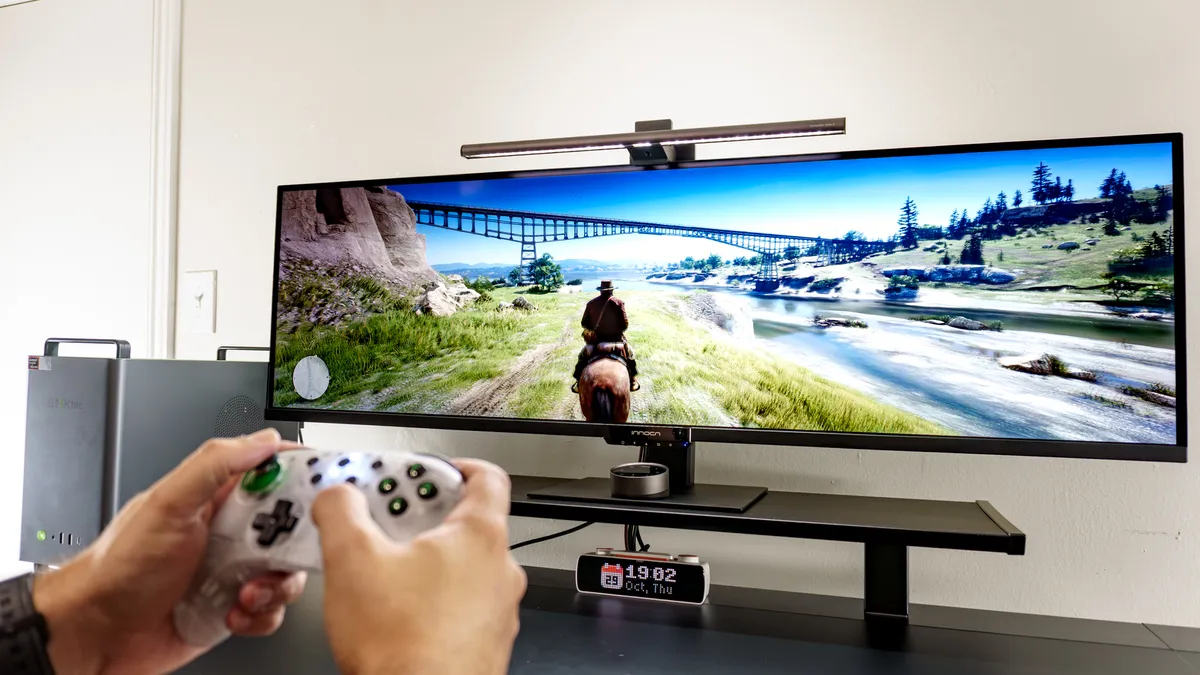
Even though it was a tight fit, I managed to get the GMKtec Neo-X1 Pro set up on the side of the E49M1R and play some Red Dead Redemption 2. Riding on my horse across the Wild West as Arthur Morgan felt almost like a dream come true, as I could take in all the scenery thanks to the E49M1R’s wider field of view. I’m sure playing a racing game like Forza Horizon 6 would have been even better, though.
It’s worth noting that while the E49M1R has a 165Hz refresh rate with support for AMD FreeSync Premium, the display definitely lags behind the best gaming monitors when it comes to response time. At 8ms, it’s better suited for slower-paced games, which is why I tested it out with Red Dead Redemption 2 as opposed to a fast-paced, competitive shooter.
All in all, though, you can certainly play games on the E49M1R — even if it’s ultimately better suited for multi-window productivity tasks.
Innocn E49M1R: The Downs
There’s truly no super ultrawide monitor quite like the Innocn E49M1R, thanks to its massive, completely flat display. However, that sheer width can cause colors on either side to look washed out depending on how close you’re sitting, and a USB-C port would have been a welcome addition.
No one-cable connection here

Although this is the first super ultrawide monitor I’ve tested, I’ve actually spent quite a bit of time using two of Innocn’s ultrawide displays: the 40C1U and the 40C1R. While the former is a premium display with a 5K2K resolution and the latter is a more budget-friendly gaming monitor, both feature USB-C with Power Delivery.
Unfortunately, the E49M1R doesn’t. Now, I know some budget laptops would struggle to drive a massive display like this one, but most modern machines can handle it just fine. With Power Delivery built in, you also wouldn’t need to reach for your laptop charger — instead, you could just plug in your Windows laptop or MacBook and get right to work on the E49M1R’s 49-inch screen.
For a monitor with a list price of $999, the lack of a USB-C port is really puzzling, especially since I’ve tested much cheaper displays from Innocn that have one.
Too flat for its own good

Now, whether you prefer a flat or curved ultrawide is something you’ll have to figure out on your own. Personally, I like flat ultrawides since they take up less space on my desk and can easily be wall-mounted or attached to a monitor arm.
With the E49M1R and its VA panel, however, its massive width creates a sort of optical illusion. Even though the picture on either side is just as bright as it is at the center, it doesn’t always appear that way — particularly when you’re sitting very close to the display. For instance, with three Chrome windows side by side, content on the outer two would appear washed out when I turned my head to look at it. However, if I pulled my office chair back a bit, it looked completely normal.
Now, if you’re dead set on having the largest, flattest super ultrawide monitor out there, I’d recommend pairing the E49M1R with a very deep desk. That way, you can position the monitor at the very back edge to mitigate this optical illusion. If you’re short on space, though, and aren’t using one of the best standing desks, you could always wall-mount this display just like you would a TV.
Innocn E49M1R: Verdict
The Innocn E49M1R is truly one of a kind, and it’s a great fit for those who want as much screen real estate as possible without a multi-monitor setup or having to give up desk space for a curved display. That alone would be enough, but its Mini-LED backlighting really makes colors pop and blacks appear deeper, too. You also get plenty of ports alongside a built-in USB hub.
While I would have liked a built-in KVM switch as well, that isn’t necessarily a dealbreaker. Missing a USB-C port with Power Delivery could be a problem if you’re mainly a laptop user — though if you primarily use a desktop computer, this won’t be an issue, even if it still would have been a nice addition.
The Innocn E49M1R delivers and then some for anyone who wants the widest, flattest super ultrawide monitor you can get. At full price, you’re getting plenty of screen space for your buck — just make sure this display isn’t too wide for your setup and that you have a desk big enough to house it first.

Follow Tom's Guide on Google News and add us as a preferred source to get our up-to-date news, analysis, and reviews in your feeds.