


I asked ChatGPT and Claude to build me a Cyber Monday deal tracker — and there’s a clear winner

With Black Friday officially behind us and Cyber Monday tomorrow, keeping track of fluctuating prices across multiple retailers can feel like a full-time job. Between checking whether a deal is actually worth it, comparing prices and trying to stick to my holiday shopping budget, I wanted something that could bring everything together in one place.
Rather than downloading another shopping app or building a spreadsheet, I decided to see whether AI could build something better.
I put Claude Code and ChatGPT Work head-to-head to create my own personalized Black Friday and Cyber Monday deal tracker. I didn't write a single line of code, and I gave both chatbots the exact same prompt.
Both built interactive dashboards on their first attempt, but one went considerably further than I expected. Here's how they compared and which one I'd actually use this holiday shopping season.
The prompt I used to build my own deals app

One of the biggest advantages of building your own app with AI is that you can decide exactly which features you want without dealing with unnecessary extras.
I wanted something that would help me make smarter purchasing decisions rather than encourage me to spend more money. That meant tracking my budget, comparing retailers and setting a price I'd actually be willing to pay for each product.
Prompt:
Build me an interactive Black Friday and Cyber Monday deal tracker with a polished, mobile-friendly dashboard.
I want to be able to:
Add products using their names and retailer URLs.
Enter the original price, current sale price and my target price.
Automatically calculate how much money and what percentage I would save.
Compare prices for the same product across multiple retailers.
See which deals have reached my target price.
Sort products by savings, price and shopping priority.
Set an overall holiday shopping budget and see how much I have left.
Mark products as purchased and track my total savings.
Edit and delete products.
Use green indicators for deals that meet my target price and amber indicators for products that are still too expensive.
Include a price history chart based on recorded price updates. Save my shopping list between sessions if persistent storage is supported, and provide an export option.
Make the interface look like a professional shopping app, with a clean layout and simple navigation. Do not invent live prices or claim to monitor retailers automatically unless that functionality actually works.
Build the functional app as an interactive Artifact, not just a description of how to build it.
That last constraint was important because I didn't want either chatbot pulling imaginary discounts out of thin air or giving me the impression that it was monitoring prices in the background when it wasn't.
Claude built an app that felt surprisingly professional
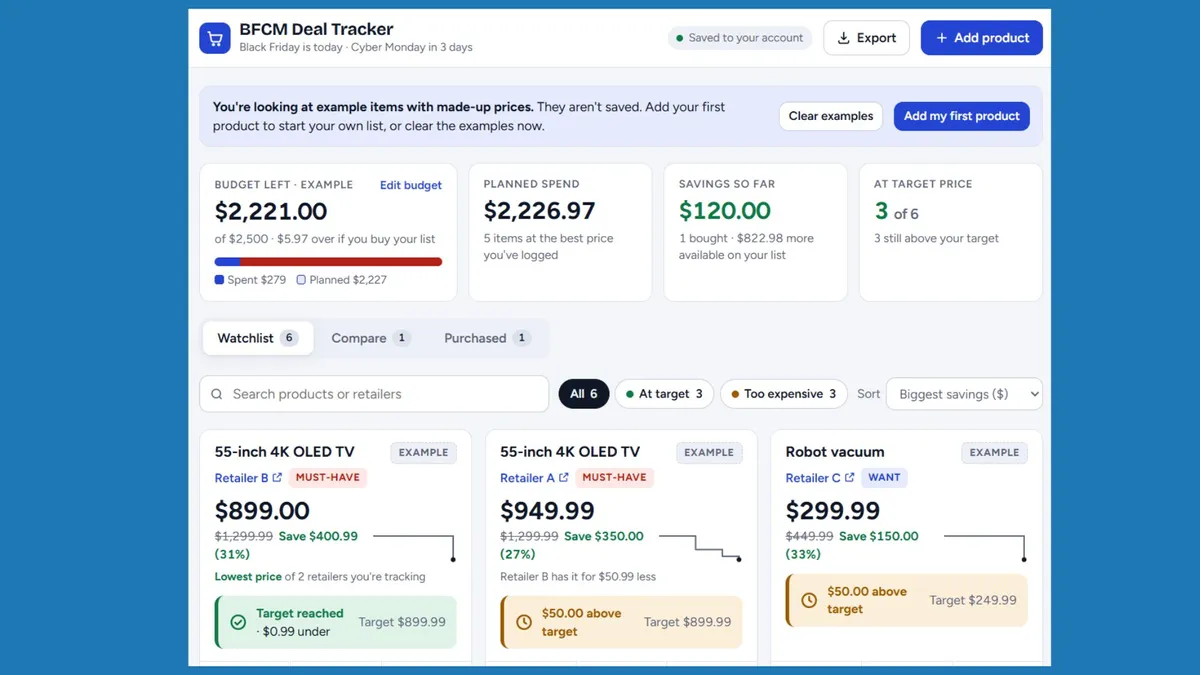
The moment Claude finished building my deal tracker, I could see myself using it.
Instead of presenting me with an empty dashboard, Claude populated the app with sample products, including a 55-inch 4K OLED TV and a robot vacuum. Each listing had a clearly marked "EXAMPLE" label, and a banner across the top explained that the prices were made up and wouldn't be saved.
There was also a button to clear the examples and another to add my first product.
It was a great way to demonstrate what the app could do without breaking my rule about inventing live prices. More importantly, I didn't have to spend time entering a bunch of information just to figure out how everything worked.
My favorite feature was how Claude handled competing retailers. In one example, a TV priced at $899 received a green indicator because it had reached my target price. The same TV at another retailer was listed at $949.99 and flagged in amber. Claude even pointed out that a competing retailer had it for $50.99 less.
Across the top of the dashboard, Claude displayed how much of my budget I had left, how much I planned to spend, my savings so far and how many deals had reached my target price. A progress bar separated money already spent from potential purchases.
There were dedicated tabs for my watchlist, retailer comparisons and completed purchases, along with a search bar, sorting options and an export button. Claude even included miniature price history charts directly on the product cards and displayed a status indicator saying my data was saved to my account.
However, there was one flaw. Because Claude treated competing retailer listings as separate entries, it counted both toward my planned spending total. If I'm comparing the same TV at three different retailers, I obviously don't intend to buy three televisions. I'd need to give Claude a follow-up prompt to fix that calculation before relying on the budget tracker for my holiday shopping.
ChatGPT built a beautiful app, but something was missing
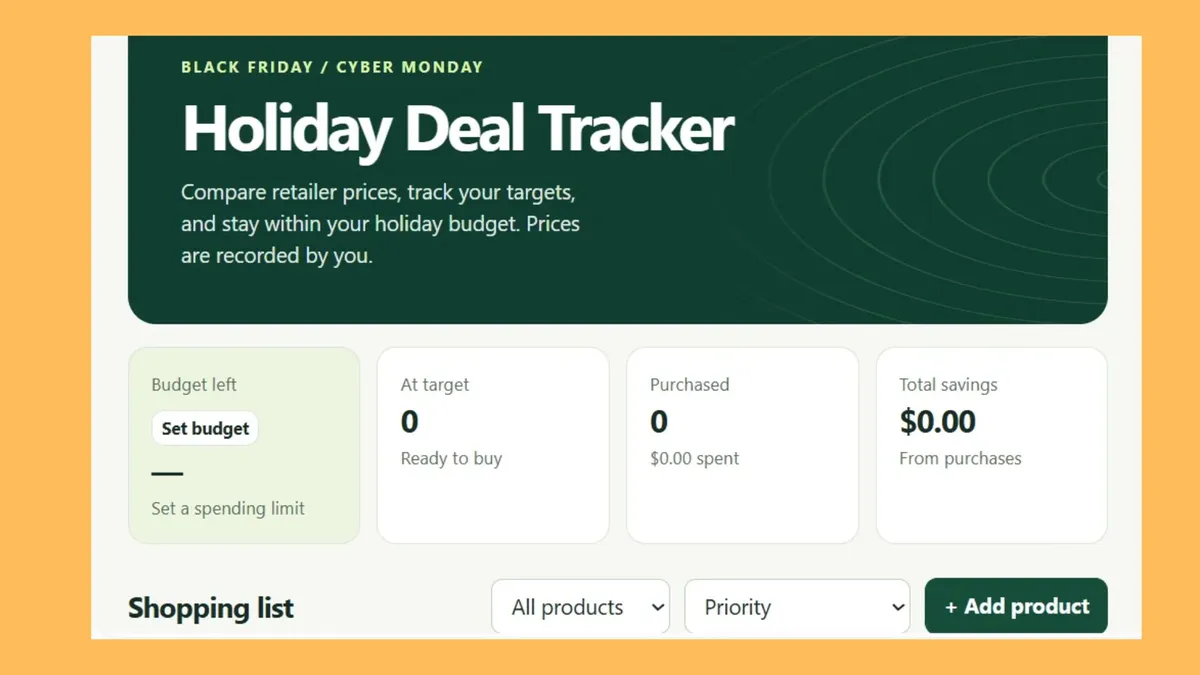
ChatGPT Work took a completely different approach to the same prompt.
Its Holiday Deal Tracker featured a forest-green banner, a warm off-white background and a spacious layout. In terms of visual design, it looked like something a major retailer might build as part of its holiday shopping experience.
But unlike Claude, ChatGPT interpreted my instructions about made-up prices more literally. Every metric on the dashboard started at zero, accompanied by a message explaining that prices were recorded by me.
While I appreciated that ChatGPT respected my instructions, the empty dashboard made it difficult to immediately appreciate what the app could do.
I'd have to enter a product name, retailer URL and several prices before seeing how the various features worked. There was no example of a deal reaching my target price or an illustration of what a retailer comparison would look like.
ChatGPT also took a more minimalist approach to navigation. Below the main dashboard, I had a shopping list, a product filter, a sorting menu and a button to add products.
What I didn't see was a dedicated comparison tab, a search bar or a planned spending calculation like the one Claude included. There was also no immediately visible export button or indication that my shopping list would be saved between sessions.
ChatGPT's approach might appeal to someone who wants a straightforward shopping list without too many numbers competing for their attention. But when I'm juggling multiple deals and retailers, I prefer having that information readily available.
How the two shopping apps compare
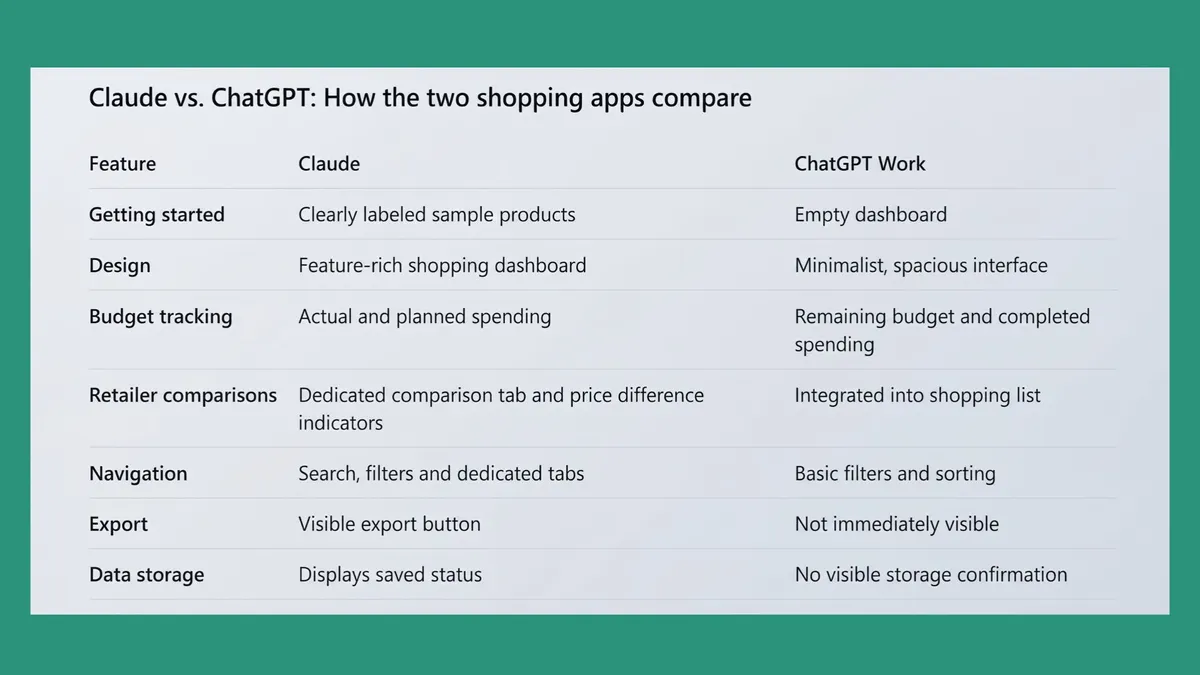
Bottom line: Claude wins
What impressed me most about this experiment wasn't simply that both chatbots could build a shopping app from a single prompt. It was how differently they interpreted what I needed.
ChatGPT built something attractive and approachable, but Claude seemed to better understand how I'd actually shop during Black Friday and Cyber Monday.
Its sample products made it easier to get started, its retailer comparisons helped put discounts into perspective and its planned spending feature offered something particularly useful during the holiday shopping season: a reminder of how quickly those seemingly irresistible deals can add up.
Neither app replaces a dedicated price-tracking service like CamelCamelCamel or Keepa, since I'd still need to manually record price changes. And I'd want to verify that saving and exporting work as advertised before entrusting either app with my entire shopping list.
Still, Claude wins this round. With a few additional prompts to refine its budget calculations, I'd have a personalized holiday shopping app built around my priorities rather than a retailer's.
And considering how much time I usually spend comparing Cyber Monday deals and holiday deals throughout the season, building my own shopping app might be one of the more practical things I've done with AI this year.

Follow Tom's Guide on Google News and add us as a preferred source to get our up-to-date news, analysis, and reviews in your feeds. Subscribe to Tom's Guide on YouTube and follow Tom's Guide Entertainment on TikTok and Instagram.
More from Tom's Guide