
 Club Benefits





I don't use Microsoft Word, but I might have to start trying it. That's because a new audio transcription feature has debuted in Microsoft 365, and it's the kind of thing that will save me (and many others) time and money — and make me wonder when Google Docs will catch up.
Debuting today in Word on the web (as a part of Microsoft 365), this new Transcribe feature allows you to upload audio into Word, and then get a transcript you can immediately drop into your document, one chunk of dialogue at a time.
- Microsoft Surface Duo hands-on: Is the ultimate foldable here?
- Forget Zoom: Microsoft Teams just got a killer feature to beat it
- Find out how to track changes in Word
- Just in: Windows 10 update could kill your SSD — what to do
And if you want to write and edit live, there's a Dictate button for live audio. But for those like myself who capture audio via the iOS Voice Memos app (or any other program) there are some limits to be aware of. Transcribe supports MP3, MP4, WAV and M4A formats and limits you to 200MB uploads.

Microsoft first promised that this feature would be coming to Word on October 2, 2019, in a blog post. Here's a GIF of how it works in action:
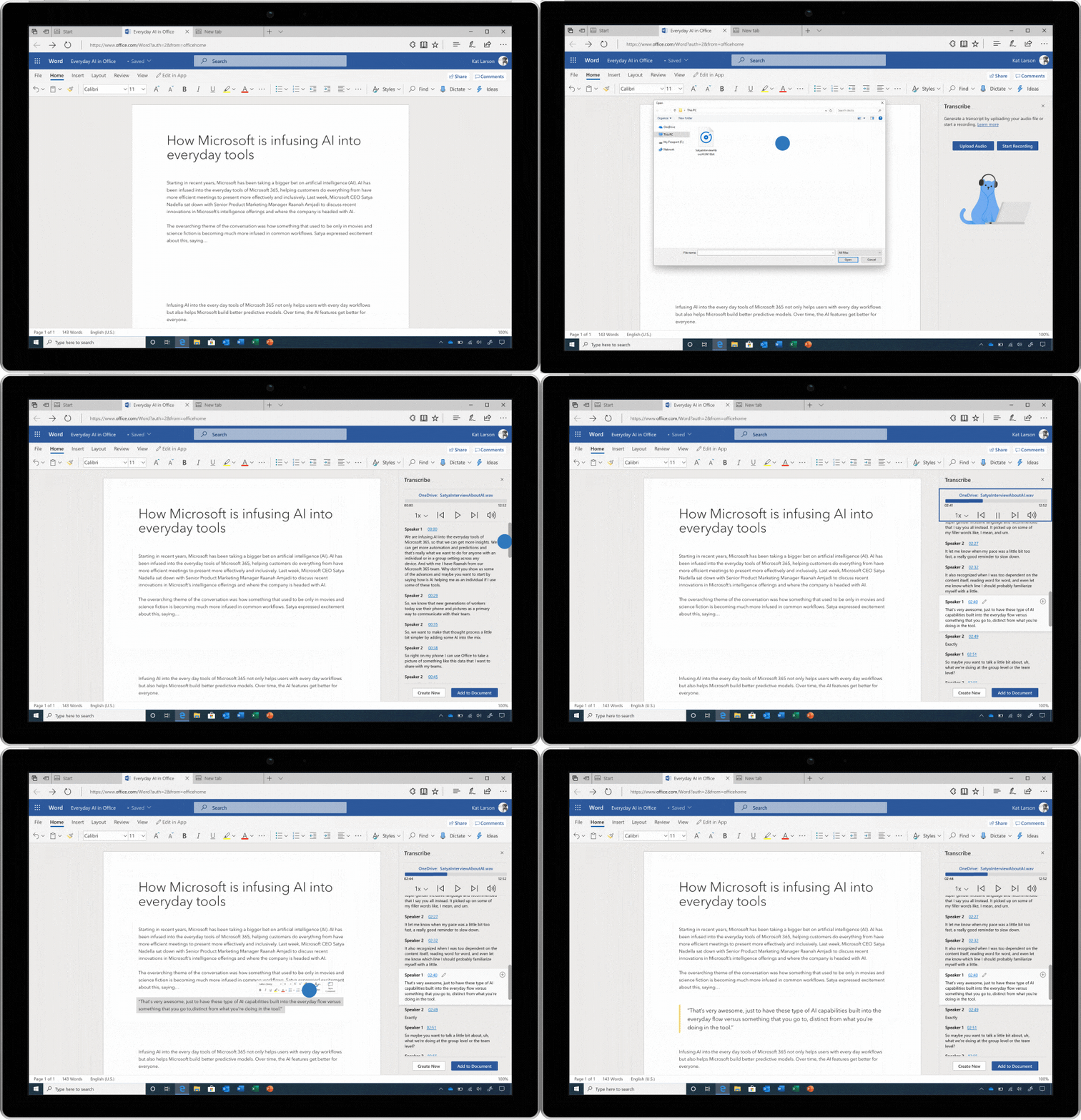
How to use Transcribe in Microsoft Word
Here's how to use Transcribe if it's available in your version of Word:
- Click the Dictate button in the toolbar
- Click Transcribe
- Click Upload Audio
- Find your audio file
- Watch as your text appears
- Drag and drop text from the menu to the document.
Word Transcribe also offers automatic formatting options, so you can insert quotes as pull-quotes. Want to verify Transcribe's accuracy? Click the timestamp next to the text to jump to that part of your audio file.
Tom Warren at The Verge notes that transcription time varies while uploading audio, but text translation works in seconds if done live.
Transcribe only supports English at the moment, and it's due to hit the Android and iOS Word apps later this year. Transcribe was originally slated for "early 2020," with the mobile app support coming in "the spring," so it might be another season before it makes it to other devices.
Personally, if this works as well as it should, I could see myself starting to use Microsoft Word over Google Docs — except Google Docs is free.
Microsoft 365 starts at $6.99 per month, but if you want a free option, Otter.ai has free live transcription and has a $9.99 monthly version that adds uploading. Hopefully Google Docs adds a Transcribe option, which seems like a no-brainer considering how Google Assistant is capable at hearing what you say.

