




With the reveal of the iPhone 17 series, there's been a lot of focus on Apple’s hardware. However, we can’t forget the Apple software, especially since the release of iOS 26 is scheduled for today.
iOS 26 has been called the biggest update coming for Apple in a long time, although to be fair, we heard the same about iOS 18. With that being said, Apple’s latest update is arguably the most radical change iOS's overall look, while also bringing new features and improving some staples.
In the interest of fairness, I will have to admit that I don’t like everything coming with iOS 26. I have some issues with the Liquid Glass design for the home screen, for example. But there are some parts that I am really interested in testing out myself, so let's break down some of my favorite new features coming as part of the iOS 26 update.
Real-time translation will make conversation a breeze wherever you are

It’s becoming something of a trend for modern smartphones to offer translation on their devices and, with the rise of AI, they’re only getting more powerful. The same is true with the iPhone, which is gaining real-time translation across the iPhone's main communication apps.
With iOS 26, whenever you talk to someone via a phone call, FaceTime or on the Messages app, you can activate the translation feature to hear or see the conversation in your native language
This feature extends beyond your phone, too. When used in conjunction with the new AirPods 3, you can have a conversation in person while still hearing the translation in real-time.
Updated Visual Intelligence makes it so much more useful
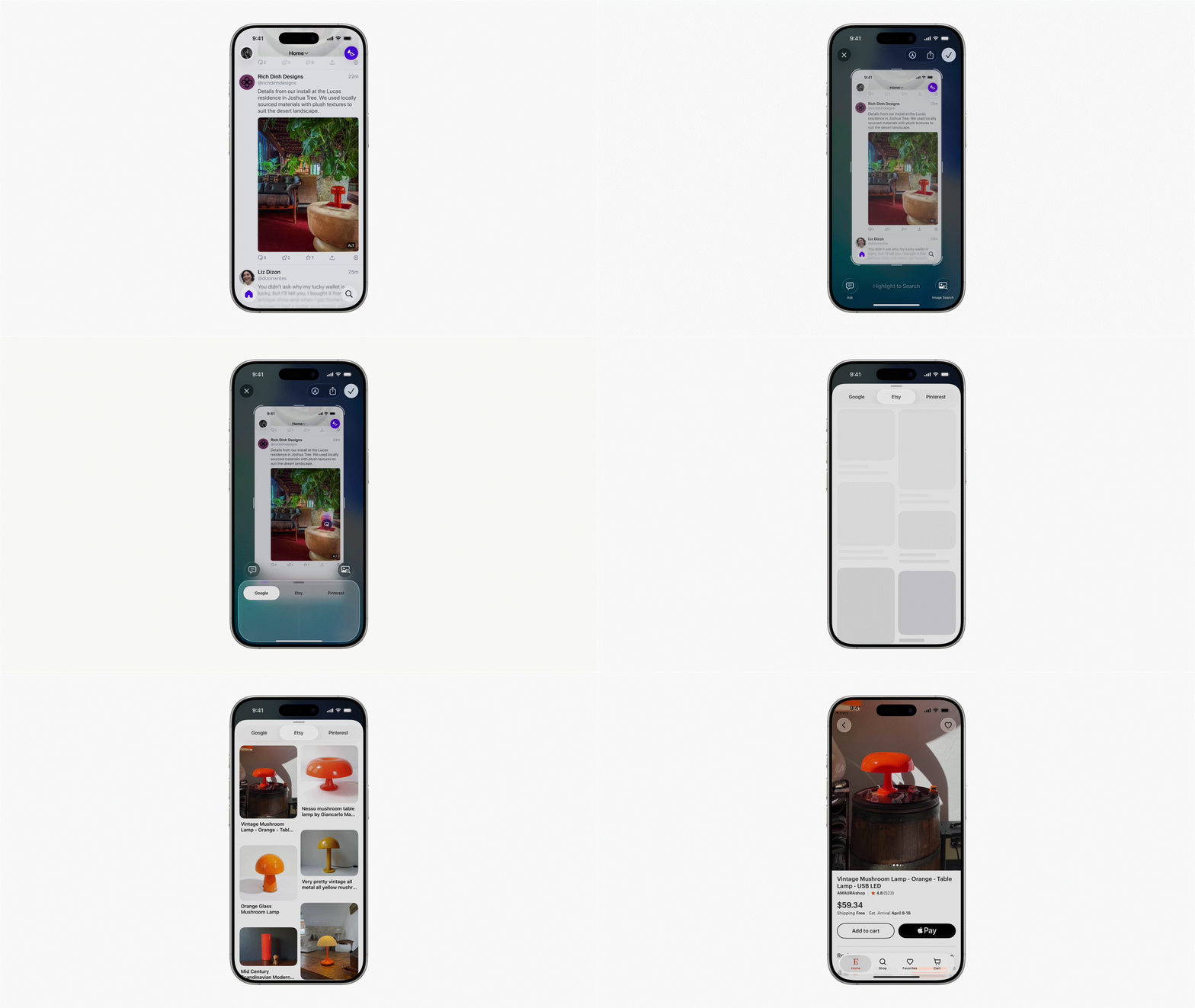
Continuing with the Apple Intelligence thread, iOS 26 also includes updates to Visual Intelligence. When it was introduced with iOS 18, Visual Intelligence enabled users to search using whatever was in view of the iPhone’s camera. The new update expands this by allowing the feature to analyze screenshots, offering a pop-up with several options to look up more information via Google or ChatGPT.
While the current version of Visual Intelligence is certainly useful, it’s limited in what it can do in your day-to-day life. This new version is arguably far more productive — and also means I don’t have to leave the house to find something relevant to take a picture of.
Improved camera app makes getting the best photos simpler

It’s not all about Apple Intelligence though, since iOS 26 also brings some great new changes to the iPhone’s camera app.
When you download the update, the first thing you’ll notice is the cleaner interface, with the only initial options being to switch between photo and video. While this might seem more limited, you can still switch between the different options by swiping left or right on the screen or swiping up to see the settings.
On top of that, the new update also makes it much easier to access the Camera app's settings, many of which have been hidden in the general settings in past versions. Now, you can access features like changing the video resolution, photo formats and more from within the app.
When can I get the iOS 26?

These are only a few of the new features coming for iPhones when iOS 26 releases later today. On that note, we’re expecting the release around 10:00 a.m. Pacific Time/1:00 p.m. Eastern Time.
There are a couple of steps you need to take before downloading the update. Firstly, make sure your phone is on the list of iOS 26-supported devices. Thankfully, it’s a pretty extensive list, with Apple confirming that any device from the iPhone 11 will be capable of downloading the update.
It is also worth noting that many of the new features are AI-focused, so they will only be available on Apple Intelligence-ready devices like the iPhone 15 Pro, iPhone 16 series and the new iPhone 17 series.
Let us know what features you’re excited for when it comes to iOS 26 and what you’re intending to try out first!
Follow Tom's Guide on Google News and add us as a preferred source to get our up-to-date news, analysis, and reviews in your feeds. Make sure to click the Follow button!
More from Tom's Guide
- Apple finally gave the iPhone 17 Pro a vapor chamber — why this upgrade matters
- iPhone 17 marks the end of the 128GB phone era — here's why that's a big deal
- How to stop people snooping through your iPhone by using Guided Access

