I’m not afraid to say it: the Nintendo Switch 2 doesn’t have long enough battery life. I don’t go out and about with my console often, but I hate not being able to rely on its battery life for more than two hours.
I recently tested the Belkin Charging Case for Nintendo Switch 2, and it just about solved the problem of the Nintendo Switch 2’s poor battery life. However, it wasn’t all perfect — so when I heard a Pro version of the case was on the way, I was excited to try it out.
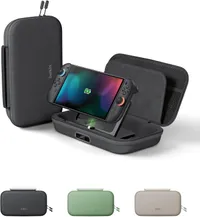
The positives

There are plenty of advantages to choosing the Belkin Charging Case Pro over the regular Charging Case. The biggest upgrade is arguably the faster 30W charging speed — that means less waiting around for your console to charge. The Pro case also feels more durable and I’d be more confident my console would survive an accidental drop in it. And if you’re going to play in tabletop mode frequently, the built-in stand on the power bank is handy.
Another big plus is the fact that you can both charge the power bank, and see how much juice the power bank has left, without opening the case.
Finally, the Nintendo Switch 2 fits better in the new Pro case. Getting it settled in the original Charging Case always felt like a very slight squeeze, but the Pro case has the perfect sink-in fit I look for.
And there are positives that have carried over from the original case, too. The 10,000mAh capacity is the same, and will recharge your console about 1.5 times — that was enough to get me five hours of playtime at minimum. (Nintendo's maximum battery life rating for the Switch 2 is 6.5 hours, so this accessory could extend your total playtime up to a possible 16.25 hours.)
You also get space for 12 game cards, a pouch for accessories, and a hidden AirTag pouch so you can attach a tracker and keep an eye on your console’s location.
The negatives

Unfortunately, my concerns with the original Nintendo Switch 2 Charging Case haven’t really been addressed — in fact, some issues have gotten worse. The Charging Case Pro is still heavy, and it's even bigger than the already bulky non-Pro case. I also thought that the old case was already expensive at $69, and the Pro version costs even more.
It’s most definitely possible to get a 10,000mAh power bank and a regular Switch 2 case for well under $100. So with this product, you’re mainly paying for the convenience of an all-in-one solution. I’m just not sure it’s worth it.
For starters, it doesn’t feel comfortable to use. I struggled to remove my Switch 2 from the power bank — it felt like it got stuck every time. I had to angle the stand to the sweet spot, place the case on a steady surface and pull the console up with both hands to get it out, which was a hassle.
Second of all, every time you put the console in the case, you have to connect it to the power bank. The non-Pro version has a cable you can simply disconnect and stash away if you don’t want to charge your console, which isn't an option here. And there were a couple of times where I noticed the Pro power bank’s percentage was dropping, while not actually charging my console.
Verdict
I’ll be keeping an eye out for sales on the Belkin Charging Case Pro, since it’ll definitely provide better value for money if it drops in price.
In the meantime, I’d recommend it most to gamers on the go who mostly play in tabletop mode, and want an easy way to keep their console charged.

Follow Tom's Guide on Google News and add us as a preferred source to get our up-to-date news, analysis, and reviews in your feeds.