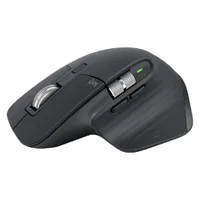
It's day three of Amazon's Prime Day deals, and this one really stood out to me. Right now, the Logitech MX Master 3S is 24% off at Amazon. That means it's just $75 instead of it's usual $99 price, and the cheapest it's ever been.
I reviewed the MX Master 3S and have been using it at work for nearly two years. I also reviewed the MX Master 4, which I still use at home. While there are some notable differences, there's really not much in it. And I'd argue that the MX Master 3S is actually the best mouse of the two for many people. But more on that below.
Regardless, Logi's MX Master series is the elite of productivity mice, and I know many have either the 3S or 4 on their bucket list to buy. Well, now is the time to do so, because the 3S has never been cheaper.
The 3S is better than the 4 for most people
Like I said above, I've reviewed both the MX Master 3S and the newer MX Master 4, and honestly I'd recommend the 3S for most people.
The MX Master 4 features a customizable control ring on the thumb rest, which may be useful for serious productivity users, but is actually more of a hindrance in day-to-day usage. I just hit it accidentally all the time, so I disabled it.

The MX Master 3S features gestures on the thumb rest, so you still have the option for custom commands. The gesture pad positioning is much better, though, making it much harder to accidentally engage in practice.
The biggie for many, though, will be the finish. The MX Master 3S features a soft-touch rubberized finish, while the 4 is hard plastic. Logitech claims this is to increase longevity, which I get, but it's far less comfortable. And besides, I've been using my MX Master 3S virtually non-stop for nearly two years and it's still in excellent shape, with no tears, degradation or deep wear areas in the rubber. Go figure.
Otherwise, these mice are effectively the same. So what does that get you?
Productivity mouse endgame
Productivity mouse endgame, that's what. This thing is awesome. The scroll wheel is absolutely beautiful and changes between ratchet and infinite scroll with a single toggle, so you can zoom down hundreds of lines on a spreadsheet in seconds, before flicking back to ratchet for fine control.

I have my middle mouse button set up to toggle between the two, which brings me onto another awesome feature of the MX Master 3S: how easy it is to customize. Using the Logi Options+ app, you can essentially tweak any feature of the 3S, including the gestures, dual scroll wheels and function buttons.
You can also use the software for adjusting sensitivity, which scales up to 8,000DPI, and you can set two different presets. I have one for work at 2,550DPI and a more sensitive 3,500DPI setting for gaming (8,000DPI is a bit too sensitive for me). And I've assigned the mouse top button to toggle between the two, so I can switch between work and gaming quickly (very important in my job, which involves lots of gaming tests).

Easily my favorite aspect of the MX Master 3S (and the Master 4, for that matter) is how comfortable it is. I have moderately large hands, so I really appreciate the width of the MX Master series. The thumb rest provides plenty of support, while the ergonomic shaping keeps your wrist as a fairly natural angle, while still allowing fast movement for gaming. I also suffer from a type of immuno-arthritis, so it's important to have a mouse that relieves pressure on my wrists... which the MX Master 3S does.
We're tracking all the best Prime Day deals
The Tom's Guide Savings Squad is busy finding the best products for less this Prime Day! Follow Tom's Guide on Google News and add us as a preferred source to get all the latest. Alternatively, you can read our content on the Tom's Guide app available now for iOS and Android.