




Mice aren't particularly exciting. Some might even argue that these rodents that help us do our work or even excel at gaming are boring. You aren't entirely wrong in thinking that. I've tested my fair share of the best mice, and more often than not, they look the same or have the same or similar features. There isn't much that's exciting about rodents.
But what if I told you that I've just tested a mouse that actually does something different? That low-key revolutionizes the world of productivity mice? "That's not possible," I hear you mumble under your breath, but it's true. The Logitech Signature Comfort Plus M850L is unlike any other mouse I've tested, and after having used it for a week, I can't go back to traditional mice.
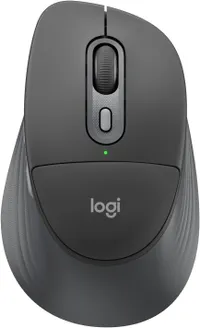
So, what makes the M850L unique? It's got a built-in cushioned palm rest, for starters, and that alone makes it worth the asking price — and it isn't too much, either. The M850L is available for just $49. Forty. Nine. Dollars. And for that money, it feels like the endgame of budget productivity mice. But is the palm rest a gimmick or a stroke of genius? I'm here to answer that question (spoiler alert: it's the latter).
It ain't vertical or a trackball, but it's still super ergonomic

When we talk about ergonomic mice, trackball and vertical rodents spring to mind. The Lenovo Go Wireless Vertical and the Logitech Ergo M575 are great examples of ergonomics done right. The Logitech Signature Comfort Plus M850L doesn't feature a trackball, and it isn't vertical, and yet, it's extremely comfortable. That's thanks to its shape and the aforementioned cushioned palm rest.
The M850L sports a contoured shape with rubber grips running along its length. These rubber grips are soft, so your thumb feels comfortable. The contoured shape also enables your hand to sit more naturally on the mouse. Then you've got the palm rest located behind the left and right click buttons. It's made of durable and squishy material and it's designed to provide some ergonomic relief by reducing pressure on the main part of your palm.

Though I was skeptical when I attended the press briefing, it took just under an hour for me to come around when I started testing the M850L. If you were given a choice between a soft, down feather pillow and a hard rocky surface, you'd choose the former to rest your head on, right? That's what the M850L's palm rest feels like, and I'd choose it over a traditional mouse any day.
Nothing short of a productivity beast

Alongside delivering all-day comfort, the Logitech Signature Comfort Plus M850L is a beast for productivity. If you need a mouse that will enable you to work for hours on end without disturbing your co-workers, and you want to maximize your productivity, this is the one to get.
The M850L is a speedy pointer — as productivity mice go, at least. You can swap between two customizable levels of DPI (up to 4,000) depending on the task you're doing. Its left- and right-click buttons are fitted with silent microswitches designed to reduce noise by up to 90%, so you don't need to worry about disturbing your co-workers.
What I love about the M850L is that Logitech has brought over a vaunted feature from its pricier work-first mice, and that's the SmartWheel. Powered by this technology, the M850L's scroll wheel automatically switches between tactile (ratchet) and super-fast (free-spin) modes based on how fast you're spinning it. This is a game-changer for productivity, as you don't need to waste seconds on manually changing the mode.
Best part? It doesn't break the bank

Given just how excellent the mouse is, you might be thinking the Logitech Signature Comfort Plus M850L is pricey. That couldn't be further from the truth. The M850L is one of the cheapest mice I've ever tested, and you can buy it in Off-White, Graphite or Black for just $49 / £49 at Amazon.
To give you a point of reference, here in the U.K. where I'm based, a cappuccino costs £4, so you can get about 10 coffees for the same price as the M850L. Given the joy coffee brings some people — including myself — I'm confident that the M850L will bring you just as much happiness if not more, especially if you're a sedentary worker.
As someone who spends up to eight hours a day, five days a week, at a desk, I can't overstate the importance of an ergonomic mouse. The M850L is a competent and comfortable mouse, and I love its cushioned palm rest so much that I now wish every productivity-oriented mouse had one. And it's earned the M850L a permanent spot on my desk.

Follow Tom's Guide on Google News and add us as a preferred source to get our up-to-date news, analysis, and reviews in your feeds. Alternatively, you can read our content on the Tom's Guide app available now for iOS and Android. Subscribe to Tom's Guide on YouTube and follow us on TikTok. Finally, you can visit our dedicated Tom's Guide Savings Squad hub for expert help on getting the best products for less.
More from Tom's Guide
- ‘The endgame of budget productivity mice’: I tested the $49 Logitech M850L and its built-in cushioned palm rest delivers unparalleled comfort
- The best wireless mouse in 2026 — tested and reviewed
- Do not buy that 8,000Hz polling rate gaming mouse — I'm not wasting my money again

