We reviewed over 100 laptops in 2025, but for my money there's one that stands head and shoulders above the others. It wasn't the lightest, the fastest or the longest-lasting, but if I had to buy one laptop this year it would be the new Framework Laptop 16.
If you missed my Framework Laptop 16 (2025) review last month, just know that the 2025 edition of the ultra-configurable Framework Laptop 16 has a few notable updates, including the option to outfit one with Nvidia GeForce RTX 5070 laptop graphics cards.
This is the first Framework laptop to be available with an Nvidia GPU, and the upgrade to RTX 50-series power (not to mention access to Nvidia's DLSS upscaling tech) unlocks new heights of power for the Framework Laptop 16.
I love that because the Framework Laptop 16 was already the most customizable gaming laptop you can buy, and now it has the muscle to compete with high-end gaming machines toe-for-toe. Admittedly, there are some aspects of the Framework Laptop 16's design that make it feel less impressive than other gaming notebooks. But after using dozens of systems over the last few years, I think I'd still pick the Framework Laptop 16 over even the best gaming laptops on the market.

Why? I suppose I just love the idea of being able to repair my laptop myself if it breaks. And the Framework Laptop 16 makes it easier to do that than just about any other notebook I've used.
No other laptop company trusts you like this

If you're not familiar, Framework has built a business out of selling laptops that are designed to be (fairly) easy to take apart and rebuild. The company pioneered this approach with its original Framework Laptop 13 a few years back, and in the years since I've seen Framework iterate and improve upon the design in ways that make it even easier to assemble and disassemble these notebooks.
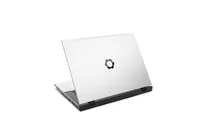
I love that because it means you have the freedom to repair, modify or upgrade your laptop as you see fit. All you need is the screwdriver/spudger tool Framework includes with each laptop and the company's online database of step-by-step repair guides. Admittedly, these laptops are a bit intimidating to open the first few times you do it—but once I got the hang of it I began to feel empowered and gain a real sense of ownership over the hardware.

The fact that this laptop is so accessible and customizable also gives you a bit more breathing room when something like the current RAMaggeddon crisis occurs. Right now everyone is stressing out about whether or not they have enough RAM in their laptops, and I expect laptops with fat stacks of RAM are going to increase in price in 2026 as vendors try to deal with RAM supply shortages.
The fact that this laptop is so accessible and customizable gives you more breathing room when something like the current RAMaggeddon crisis occurs.
Framework has also raised prices on its RAM upgrades and expects to raise prices further in 2026, but the company has committed to not gouging customers for RAM. Plus, the fact that you can swap or upgrade the RAM yourself gives Framework Laptop 16 owners a smidge more freedom during the RAM crisis because you have the option of shopping for deals on DDR5 RAM upgrades from either Framework or third-party RAM makers like Crucial—though you'll want to be careful, as the company has only verified a short list of DRAM sticks as compatible with the Framework Laptop 16.
But that's part of the fun of buying a Framework: you join a community of tinkerers and tech enthusiasts who are committed to taking charge of their device and learning how it works. In the course of reviewing a few Frameworks I've learned a lot about how (and how not) to do things like seat RAM or connect ribbon cables, and I love feeling like I have a decent shot of fixing my laptop if something goes wrong.

Of course, the converse of that is that I think Framework Laptops tend to have issues and errors I don't experience on other, less repairable devices. The Framework Laptop 16's customizable keyboard deck is an amazing invention, for example, but the downside to having a bunch of movable and customizable plates on your keyboard deck seems to be that they sometimes flex or shift under your hands. That has never been a problem for me while working or gaming, but it's certainly disconcerting.
The Framework Laptop 16 holds all the Cards

Finally, I wanted to highlight the fact that the Framework Laptop 16 offers 6 Expansion Card slots on its undercarriage — 3 on either side.
If you're not familiar, the Expansion Card system is unique to Framework Laptops and works like this: you buy Expansion Cards direct from Framework that each contain either a specific port (say, USB-A or Ethernet) or some extra SSD storage (256GB-1TB).
You can then slot these Cards into your laptop at will, allowing you to mix and match the ports and storage you carry with you to suit your day's needs. So while you do need to pay for specific ports up front (since no Framework Laptop comes standard with Expansion Cards) once you buy an Expansion Card you can use it whenever and in whichever slot you please. I'm pretty sure you can also swap Expansion Cards between different models of Framework Laptop, so if you own multiple sizes or models you can use the same stock of Cards between all of them.
This also helps future-proof the Framework Laptop 16 since if new ports or upgraded connection standards come out in 5-10 years you don't need to buy a whole new laptop—you just need to buy a new Expansion Card with the new tech built in.
Bottom line

The same holds true for the Framework Laptop 16 in general: if new tech comes out you don't necessarily need to buy a whole new Framework. You might just need to buy the specific upgrade you want and then install it yourself, which could lead to a future where you own the same Framework Laptop for 10-15 years and it never feels too old or obsolete.
This new 2025 Framework Laptop 16 is the perfect example: Framework made a lot of noise about the fact that this is the first laptop it's shipping with Nvidia GPUs onboard, but the company also worked to make sure the new Nvidia GeForce RTX 5070 Graphics Module that debuted in 2025 is also fully backwards-compatible with the original 2023 Framework Laptop 16.
So Framework Laptop 16 (2023) owners who bought their laptop a year or two ago don't have to ditch it and buy a whole new one to get the latest and greatest — they just have to buy the GeForce RTX 5070 Module and install it on their current laptop.
That's incredible value that no other laptop maker on the planet offers, which is why despite their peccadilloes the Framework Laptop 16 remains my favorite laptop of 2025.

Follow Tom's Guide on Google News and add us as a preferred source to get our up-to-date news, analysis, and reviews in your feeds.
More from Tom's Guide
- Check out our ultimate back-to-school guide
- 5 tips to be more productive in Google Keep
- Windows 10 dies in October — 3 ways to avoid upgrading to Windows 11