Testing Nvidia’s RTX Spark inside laptops for the past month felt like the birth of a different species of computer. Confined to a portable chassis, that local AI prowess and raw horsepower make good sense to turn it into a real everything machine.
But when you rip that N1X out of a laptop, drop it into a desk-bound mini PC like the Asus ProArt GR1X, and slap a price tag of at least $4,499 on it ($6,999 for the 128GB version I’m testing), the entire narrative changes.
Yes, when tethered to a wall, it is faster than its laptop counterpart. But this chip is no longer fighting the MacBook Pro. It is fighting the desktop market — a more ruthlessly powerful space where (in some ways) Nvidia is fighting with itself.

I currently have two 128GB heavyweights on the test bench. In the green corner is the Asus ProArt GR1X, powered by RTX Spark and 128GB of memory. In the red corner is the Geekom A9 Mega, armed with AMD’s Ryzen AI Max 395 and the exact same 128GB memory pool, but priced $3,000 cheaper.
And remember when I said Nvidia is fighting with itself in the desktop space? Well, to prove that point, I also threw my custom-built RTX 5070 Ti desktop into the ring for good measure (a quick foray on PC Part Picker shows that would be around $4,000 cheaper).
I’m going to do two things here:
- Show you the benchmark numbers that matter. Things that matter to the people who would be looking to buy this system. It’s a big investment, so I want to make sure you see the return you’ll get on it!
- Tell you about my life with it. While I’d say RTX Spark makes the most sense to me in a laptop, having it in a mini PC (and always on, most importantly) does unlock the capability to have your own local data center.
Scenario 1: The local agent

The premise
You are buying a 128GB mini PC to act as an always-on, hyper-secure household brain that you don’t pay subscriptions for. You want it to run a local model like Qwen 3.8 Flash via Hermes to autonomously organize your morning emails, scrape the web for news, or bridge with Home Assistant to tell your robot vacuum to clean the kitchen.
Measuring this comes down to two things: Tokens Per Second (TPS), which is how fast the AI types, and Time to First Token (TTFT), which is its reaction time before answering.
The test
I pushed both machines through LM Studio using the Qwen 3.8 27B model on two standard generative tasks and one agentic task.
Benchmark / Task |
Nvidia RTX Spark (Asus ProArt GR1X) |
AMD Ryzen AI Max 395 (Geekom A9 Mega) |
Apollo 17 Writing Test (Speed) |
25.63 Tokens/sec |
20.76 Tokens/sec |
Apollo 17 Writing Test (Reaction) |
0.32 seconds |
1.10 seconds |
Battle of Waterloo Summary (Speed) |
31.11 Tokens/sec |
24.30 Tokens/sec |
Battle of Waterloo Summary (Reaction) |
0.98 seconds |
2.41 seconds |
Agentic Coding Task (Speed) |
30.03 Tokens/sec |
23.77 Tokens/sec |
Agentic Coding Task (Reaction) |
0.55 seconds |
1.26 seconds |
The life

Nvidia’s chip has the reflexes of a driver hitting the apex at Silverstone. That sub-second reaction time makes conversational agents feel incredibly lifelike, and when I turned it into a self-hosted agent that I could talk to from my Telegram app, the end result was something that did the boring morning admin for me while I spoke to my wife on the phone instead.
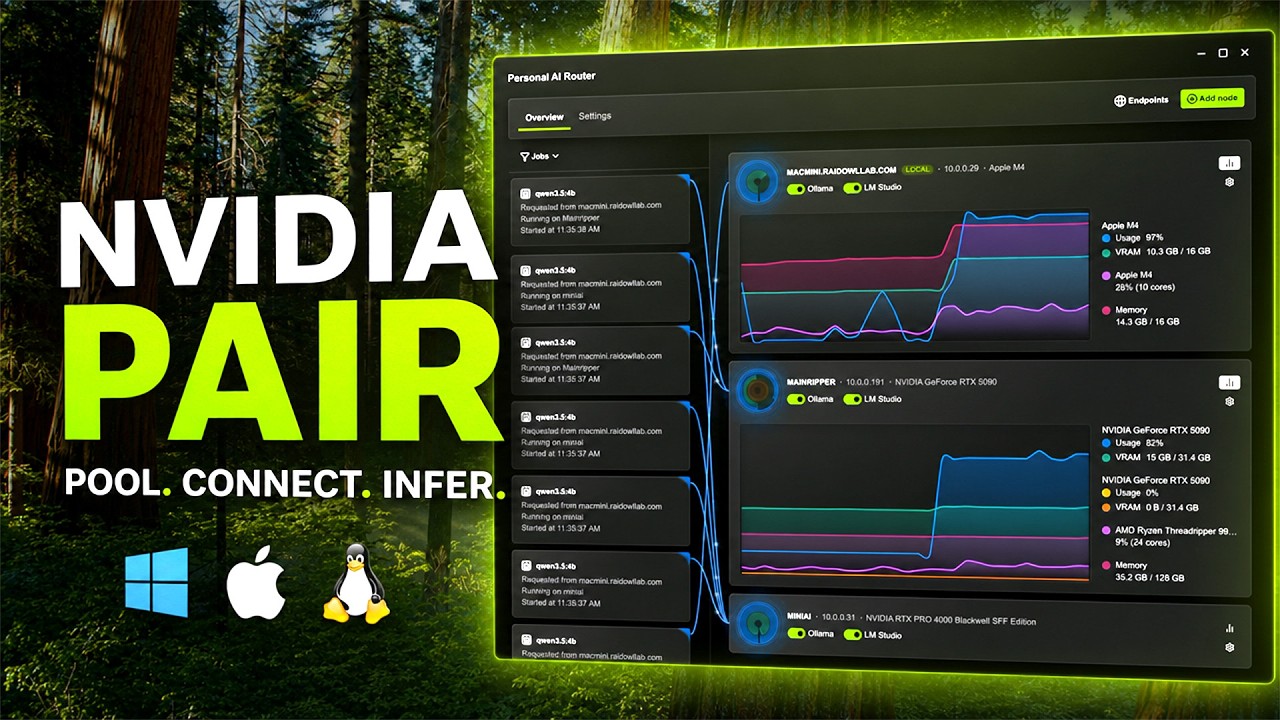
Plus if you tap into Nvidia PAIR, you can use all the supported devices in your home to share AI compute. For example, a prompt on my MacBook Pro fired up the Spark machine for a longer task, while whirring my RTX 5070 Ti desktop into life for a short burst.
Meanwhile, the AMD machine is perfectly capable of this too, but it pauses just long enough for you to notice it clearing its throat. That being said, 24 tokens per second on Geekom is still faster than any human can read.
And as for the desktop PC, this is technically possible but with some caveats (because it treats all your system memory as different pools rather than one giant unified ocean):
- A model works best when stored in the VRAM of a GPU, and a 27-billion-parameter model like the one I’m testing (even when heavily compressed) will take a lot of that 16GB on board the RTX 5070 Ti.
- When the GPU runs out, it has to “offload” the remaining data to your standard RAM, which creates a massive traffic jam and drops that 60+ TPS speed down to a crawl of around 4-5 TPS.
That gaming rig is a Ferrari driving on a 100-foot track — unbelievably fast, but the track (its VRAM) is so short that you can only go so fast before crashing into the wall. The 128GB mini-PCs are freight trains with a lower top speed, but enough space to carry massive cargo (huge models) without ever derailing.
Scenario 2: The creator’s paradox

The premise
My custom RTX 5070 Ti desktop will absolutely smoke these mini PCs in standard graphical tasks. It’s a monster card that consumes more than double the total wattage of the RTX Spark (paying my respects to your electric bill and fan noise compared to the Spark).
But as I mentioned above, standard GPUs are fundamentally bottlenecked by their memory. It may be fast, but it only has the surface area of an airplane tray table. The moment you try to render high-res AI video or compile massive 3D Gaussian splats, the PC runs out of room.
The massive unified memory pool of RTX Spark gives you the surface area of a massive dining room table, swallowing heavy generative workloads whole.
The test
I booted up ComfyUI for local video generation and ran the synthetic Procyon benchmarking suite to measure raw compute overhead.
Benchmark / Task |
Nvidia RTX Spark (Asus ProArt GR1X) |
AMD Ryzen AI Max 395 (Geekom A9 Mega) |
ComfyUI Minimax v3 (Video Gen) |
5 minutes, 2 seconds |
13 minutes, 51 seconds |
Handbrake 4K to 1080p Transcode |
1 hour, 42 minutes |
2 hours, 46 minutes |
Procyon Stable Diffusion XL |
1,834 pts |
673 pts |
Procyon AI Computer Vision |
3,879 pts |
1,284 pts |
Procyon Text Gen (Llama 3.1) |
2,404 pts |
792 pts |
The life

This is an absolute bloodbath. Nvidia’s proprietary Tensor cores and hyper-efficient NVFP4 precision formats completely lap AMD’s Strix Halo. As you can see, Spark generated the exact same ComfyUI video nearly three times faster.
If you are a 3D artist, indie game developer or an ad agency director generating local video assets on a tight deadline, rendering time is literally money. In those professional environments, the Asus ProArt GR1X pays for itself.
Though, quick side note Asus. This is a creator machine — would it have killed you to put an SD card reader on here? For moving photos, I've gotta head back into dongle hell.



But for everyday people like you and me? It comes down to how you feel about all this stuff. Personally, there’s a big difference in my mind between human creativity and getting a typed prompt right to churn out AI stuff.
And while there are improvements on that human side — Adobe Creative Suite is now optimized for RTX Spark, for example — I didn’t really use it for anything beyond my YouTube video intro and some fun experiments with my wife’s doodles.
Scenario 3: The gaming reality check

The premise
You’re paying a massive premium for AI, so it might as well play video games well, too, at the end of the day. I mean, that’s a lot of money — you want this to be a true everything machine.
The test
I ran all the usual 3DMark benchmarks to measure raw, unassisted graphics muscle, and checked the frame rates on key games before and after DLSS.
Hardware |
3DMark Time Spy Extreme Score |
3DMark Speed Way |
3DMark Port Royal |
Custom RTX 5070 Ti PC |
13,358 pts |
7,555 pts |
14,224 pts |
Asus ProArt GR1X (RTX Spark) |
6,524 pts |
3,135 pts |
10,037 pts |
Geekom A9 Mega (Ryzen AI Max 395) |
5,336 pts |
2,042 pts |
6,184 pts |
Game (settings) |
Asus ProArt GR1X (RTX Spark) |
Custom RTX 5070 Ti PC |
Black Myth Wukong (1440p Cinematic NO DLSS) |
30 FPS |
86 FPS |
Cyberpunk 2077 (1440p Ray Tracing Ultra NO DLSS) |
28.29 FPS |
62.11 FPS |
Cyberpunk 2077 (1440p Ray Tracing Ultra DLSS 4.5 Balanced w/ Dynamic Frame Gen) |
120.3 FPS |
225.56 FPS |
The life

In use, it’s nice to have a mini PC that’s capable of gaming in the way that it is. But in the desktop space, this is RTX Spark’s harshest reality check. If gaming is something you care about chiefly over getting stuff done, you know, I know (and Nvidia knows) you should get a gaming PC.
Not to say it doesn’t work brilliantly, because it does. This is a mighty integrated GPU that does smoke AMD, keeping the machine nicely viable for high-end 1440p gaming with all the DLSS support.
But a standard RTX 5070 Ti desktop, which you could easily build (or buy) for half the price of the Asus, doubles the Spark’s native performance.
What I learned

RTX Spark mini PCs, such as the Asus ProArt GR1X, are localized token generators disguised as PCs. It’s not going to be for everyone, so let me help you out here.
If you’re a professional with a well-used AI workflow and big creative demands

RTX Spark is a cheat code. Its power impresses, and the speed gains mean you won’t be spending time twiddling your thumbs waiting for it. And the RTX side of it for gaming makes this a machine you can work on by day and play by night.
If you’re exploring automating your workflow and bypassing cloud API fees with a massive localized brain

AMD power does 80% of what the Nvidia box can do in daily tasks, and it leaves you with a lot more money in your pocket. Of course there’s a speed advantage with Spark, but is it $3,000 of an advantage? That’s up to you.
If you’re only going to be dabbling with AI here and there

If you’ve got the space for an actual desktop, this is going to be the move. Component prices are steep, but even with that in mind, you’ll get better bang for your buck in gaming and short burst AI/creativity work.

Follow Tom's Guide on Google News and add us as a preferred source to get our up-to-date news, analysis, and reviews in your feeds.
More from Tom's Guide
- Apple’s $2,899 MacBook PROLED hides a massive unified memory bottleneck — why I think power users should abandon macOS for Nvidia RTX Spark and AMD Strix Halo
- Is ‘RAMageddon’ a lie? A Judge just denied motion to dismiss RAM price fixing lawsuit, and the new evidence is potentially damning for them (and great for us)
- I tested AMD FSR 4 on the ROG Xbox Ally X20 and Strix Halo — and the performance 'boost' is a total optical illusion