




When a TV, soundbar, streaming device and cable box all have their own controller, a good universal remote can make an entertainment setup far less frustrating. To make your home theater and beyond easy to control, you'll want to invest in the right universal controller — and we've done the hands-on testing to find the ones worth getting.
Options are thinner than they once were following the Logitech Harmony’s exit, the previous gold standard of universal remotes. However, there are still great options to use, and you'll find many controllers come from SofaBaton. If you're looking for a do-it-all remote, that's our go-to recommendation.
Right now, the SofaBaton X2 is our top pick for its premium design, colour touchscreen and broad device support. But for a more value-friendly remote, the SofaBaton X1S is our favorite choice for the amount of features it offers. Can't be bothered with buttons? You'll want to consider the still-impressive Amazon Fire TV Cube.
Wondering if it's still worth buying a universal remote? Or whether you should use your phone as a universal controller? I've got you covered below. For more in-depth reviews and our expert advice, this guide will help you find the universal remote to suit your home media system.
The best universal remotes you can buy today
Why you can trust Tom's Guide Our writers and editors spend hours analyzing and reviewing products, services, and apps to help find what's best for you. Find out more about how we test, analyze, and rate.
The best universal remote overall


The SofaBaton X2 has taken over as the best universal remote you can get today, with its plentiful connectivity, premium aluminum body and ease of use (once it's properly set up) making it a treat to control your whole entertainment setup. It feels satisfyingly heftier than the SofaBaton X1S, and the charging cradle means this will never run out of battery. On the practical side, the X2’s battery lasts three to four weeks between charges anyway.
Compatibility is a real highlight: the X2 can control up to 50 devices and supports a wide range of protocols, including Bluetooth, infrared, Wi-Fi, and RF433/RF315. For anyone trying to consolidate a living room full of TVs, streamers, and sound systems, the breadth of supported hardware is genuinely confidence-inspiring.
Smart home and assistant integration has improved, too. The X2 works with Alexa and Google Home, and now lets you control Sonos, Roku, and Philips Hue directly. You can even tie it into Home Assistant via MQTT for more advanced setups. That said, if you’re coming from a Logitech Harmony, you may find the polish on smart home controls isn’t quite as seamless.
The setup process is where the X2 stumbles most. It took our tester, Mike, about 45 minutes to pair all my devices and create activities, which is an improvement in clarity over previous generations, but it’s far from plug-and-play. If you’re hoping for a quick five-minute setup, this isn’t it.
Once in daily use, though, the remote feels great to use: all controls are backlit for easy nighttime navigation, but the two main touch-sensitive buttons just below the touchscreen aren’t illuminated, making them tricky to find in the dark.
For those who want broad compatibility, a traditional remote feel and a high-end look, the X2 is the most capable universal remote we've tested, making it worth shopping for.
- Read our full SofaBaton X2 review
The best value universal remote
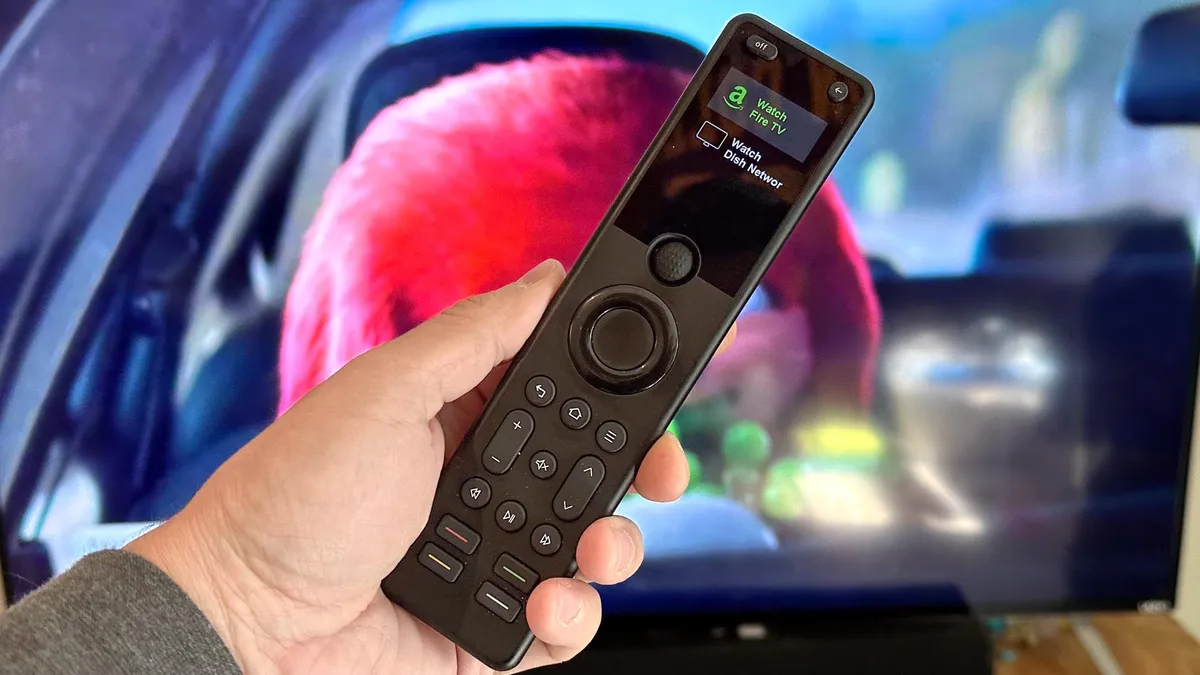

Another SofaBaton, but this time, more affordable. The SofaBaton X1S still stands out as the best value for anyone who wants a universal remote that can control up to 60 devices and is noticeably easier to set up than earlier models. The improved setup process made getting everything working much less of a headache, which is a huge win if you’re trying to avoid hours of configuration frustration.
You get broad compatibility, as the X1S supports Wi-Fi, Bluetooth, and classic Infrared connections, so it works with a typical mix of TVs, streaming boxes, soundbars and game consoles without extra adapters. The built-in rechargeable battery charges via USB-C, which keeps things simple and takes out the need to hunt for AAA batteries lying around the house.
Smart home controls are here, too, and you can link the X1S to Alexa or Google, but its integration is limited. You can only control basic functions, and more advanced features like dimming lights or changing colors aren’t possible here. On the plus side, the mobile app (iOS and Android) makes programming and tweaking device settings much easier than remotes that force you to use tiny onboard screens.
Again, our tester, Mike, had everything sorted within about 30 to 45 minutes, so it will take time. But once set up, it feels a bit snappier when sending commands than older SofaBaton models. Otherwise The X1S is a reliable, everyday universal remote at a fair price.
- Read our full Sofabaton X1S review
Best voice control universal remote

If you have limited mobility, then you're going to need a universal remote that you can control with just your voice. While it isn't perfect, the Amazon Fire TV Cube packs both one of the best streaming devices and Alexa into a single package, so you can use Amazon's assistant to not only look up shows and programs you want to watch, but also control your TV, cable box, switch HDMI inputs and more.
Of course, Amazon Fire TV sticks have become a popular, more affordable alternative, and the best smart home hubs deliver control over devices via voice control, too. But despite its age, the Fire TV Cube is still an excellent choice, as it's still one of the most capable streaming devices around.
As with most Alexa smart speakers, we found that the Fire TV Cube is generally very quick to respond to our queries, and it's good for more than just watching TV, as you can use it to ask about the weather, control your smart home devices, make phone calls and much more.
Plus, as a streaming device, it offers an excellent 4K HDR image and fast response times. The Fire TV interface could use some improvement, but it gives you access to just about all the best streaming services you could want. It also comes with a physical remote, but you can't use it to replicate everything you can do with your voice.
- Read our full Amazon Fire TV Cube review
Also tested
While you won't see too many universal remotes these days, the ones we've tested before are still available today (except for the discontinued Logitech Harmony Elite). So, if you're looking for more options, check out our thoughts below.
Meet our tester

Michael A. Prospero is the U.S. Editor-in-Chief for Tom’s Guide. In his spare time, he tests out the latest drones, electric scooters, and smart home gadgets, including universal remotes. Before his tenure at Tom's Guide, he was the Reviews Editor for Laptop Magazine, a reporter at Fast Company, the Times of Trenton, and, many eons back, an intern at George magazine.
Best Universal Remote: Frequently Asked Questions

Are universal remotes still worth buying?
Universal remotes are still worth buying if you use several home-entertainment devices and want to replace multiple controllers with one. They are most useful for systems combining a TV, soundbar or AV receiver, cable box and streaming device, especially when you want one-button activities that set the right power and input states.
What about HDMI-CEC (Consumer Electronics Control)? HDMI-CEC means a TV’s own remote can now handle basic control of some connected gear, so a separate remote may not be necessary for a simple setup. A universal remote remains the better fit when CEC is unreliable, you have older components or you need broader control options.
Can I use my phone as a universal remote?
Yes, your iPhone or Android phone can act as a universal remote for multiple devices, like smart TVs, sound bars, streaming devices and more. Many universal remote apps on Apple's App Store and the Google Play Store can turn your phone into a universal remote control, linking to many supported devices. You can also use Apple's own Remote app to control devices like an Apple TV.
Depending on the app, they can come with ads and can be unreliable, and some you may have to pay for. If you'd prefer to have a separate device so you don't have to keep digging out your phone to connect to devices, a universal smart remote is still a great choice.
What devices can a universal remote control?
A universal remote can typically control a TV, soundbar, AV receiver, cable or satellite box and compatible streaming device. Many remotes use infrared for TVs and other traditional AV equipment, while more advanced models can also use Bluetooth, Wi-Fi or RF (Radio Frequency) to reach a wider range of devices.
The exact number and type of devices supported vary by model. For example, SofaBaton X2 supports Bluetooth, infrared, Wi-Fi and RF with up to 50 devices, while the lower-cost SofaBaton U2 controls up to 15 devices. Before buying, it's best to check every device you want to use, then see whether the remote supports each specific device.
Do universal remotes work with streaming devices such as Roku, Fire TV and Apple TV?
Some universal remotes work with Roku, Fire TV and Apple TV devices, but support depends on the remote and the streaming device. Traditional infrared control may be enough for some hardware, whereas devices such as an Amazon Fire TV Stick can require Bluetooth support.
SofaBaton remotes work with all major streaming devices, so the SofaBaton X2 and SofaBaton X1S won't have any problems. Of course, the Fire TV Cube also works with streaming platforms like Prime Video, too. Either way, check the remote maker’s compatibility for your exact streaming player before buying, and confirm that it can control functions such as power, volume, navigation and input switching.
How to choose the best universal remote

Here are some factors you'll want to consider when buying a universal remote.
- Ergonomics and design: Generally, most universal remotes should feel comfortable to hold. I also prefer universal remotes with physical, backlit buttons, which makes them easier to see and feel in a darkened room.
- How many devices can it control? Depending on the price and complexity of the remote, you may be able to control dozens of devices, or only a few. It's good to take stock of everything you want to control before making a purchase.
- Replaceable vs. rechargeable battery: This isn't a huge consideration, but if you have a remote that takes AA or AAA batteries, you'll need to replace them every so often.
- Infrared vs. Bluetooth: More advanced universal remotes will have both infrared (IR) and Bluetooth transmitters; most devices, like your TV, will use IR, but some of the best streaming devices, like the Amazon Fire TV stick, require a Bluetooth connection.
- Does it have a hub? Some remotes, like the SofaBaton U2 and the Logitech Harmony Elite, communicate with a Wi-Fi-connected hub, which then sends commands to your entertainment system. This has two advantages: It lets you hide your A/V system away so you don't see wires, and it also enables you to control smart home devices linked to your network.
How we test the best universal remotes

To test universal remotes, we set them up in a home entertainment system and connect them to several streaming devices (an Apple TV, Amazon Fire TV Cube, Roku Stick) as well as a Dish TV receiver and a soundbar.
We look to see how easy things are to set up — programming a universal remote is often the hardest part of any of these systems — and once everything is up and running, see how quickly and accurately the remote can send commands to all devices. If the universal remote can also control smart home devices, I'll link them up as well to see how it can handle all the other gadgets in my home.
I also take into consideration the feel of the remote in my hands, as well as the ease with which I can reach all the buttons and see them in a dark room.

