I lived every tech owner’s worst nightmare — my phone suddenly stopped charging. My OnePlus phone suddenly developed an issue with its charging port, meaning it would either charge at a snail’s pace or not at all. I was distraught, until I realized I could fix the problem with a wireless charger.
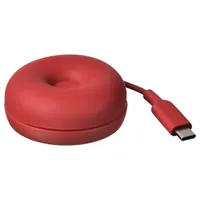
Enter the VÄSTMÄRKE Wireless Charger for $9.99 at IKEA. It supports Qi 2.0 devices and also has a USB-C cable that tucks away into the unit.
The charging port is one of the more vulnerable points of modern smartphones, especially since most of us plug and unplug our phones multiple times a day. Using a wireless charger can keep your charging port intact, meaning you’ll be able to hold onto your phone for longer before the port becomes damaged — and keep using your phone if the charging port gives up entirely.
The IKEA VÄSTMÄRKE costs less than $10, but it’s a seriously nifty gadget with a surprising amount of smarts packed into it. It snaps onto the back of your phone via the magnets in newer iPhones and Samsung phones. While your phone is charging, the VÄSTMÄRKE acts like a phone grip or pop socket — making your phone more comfortable to hold. And when you’re done using it, you can wind up your wireless charger’s cable and tuck it under the VÄSTMÄRKE’s silicone top layer, keeping it tidy and protected.
Even though I already own a wireless charger, I’m still considering picking this one from IKEA as a backup. After all, if my current one breaks, I’ll be stuck with an unchargeable phone again!
Shop more of today's best deals
- Amazon: save on Ninja, Echo, Dyson, more
- Skechers sneakers: from $16 @ Amazon
- Lego: deals from $7 @ Amazon
- Lululemon: top picks from $9
- Carhartt apparel: deals from $14
- REI: half-off Arc'teryx, Patagonia and more
- Hoka: sneakers from $99
- Nike: apparel/sneakers from $7
- TV sale: deals from $59 @ Best Buy
- Dell: monitors from $69, laptops from $299