After spending the last five years testing the best office chairs, I decided to mix things up by going completely chair-free for a week. While I missed the comfort and full-body support of my ergonomic office chair, I found myself moving a whole lot more, which is exactly the kind of thing you need to break up your workday.
Although you can do something similar with one of the best standing desks by switching between sitting and standing, you might not be ready — or even want — to swap out your current desk. Plus, given a good entry-level, dual-motor standing desk costs around $500, that’s a big investment if you just want to be a bit more active while working.
To that end, I decided to try out three active chairs for a week to see how well they supported my body and my workload. Unlike a traditional seat, active chairs encourage small, continuous movements and micro-adjustments throughout the day. Not only does this keep your core engaged and improve circulation, but it can also sharpen your focus and help fight off mid-day drowsiness.
Here’s what it was like ditching my office chair for a wobble stool, a saddle stool, and a kneeling chair. While this experiment was originally supposed to last just a week, it’s now been two — and of these three active chairs, I’ve found one I’m sticking with long term.
Bended knees, better posture?

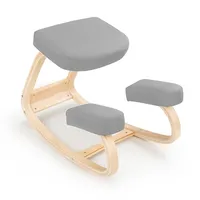
As the oddball of the bunch, I decided to try out the kneeling chair first. Although this design was invented in the late ’70s and first rose to prominence in the ’80s, it’s seen a massive resurgence recently as more people work from home and look for alternatives to traditional office chairs. Even as someone well versed in home office furniture, it took me a few minutes to figure out how to sit on it properly.
With a kneeling chair, you sit on the top cushion while your shins rest on the two smaller pads below. Doing so drops your thighs from the standard 90° angle of an office chair down to a 60° or 70° angle. This shifts part of your body weight onto your shins rather than dumping all of it onto your tailbone, which helps reduce lower back pressure and prevents slouching in the process.

I learned the hard way what happens when you slouch on a kneeling chair: doing so absolutely kills your shins. After that painful lesson, I made a conscious effort to push my glutes back, straighten up the small of my back, and use the balls of my feet to keep the rest of my posture accountable. This made working in the chair a whole lot more comfortable, though I found myself focusing just as much on my posture as I did on the task at hand.
Many kneeling chairs feature a curved wooden base like the model I tested. This made sitting upright easier while allowing me to rock back and forth to burn off extra energy— a fun mental reset whenever my work got tedious.
While I had hoped the kneeling chair would be my favorite, it didn’t quite live up to the hype for me. Still, if you struggle with lower back pressure and want an active way to force better alignment, it could be the right alternative seat for you.
Constant motion, fixed focus?

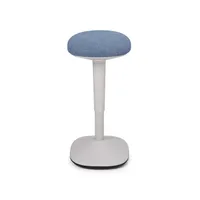
If you’ve ever seen someone sitting on an exercise ball at work, a wobble stool is the more professional (and much safer) alternative. While the kneeling chair gives you some limited movement, a wobble stool is designed to keep you moving continuously. It features a rounded, weighted base that tilts, swivels, and sways a full 360° — for better or worse.
A word of warning, though: a wobble stool is best paired with a standing desk, as they typically have a higher starting height than a traditional office chair. For instance, with the Secretlab Magnus Evo standing desk I used for testing, I had to raise the desktop up to 33 inches just to use the wobble stool comfortably.
Since you have to engage your core, lower back, and leg muscles to stay balanced, using one is a lot more physically taxing than a kneeling chair. If you’re wondering how wobble stools made the jump into home offices, they actually grew out of physical therapy and sensory education in the early 2000s. They are frequently recommended for people with ADHD or high energy, as the continuous micro-movements help channel extra energy into better mental focus.

Once I got my desk raised to a height where my forearms and monitor were in an ergonomic position, using the wobble stool felt far more natural to me than the kneeling chair. I really liked being able to rock back and forth or sway side to side for quick breaks while typing. I also found the weighted base to be a surprisingly comfortable spot to rest my feet, even if maintaining an upright, backless posture required more core stamina while doing so.
The wobble stool wasn't without its flaws, though. My rear got sore after prolonged stretches, forcing me to take a break every 40 minutes to an hour. Then again, taking routine breaks is something we should all be doing at our desks anyway, and after a quick stretch, I was ready to jump right back on. I also loved its space-saving footprint — it slid right under my desk out of the way and was light enough to move around my office effortlessly.
Saddle posture, perfect perch?

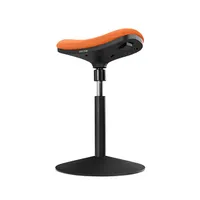
Although it’s a single seat, what makes a saddle stool like this one stand out is that there are actually two ways to sit on it: like you're riding a horse or in a perching position. While this makes it the most versatile option of the bunch, you do lose out on some of the dynamic motion you get with a kneeling chair or a wobble stool.
Just like those other alternative seats, the saddle stool has an interesting history. Back in the 1970s, a doctor noticed that equestrians didn’t suffer from the same back pain that office workers routinely deal with. However, it wasn’t until 20 years later that saddle stools became the gold standard for dentists, surgeons, and others in the medical field who need high mobility without a bulky office chair.
When using one of these chairs in its default saddle position, your spine is instantly aligned, which prevents slouching or rounding your lower back. Sitting astride the cushion automatically tilts your pelvis forward, locking your spine into a natural S-curve without needing a backrest. Like the wobble stool, though, you’ll need an adjustable desk since you have to raise your desktop higher to accommodate its taller height. When used in a perched position, a saddle stool offers more rear cushioning, but you have to engage your core and back muscles to sit upright with good posture.

Although I initially tried using this saddle stool as intended, I quickly switched to a perched position to give my glutes extra support. This turned out to be surprisingly taxing on the rest of my body. Even though I wasn’t in constant motion like I was on the wobble stool, making a conscious effort to keep my core engaged and stay upright wore me out fast.
When I swung the seat back around into the saddle position, everything clicked. Sure, my rear wasn’t quite as cushioned, but with my spine locked into a natural S-curve, the whole experience felt much more comfortable overall — mainly because I didn't have to strain so hard to maintain good posture. As for movement, saddle stools do offer some range of motion, but it is noticeably more limited. While I couldn’t sway side to side, I could rock back and forth ever so slightly. Still, the saddle stool’s instant posture fix more than made up for its subtle motion.
Wobbling won me over

When I first set out to conduct this experiment, I really thought the kneeling chair was going to be my top pick. Of the three, it looked the most comfortable and I had seen it getting the most attention online. On the other hand, I actually built and tried the saddle stool first, so I was already familiar with its design and limitations, though I hadn’t spent much time using it as my daily driver.
The wobble stool surprised me the most. Its seat is very traditional — we’ve all sat on similarly shaped stools before — but what really won me over was the total freedom of moving in a full 360-degree circle. When I was deep in focus on my screen, I could lean all the way forward without tweaking levers or knobs like I would on a standard office chair. Then, when I needed to sit back and look at the big picture, I could lean all the way back just as easily. That complete flexibility of movement felt incredibly freeing for someone tethered to a desk all day.
As you might have guessed, the wobble stool takes the top spot. I don’t plan on completely ditching my office chair now that this week-long experiment has stretched into week two, but I’m certainly not done with the wobble stool either. Thanks to its compact footprint, I plan to keep it stored right under my desk so I can pull it out to break up the day between sitting and standing.
These were the three alternative seats I had on hand after Uplift Desk sent them over for testing. If there’s an active chair you swear by or one you’d like to see me try next, let me know in the comments below.
As for me, I think it’s finally time to wheel the next ergonomic chair into my home office and give my core a well-deserved break.

Follow Tom's Guide on Google News and add us as a preferred source to get our up-to-date news, analysis, and reviews in your feeds. Subscribe to Tom's Guide on YouTube and follow us on TikTok.
More from Tom’s Guide