As someone who reviews the best cameras and the best drones on the regular, I'm no stranger to massive files that eat into my laptop's small storage. Whenever I review a camera or drone that records 6K or 8K video, my laptop shakes in its boots. Testing a 100MP medium-format camera that captures RAW files over 200MB each, like the Fujifilm GFX100RF? A tear falls down my laptop's lid.
I know what you're thinking. "Just get an external SSD!" And you'd be right in suggesting that. Thankfully, as part of my job, I get to test all kinds of cool gadgets — and I think I've just tested one of the coolest digital storage systems, or Direct-Attached Storage more commonly known as DAS, (a lot of) money can buy right now. The Seagate LaCie 8big Pro5 is certainly big and definitely designed for pros — and it's got a hefty price to match.
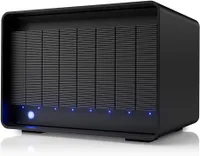
So, what exactly is the LaCie 8big Pro5? Well, it's a high-capacity DAS system featuring eight hot-swappable bays that house IronWolf Pro hard drives of varying capacities depending on the model you buy. The cheapest you can get is the 32TB model ($6,812), while the most expensive is the 256TB model, which costs a whopping $14,259. The LaCie 8big Pro5 is designed for professional creative workflows, video production, and broadcast environments requiring real-time editing of 4K, 6K or 8K footage.
Or for anyone who really, really needs the storage and doesn't mind splurging on it. I've spent a couple of weeks testing and using the LaCie 8big Pro5 and I'm impressed. It makes me feel like I'll never need storage again for generations. Here are three things I like about it and two I don't.
What I like
Tank-like and hot-swappable design

When the Seagate LaCie 8big Pro5 arrived at my office and I tried to lift up the cardboard box, I was afraid I was going to pull my back out. That's because the LaCie 8big Pro is built like a tank. This thing is a beast, made of sturdy, solid, single-piece aluminum with a metallic gray finish. I'm certain it could stand the test of time and you'd find it, intact, under the rubble of a demolished building in the post-apocalyptic world.


The LaCie 8big Pro5 is a chunky DAS, measuring 11.69 x 9.13 x 8.46 inches and weighing a whopping 31.59lbs. To make moving it around easier, it features an integrated carrying handle on the top. I highly doubt you'd be doing much traveling with it, though. But hey, if you lifted this thing two or three times, you could probably skip arm day at the gym.
This DAS is hot-swappable, too. Now, as someone who tests the best mechanical keyboards day in and out, I could kind of gauge what 'hot-swappable' meant in this context. On a keyboard, it means that you can change the switches by simply popping them out and not having to de- and re-solder them to the PCB. It's a similar concept on the LaCie 8big Pro5. You can essentially remove and replace the eight individual hard drives while the storage system remains powered on and running, and your projects and data transfers keep running on the remaining active drives.


I also love the LaCie 8big Pro5's Redundancy Protection. When using a fault-tolerant RAID mode, like RAID 5 or RAID 6, the system uses parity data to keep your files safe while a broken drive is missing.
You needn't worry about manually getting a replacement drive up and running either, as LaCie RAID Manager automatically rebuilds the data array for you. As someone who's a newbie to this stuff, I appreciate that I don't have to wrap my head around a plethora of technical terms — the software does it for me.
Ridiculous read and write speeds

A storage system that's designed to aid creative workflows wouldn't mean much if it didn't boast fast read and write speeds — and thankfully, the Seagate LaCie 8big Pro5 does just that. I ran a disk speed test using CrystalDiskMark and the numbers speak for themselves. Read and write speeds are more dependant on the hard drives themselves, rather than the enclosure, and I tested the LaCie 8big Pro5 with Seagate IronWolf Pro 24TB Enterprise NAS HDDs ($859 each).

As you can see from the screenshot above, the LaCie 8big Pro5 boasts 2,928MBps read and 1,687MBps write speeds (Q8T1). These are great for copying movies, video files, or gargantuan RAW images. The 2,387MBps read and 1,572MBps write speeds in Q1T1 represent standard real-world transfer speeds when copying single large files one at a time.
These numbers basically tell you that the LaCie 8big Pro5 is healthy and operating at high speeds, and the DAS delivers fast boot times, rapid game load screens, and smooth handling of heavy file transfers. Overall, the LaCie 8big Pro5 performs formidably and proves its worth in complex workflows.
Doubles as a charger!

I don't know about you but I really don't like multiple cables cluttering my desk and making my setup look messy. A good cable management solution is a dock, and the Seagate LaCie 8big Pro5's got one built it in — it's a DAS that essentially doubles as a charger.
Located on the back are four USB-C ports. One of these is a Thunderbolt 5 port with 140W of power delivery, so you can power your Windows laptop or MacBook without an dedicated charger. There are also two downstream ports for connecting external displays (up to two 8K monitors) or daisy-chaining additional Thunderbolt devices with up to 30W PD per port.
The last is a downstream USB 3.2 Gen 2 port with speeds up to 20Gbps and 15W PD, and it's meant for your peripherals, like mice and keyboards. The 20Gbps speed is excellent as it made quick work of transferring big 4K video files from the Sony RX10 V. The LaCie 8big Pro5 basically packs everything you could ask for to maintain a neat and tidy setup.
What I don't like
The eye-watering price tag

Direct-Attached Storage systems don't come cheap, and the same goes for the Seagate LaCie 8big Pro5. Given that this DAS is designed for creative professionals, film studios, and perhaps game developers, it's no surprise that it costs an arm and a leg. Given that, it would be unfair to mark it down for the premium price tag, but it's worth pointing out anyway.
The LaCie 8big Pro5 starts at $6,812 for the 32TB model and goes up to $14,259 for the 256TB model. I'll give you a moment to take it in. If you want a breakdown of all the models, I've done the homework for you:
Yep, it's a lot. When I showed this table to my coworker and fellow senior reviews writer, Erin, she exclaimed over Slack, "You could buy ALMOST FIVE of my cars for that. That's 4.6 2012 Volkswagen Polos for £14,000. And my old car? You could get FORTY SIX 2007 Fiat Pandas for £14K."
Thankfully, though, should something go wrong with your LaCie 8big Pro5, Seagate happily offers a 5-year warranty and Rescue Data Recovery services (but it isn't available in all countries).
E-waste, anyone?

This might be a minor complaint and it might not matter to many people — but it does to me. The Seagate LaCie 8big Pro5 comes with not one, not two, not three, but four power cords for various international standards. I can kind of understand why that is. If you work for a film studio and are constantly lugging hard drives and storage units on planes or other modes of transport, perhaps you'd need — not one, not two, not three — four international power cables.
I, personally, find it a little frustrating, as most people will end up using just one power cord — as I did the U.K. one in my testing — and will probably get rid of the other three. These will then end up as e-waste in a landfill somewhere. As an environmentally-conscious person who tries to do her part to save the planet, it's annoying. I wish Seagate gave you the option to pick the power cords you needed most at checkout.
Looking ahead...

If you're someone who deals with massive video files and RAW images, and you need massive storage capacity and ultra-fast data speeds, the Seagate LaCie 8big Pro5 is the DAS for you. I've thoroughly enjoyed my time with it. It's powerful and it's built like a tank, and it's hot-swappable design means you can remove the individual SSDs without worrying about data corruption.
I also love that the LaCie 8big Pro5 essentially doubles as a dock, or a charger, for all your peripherals and external displays, which results in effective cable management. If you've got $7,000 saved up and need a competent DAS, this is the one to get.

Follow Tom's Guide on Google News and add us as a preferred source to get our up-to-date news, analysis, and reviews in your feeds.
More from Tom's Guide
- These are the 5 best external SSDs we've tested to free up space on your laptop and phone
- The coolest piece of tech I bought all year was the DXP4800 Plus — here’s why it’s a game changer
- I’ve taken over 3,000 photos on the Sony RX10 V — its 25x zoom lens and 30fps blackout-free burst make it the king of bridge cameras