
Google Drive Testing Full Offline Storage: How to Try It
You can now store more files offline, but only if you're using the Chrome browser.

Here at Tom’s Guide our expert editors are committed to bringing you the best news, reviews and guides to help you stay informed and ahead of the curve!
You are now subscribed
Your newsletter sign-up was successful
Want to add more newsletters?
Daily (Mon-Sun)
Tom's Guide Daily
Sign up to get the latest updates on all of your favorite content! From cutting-edge tech news and the hottest streaming buzz to unbeatable deals on the best products and in-depth reviews, we’ve got you covered.
Weekly on Thursday
Tom's AI Guide
Be AI savvy with your weekly newsletter summing up all the biggest AI news you need to know. Plus, analysis from our AI editor and tips on how to use the latest AI tools!
Weekly on Friday
Tom's iGuide
Unlock the vast world of Apple news straight to your inbox. With coverage on everything from exciting product launches to essential software updates, this is your go-to source for the latest updates on all the best Apple content.
Weekly on Monday
Tom's Streaming Guide
Our weekly newsletter is expertly crafted to immerse you in the world of streaming. Stay updated on the latest releases and our top recommendations across your favorite streaming platforms.
Join the club
Get full access to premium articles, exclusive features and a growing list of member rewards.
Update: Google Drive just got a huge upgrade — and it's about time.
If you're someone who likes to save your documents locally and not necessarily keep everything in the cloud, Google Drive is testing a new feature to help you do just that.
In a blog post this week, Google said that its G Suite users can apply to be part of a beta test that would let them save PDFs, images, Microsoft Office files, and other documents not saved in a Google format to their local machines. The feature was previously available on Google's Docs, Slides, and Sheets files, but is now being added to Microsoft Office and other formats.
However, before you jump to your Google Drive to try out the feature, keep in mind that G Suite requirement, which means that this feature is limited to business customers (at least at first). You'll also need to be using the Chrome browser.
These are all of the conditions that need to be met in order to test out Google Drive offline storage:
- The domain enables Drive File Stream use/installation (and is therefore a G Suite domain).
- Admins have enabled offline for the domain / device using the admin console settings.
- End users are signed into Chrome, and use Drive File Stream with the accounts associated to the whitelisted domain
- End users have offline enabled from within Drive or Docs settings.
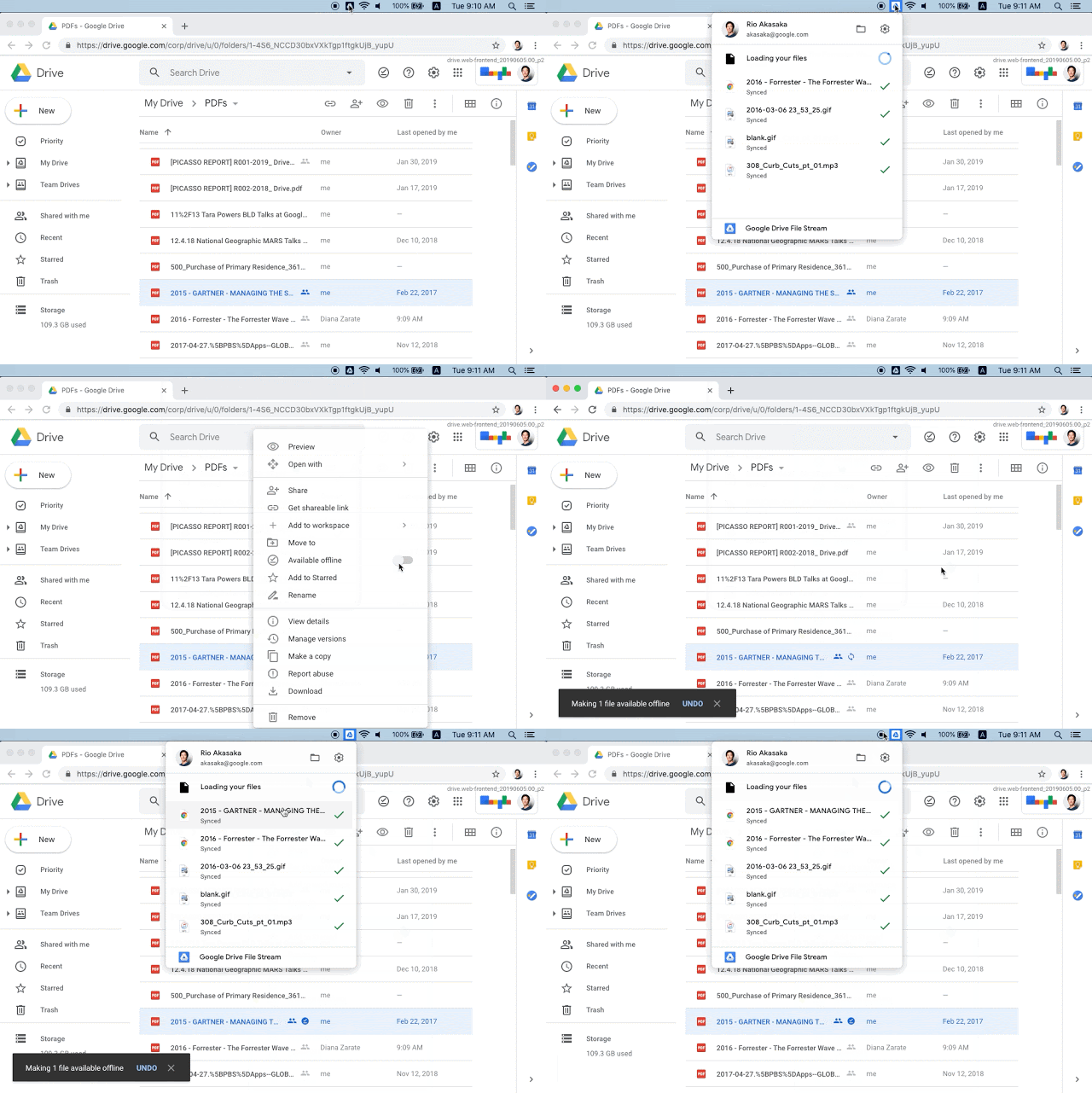
If you're interested in joining the beta, you can do so by clicking here and applying. If you're accepted, you'll need to sign in to your Google Drive, choose the files you want to save offline, right click on them, and mark them as "Make available offline." You'll then be able to download them to your local machine.
Google is accepting applications now.
Get instant access to breaking news, the hottest reviews, great deals and helpful tips.
Don Reisinger is CEO and founder of D2 Tech Agency. A communications strategist, consultant, and copywriter, Don has also written for many leading technology and business publications including CNET, Fortune Magazine, The New York Times, Forbes, Computerworld, Digital Trends, TechCrunch and Slashgear. He has also written for Tom's Guide for many years, contributing hundreds of articles on everything from phones to games to streaming and smart home.
