If you want your child to be able to stay in touch with their friends, but they’re too young for a smart phone, then a kid-friendly phone could be the answer. These devices look like old-school phones, but use VoIP technology to make the calls. These phones are also managed by an app, so parents can control who their child talks to, and for how long and when they can make calls.
There are a number of companies that make these kinds of phones; to see which was the best, I called in four models to test them side by side: the Tin Can, Ring, Ring, Pinwheel, and the Waffle, which was just announced and goes on sale at the end of October.
I compared things such as hardware costs and features, setup, parental controls, and subscription fees, and had my 7-year-old daughter test out all four to see which is the best landline phone for your kid. Read on to find out which was our favorite.
Design


If you’re going to make a phone that’s geared for kids, it’s got to look the part. Tin Can’s phones definitely look the most “fun,” with their multicolored designs. My daughter liked the color of the pink and orange Tin Can phone the best, and thought it was the most comfortable to hold, though it was the widest of the bunch, which may be an issue for kids with smaller hands .
I also liked that its cord was long — more than twice that of the other two, which meant that it was easier to hold the receiver without the base flying around.


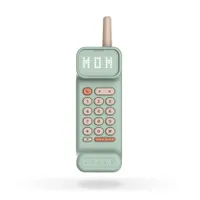
After Tin Can, I would say that Waffle’s phone colors and designs are the most fun for a kid. Each model is multicolored — I tested one that was mint green and a pale pink — and above the keypad is a bright white LED display that shows the time and also the name of the person who’s calling.
I also like that the handset itself is narrow, which makes it easier for smaller hands to hold. There’s no wall mount, but Waffle’s phone is unique in that it has an internal battery, so you can carry it from room to room without being tethered to a wire.


Pinwheel comes in third here, as it offers phones in multiple colors, and its devices have a softer, rounder design. The Pinwheel’s buttons were easiest to press, but she had trouble putting the phone back on the base.


Ring Ring’s phones look the part of traditional phones from the 90s, which will definitely appeal to Boomers and Gen Xers, but the nostalgia won’t hit as hard for kids who have never seen a landline before. The company sent me the Modern design; it also has a Classic model that has the more rounded look of the phone that hung in your kitchen.
Both the Pinwheel and Ring Ring can be wall-mounted, but not the Tin Can nor the Waffle.
Score (Out of 20)
Pinwheel -10
Ring Ring - 10
Tin Can - 20
Waffle - 16
Device cost and options



Ring Ring
Ring Ring gives you the greatest number of options when it comes to devices, however, they look like they would more appeal to 80s-nostalgic parents rather than kids. You can get a Wi-Fi-enabled handset (the Modern Kit, which comes in black or white) for $79, or the Nostalgic Kit, which requires an Ethernet connection to your router, but looks like a phone you might have had in your kitchen a few decades ago. This model costs $89, and comes in black, white, and pink.
If you already have an old-school phone, you can plug it into the Bridge Adapter ($59), which itself plugs into your router.
Included with the Ring Ring phone are a set of small business cards that you or your kid can fill out to hand to their friends, which is a nice little addition. The base of the phone also has a small card where you can write down the names and numbers of up to 10 people you can speed-dial.
Tin Can
Tin Can only offers four phones, but they’re the most colorful of the bunch. They’re also the second-most expensive, at $100 each. However, Tin Can is the only service that offers a discount if you purchase more than one device: If you buy two, they cost $95 each; if you buy three or more, the unit price decreases to $90. It’s a smart idea, as all of these services rely on not just you, but all your kid’s friends having one too.
Pinwheel
Pinwheel falls in between Tin Can and Ring Ring, both in terms of pricing and phone options. The Pinwheel Spark costs $79 and comes in four colors; the Pinwheel Classic (which comes in pink, white, and black) costs $99. However, at the time of writing, they were discounted to $68 and $79, respectively.
Pinwheel’s phone comes with a little booklet where your kid can write the names and numbers of their friends, a sheet of stickers, and a bunch of “Call me!” cards that they can hand out to their friends.
Ring Ring wins for having the least expensive (if least interesting) handsets, as well as the ability to use a traditional phone. Tin Can has the most colorful but the most expensive phones, and the fewest options.
Waffle
Waffle has both the fewest options when it comes to phone colors (mint green and pink, black and neon green, and purple with yellow), and is the most expensive, at $119 each. There’s no discount if you purchase more than one phone.
(Out of 20)
Pinwheel: 16
Ring Ring: 18
Tin Can: 15
Waffle: 12
Parental Controls and app
Pinwheel
Since Pinwheel’s app manages both its landline and mobile phones, it’s a bit more complex (and a little more confusing) to use than the other apps. Just like with those apps, you can designate certain times for when your child is allowed to call other people. Pinwheel calls these “Modes,” and when used on its mobile phone, can also let you designate which apps they can use on their mobile phone.
If you’re just using the landline, then the only two options you get are letting them call anyone or emergency contacts only. Because you can set multiple Modes for each day, the timeline can look a bit messy, quickly.
Ring Ring
Ring Ring’s app is simple and easy to use. You can add contacts manually or import them from your phone, and in the iOS app at least, you can invite other managers to oversee the account.
The app lets you set quiet hours each day, and also lets you set a daily cap on the number of minutes a kid can use the phone, from 15 to 240 minutes. Even better, there’s an option that will show other Ring Ring users if it’s a good or a bad time to call.
You’re not only able to view missed calls, but you can also listen to voicemails from within the app. And, you can select from 7 different ring tones and change the ringer volume.
Tin Can
Tin Can’s app is also very easy to use, but has fewer features than Ring Ring. You can set active and quiet hours, but you can’t set an overall time limit. You also can’t change the ring tone or volume from the app — you can only do that from the phone itself, and there, you can only adjust the volume. The Tin Can app shows a call log, but does not show voicemails, or let you listen to them — you can only listen to voicemails from the phone itself.
I did like that you can give someone else your Tin Can number, but when they call for the first time, you have to approve their number in the app first.
Waffle
Waffle also offers customizable quiet times, which were easy to set up. When setting up contacts, you can also assign each a small avatar. However, you have to manually input each contact, rather than importing them from your phone. An upcoming update will allow you to send requests to other Waffle phones, asking them to add you as a contact.
A call log shows everyone who rang, and who left a message, and I also like that you can listen to voice messages from the app, rather than having to go through the phone.
(Out of 15)
Pinwheel - 12
Ring Ring - 18
Tin Can - 16
Waffle - 16
Setup
Pinwheel
When you first set up the app, you’re prompted to add your name and phone number, which will automatically be added as your child’s first contact.
The Pinwheel Spark (which I tested) comes with the handset as well as a very large power plug, that has not just a phone connection, but USB and two Ethernet ports so you could connect it directly to your router, should you not wish to use Wi-Fi.
You have to select “Pinwheel Home” in the app when setting up the device, as “Pinwheel Phone” is for setting up service with the company’s mobile devices. I initially chose the latter option, which led me down the wrong path.
During the setup process, you have to activate Airplane mode on your phone, then turn on Wi-Fi, scan a QR code, connect to the Pinwheel’s Wi-Fi, and then using the Pinwheel app, connect it to your Wi-Fi network.
The app gives you suggested times to set quiet hours, but there’s no way to automatically import contacts from your phone. You have to add each one manually.
Ring Ring
Annoyingly, the Ring Ring phone needs to be initially plugged into your router to connect it to your Wi-Fi network. A very short Ethernet cable is provided for that purpose. After I connected it, it took a minute or two for the phone to sync with my Wi-Fi and get the settings. You then have to unplug and restart the phone.
Ring Ring's app is the most businesslike of the bunch, so it's not as fun to look at, but then again, this isn't something your kids are going to interact with.
Tin Can
The Tin Can setup was pretty simple. After plugging it in, I downloaded the Tin Can app, scanned a QR code, and connected the phone to my account. I then linked the phone to my Wi-Fi in the Tin Can app, and started importing contacts, and set quiet hours and the like.
Waffle
Setup for the Waffle was pretty easy. I plugged the phone in, downloaded the app, and, when prompted, connected to the phone via Bluetooth. From there, I added my Wi-Fi password to the app, which then sent it to the phone. After that, it was just a matter of adding contacts and quiet time.
(Out of 10)
Pinwheel - 4
Ring Ring - 6
Tin Can - 10
Waffle - 10
Subscription Pricing
| Header Cell - Column 0 | Tin Can |
Ring Ring |
Pinwheel Friends & Family |
Pinwheel Unlimited |
Waffle Free |
Waffle Home Plus+ |
|---|---|---|---|---|---|---|
Monthly plan |
$9.99 (first month free) |
$8.95/month, $96/year |
$6.99 (15% off for multiple devices) |
$9.99 (15% off for multiple devices) |
$0 |
$9.99 |
External calls |
Unlimited |
Unlimited |
Up to 5 |
Unlimited |
1/400 min per month |
Unlimited |
E911 calling |
Free |
Plan req’d |
Free |
Free |
Free |
Free |
Parental controls |
Free |
Free |
Free |
Free |
Free |
Free |
Voicemail |
Free |
Free |
Free |
Free |
Free |
Free |
All of the phones for all four of the companies work without signing up for a paid plan, but you’ll be (mostly) limited to calling other phones on that service. For example, Tin Can phones can only call other Tin Can phones.The one exception is Waffle, whose free plan allows you to add one external contact, and lets you talk to that contact for up to 400 minutes per month.
With every phone, if you sign up for the paid service, you’ll get a phone number, which will allow you to dial any number, just like a real phone.
Apart from price, the only real difference between all four companies is that Tin Can, Pinwheel and Waffle offer e911 calling for free; with Ring Ring, you need to sign up.
Pinwheel is the only one of the companies that offers two paid plans — one which lets you call up to five outside contacts, and one that lets you call an unlimited number of outside contacts. Given that my kid generally only calls her grandparents, the $7 plan makes the most sense. It also offers a discount of 15% if you have multiple devices, so the $9.99 plan would cost $8.49.
Ring Ring’s plan is $8.95 per month, but drops to $8.06 per month if you sign up for an annual plan. Tin Can is the most expensive, and doesn’t offer any discounts, but it does give you the first month for free, which gives you time to see if the plan is really worth it.
Waffle also costs $9.99 per month, but only gives you a 10-day trial. I also don’t like that the app forces you to add your credit card info, even if you only want to sign up for the free plan.
(Out of 20)
Pinwheel - 20
Ring Ring - 15
Tin Can - 10
Waffle - 8
Call Quality and features
To test each service, I placed a call from my iPhone to each phone, which were all about 15 feet from my Wi-Fi router. All of the phones performed reasonably well in this test; many of the issues you'll encounter, if any, will be related to the strength of your Wi-Fi router and where your phone is in relation to it.
Pinwheel
The Pinwheel’s phone had a very loud and very harsh ring. While you can adjust the volume of the ringer, you can’t change its shrillness. Pinwheel users with a paid account can also make calls to international numbers. When I placed a call to the Pinwheel, the caller sounded on a par with the Ring Ring, but said I sounded a bit distant.
Ring Ring
Unlike the other two phones, the Ring Ring not only rings, but announces the number of the person who’s calling. While I wish it would be smart enough to say the contact’s name, this is more than what the Tin Can and Pinwheel offer. There’s also a little red light on the phone that flashes red when there’s a call, and turns green while you’re talking. I found the sound of the caller’s voice to be clear, and they said I sounded good as well.
Ring Ring currently offers calling to and from Canada, and is trialing a feature to let Whatsapp users call its phones.
Tin Can
Tin Can’s ringer was pleasant and loud without being annoying. The default ring is a series of tones that rises slightly in pitch, though you don’t get an announcement of who’s calling, like the Ring Ring. Calls placed to the Tin Can phone sounded very good, and the caller said I sounded clear, too.
Tin Can’s service is fully available in the U.S. and Canada, but the company is expanding to the UK, Australia and New Zealand; devices are slated to ship this November.
Waffle
One quibble with the Waffle phone is that when you pick up the handset, you don’t get the traditional dial tone, as you do with the other phones I tested. It may not mean anything to your kid, but for us older folks, it’s a sign that the phone is working. Also, unlike the other phones, you have to press a button on the Waffle phone to answer a call, rather than just picking up the receiver.
On two calls I made with the Waffle phone, the caller sounded watery and distant, though I sounded fine to the other person. However, on another call with the Waffle, there were no issues.
You can’t change the tone of the Waffle’s ringer (there will be 10 ringers to choose from in a future update), but it’s a pleasant little melody. And, as mentioned earlier, the phone also displays a caller ID, so you know who’s on the other end even before you answer. If you’re on the paid plan, you can also make international calls.
(Out of 15)
Pinwheel -10
Ring Ring - 15
Tin Can - 14
Waffle - 10
Bottom line

| Header Cell - Column 0 | Pinwheel |
Ring Ring |
Tin Can |
Waffle |
|---|---|---|---|---|
Design (out of 20) |
10 |
10 |
20 |
16 |
Device cost/options (out of 20) |
16 |
18 |
15 |
12 |
Parental controls and app (out of 15) |
12 |
18 |
16 |
16 |
Setup (out of 10) |
4 |
6 |
10 |
10 |
Subscription (out of 20) |
20 |
15 |
10 |
8 |
Call quality/features (out of 15) |
10 |
15 |
14 |
10 |
Total |
72 |
82 |
85 |
72 |
Overall, Tin Can won this contest, with a total score of 85. Its phones were the most fun to look at, and setup was a cinch. However, its subscription prices were the most expensive, as was the hardware cost.
Ring Ring came in second with a score of 82. While its phones and app were the least interesting design-wise, it offered the best parental controls and app, and the cost of the hardware was the most competitive.
Pinwheel and Waffle tied for third. Pinwheel’s app and setup were a tad more complicated than needs be. However, I liked its tiered subscription model, which was the most affordable among the bunch.
While Waffle’s handsets are the most expensive (as is its subscription), they offer features not found on any of the others, such as caller ID and a built-in battery. Depending on your preferences, they could be with the premium. I also really liked their design.
Ultimately, the service you sign up for is probably going to be the one that most of your kid’s friends are already using. In my case it was Tin Can.
So, if you’re an early adopter in your neighborhood, it’s up to you to evangelize the device you buy, so that your child has someone to talk to. While its devices are the priciest, Tin Can is doing a smart thing by discounting its phones if you buy more than one, so you could potentially go in with a few other families at the start. Otherwise, you’ll just have to pick what’s most popular in your community.

Follow Tom's Guide on Google News and add us as a preferred source to get our up-to-date news, analysis, and reviews in your feeds. Make sure to click the Follow button!