







My kids treat almost anything with a scoreboard as a personal challenge, which made them the ideal testers for Strikesphere, a sports tech line from Golden Bear Toys that adds sensors, light-up targets and automated launch modes to familiar training gear.
We tested three of the company's products at home: the Soccer Launcher, the Speed Ball and the B-Ball Bounce. While my kids are very athletic, they are also very hard on toys (see the review of my youngest throwing the AT&T AmiGO tablet), and, they speak their mind when it comes to what they like and don't like.
My 5-year-old is drawn to anything that counts down, lights up or gives him a reason to run around the living room, while my 12-year-old plays soccer and loses interest quickly in gear that can't keep up with him. That split ended up being the most useful lens for judging all three, because the products that worked best were the ones that could hold a kindergartner's attention and still give a competitive player a reason to keep coming back. Some of them won over both kids right away, and one needed a little creativity on our part before it clicked for my older son.
One important thing to note is this toy is sold from the U.K. and not yet available on Amazon, so you'll have to adjust the currency to USD if you are purchasing in the states.
StrikeSphere Speed Ball
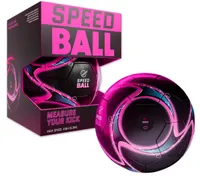
The Speed Ball was easily one of the biggest hits with my kids — and one won over my 12-year-old immediately.
The idea is incredibly simple, but unique, especially for kids working on their powerful kick. The ball has a built-in sensor that measures the power of each kick and displays your score directly on its LED screen, with scores going all the way up to 999. There's no app to download or phone to pair. You turn it on, kick it and immediately see how you did.
That instant feedback turned kicking a ball around into a competition pretty quickly. My 12-year-old kept trying to beat his previous score, which gave him a reason to take another shot and then another. It's one of those rare tech features that adds something to the game without making the product more complicated to use.
My one complaint is the size. The Speed Ball is a size 4 rather than a regulation size 5, which my older son noticed. For younger players that probably won't matter — and may actually be preferable — but I'd love to see StrikeSphere offer a size 5 version for older kids who are already accustomed to playing with a full-size ball. Also, being a size 4 it didn't fit on the StrikeSphere soccer launcher. Not necessary, but something to note for families who want to avoid switching the ball out while using both toys.
Still, this was one of those products I didn't have to convince my kids to test. Once they started trying to beat their scores, they just kept going.
StrikeSphere Soccer Launcher
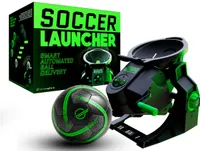
Of the three StrikeSphere products we tested, the Soccer Launcher was probably our least favorite because it didn't keep the game going. Although it was still a hit, especially with my 5-year-old, I wouldn't suggest it for children much older.
The concept is pretty simple: you wind the handle and choose between a five-second countdown or three claps to send the ball into the air. There are six launch angles, and StrikeSphere says it can send a ball up to 13 feet, although for us, it was more like 9 feet.
My 12-year-old was harder to impress. He plays soccer and quickly found that the Launcher didn't have enough power to make it particularly challenging on its own. We eventually put it in front of our soccer rebounder, which completely changed the experience. Instead of receiving the relatively gentle launch, he could react to the ball coming back off the net, making it faster and much less predictable.
That setup also highlighted my biggest complaint with the Launcher: it's too lightweight. Ours frequently tipped or shifted when it fired the ball, and I found myself having to stand it back up or reposition it between launches. The lightweight design makes it easy to carry around, but I'd gladly trade some of that portability for a heavier, more stable base. That's the first thing I'd change in a second-generation model.
Still, I liked that one product could entertain kids at very different skill levels once we got creative with it. Younger kids may enjoy the simple thrill of waiting for the ball to launch, while older players can pair it with other training equipment to make the drill considerably harder.
Similar to the StrikeSphere Speed Ball, this toy is sold from the U.K. and not yet available on Amazon.
StrikeSphere B-Ball Bounce
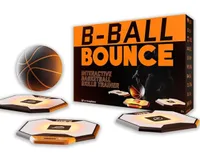
If my 12-year-old claimed the Speed Ball, the B-Ball Bounce belonged to my 5-year-old. This was easily his favorite of the three.
What I liked most was that he could set it up and play with it completely on his own. That's a big deal with kids' toys, especially when so many supposedly simple games require a parent to assemble something, explain the rules or keep resetting it.
The B-Ball Bounce also gave him a way to burn off some energy indoors. That made it especially useful on rainy days when getting outside wasn't an option, although he was perfectly happy taking it outside and playing there, too.
The game became more fun for him as it sped up. He had to watch closely, react quickly and stay focused on what was happening rather than just mindlessly throwing a ball around. I could actually see the concentration on his face as he tried to keep up with it.
And that may have been my favorite thing about the B-Ball Bounce. It kept him moving, but it also demanded his attention. For a 5-year-old who has plenty of energy to burn, getting physical activity and a game that requires focus at the same time was a pretty great combination.
Bottom line
After testing all three StrikeSphere products, I can honestly say that we have found our new favorite brand of sports toys. For us, I think the biggest selling point is how easily they turn ordinary sports practice into something kids actually want to do.
My 5-year-old loved the B-Ball Bounce and Soccer Launcher, while my soccer-playing 12-year-old kept coming back to the Speed Ball to beat his previous score. The Soccer Launcher could use a sturdier base and a little more power, but pairing it with our rebounder made a noticeable difference.
What impressed me most was that none of these products required a screen or complicated setup to keep my kids entertained. They were moving, competing and practicing within minutes of opening the box. For a busy mom with very active kids, that was a huge win.
Follow Tom's Guide on Google News and add us as a preferred source to get our up-to-date news, analysis, and reviews in your feeds. Subscribe to Tom's Guide on YouTube and follow us on TikTok.

More from Tom's Guide

