




I’ve previously used Moft’s MagSafe wallets, but only for a super short time. That’s because they lacked a critical feature that has become practically integral to any wallet I fasten to my iPhone: Find My support. Without it, Moft’s wallets were just like any other ordinary wallet out there.
But the accessory maker updated its MagSafe wallets to finally support Apple’s Find My, allowing me to track it down in the event I lose or misplace it. Obviously, the peace of mind that I can always track it down is great, but it has a surprisingly cool feature that makes it even more invaluable.


Now, as much as I appreciate the findability of Moft’s Trackable Tripod Wallet, it’s how it doubles as a phone tripod that really sells me on its utility. It’s great for all sorts of things, like when I’m trying to snap a shot under low light using my iPhone 17 Pro’s night mode — keeping it completely still throughout the capture eliminates any potential shakes that could ruin the shot.
When I’m at work, though, I really like how I can angle it so that I can take video calls hands-free. And while I’m on break outside having lunch, I can use the tripod to prop up my phone to watch my favorite TV shows, or pass the time scrolling through video reels on TikTok or Instagram.
Moft also has a distinct design language that gives this MagSafe wallet a more sophisticated look than others I’ve used, especially compared to Supcase’s MagSafe wallet.
If you prefer a more contemporary aesthetic, then you’ll absolutely love Moft’s design here. And since it now offers Find My support — which even features a built-in speaker — I really love that it gains the one feature that prevented me from using it before.
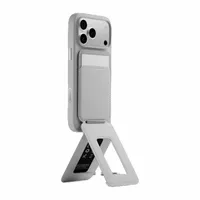


Beyond that, Moft also adds Find My support to its other popular option — the Moft Trackable Snap-on Phone Stand & Wallet. It’s a sleeker version that still has the same cool feature of converting into a phone tripod and stand, but I really like how folding it over also doubles as a phone grip.
Other features that these new MagSafe wallets have in common include six months of battery life from a single charge, which is a big incentive for me considering I find it incredibly annoying to replace the battery in an AirTag.
If you look closer at them, you’ll notice that they don’t have ports to charge their batteries. Instead, they can be charged wirelessly on a MagSafe charger for even more convenience.
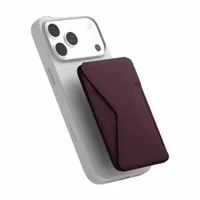
If there’s one thing I wish Moft would change, it would be to accommodate more than two cards. Sure, they’re sleeker than other MagSafe wallets I’ve tested, but I would appreciate them more if they could store at least five cards.
With only two slots, it forces me to bring just my driver’s license and one credit card. Despite this shortcoming, it’s nice to see that Moft’s MagSafe wallets are finally trackable.

Follow Tom's Guide on Google News and add us as a preferred source to get our up-to-date news, analysis, and reviews in your feeds. Subscribe to Tom's Guide on YouTube and follow us on TikTok. Finally, you can visit our dedicated Tom's Guide Savings Squad hub for expert help on getting the best products for less.
More from Tom's Guide
- This underrated Motorola Razr Fold feature makes me more productive — Google, Apple, and Samsung should take notice
- I walked 11,000 steps with the Apple Watch 11 and Garmin Forerunner 170 — and the results surprised me
- Apple Card promotion could offer free AirPods Pro 3 as soon as next week: here's how it works

