I’m tired of paying Apple $10 every month to preserve my memories. I’m also tired of seeing a warning atop my Google Drive account that I’m running out of storage — but there’s a special offer to pay for more space!
Ever since the first smartphones let us take digital pictures, we’ve been faced with the problem of just where do you store all those photos of pets, kids, parents, birthday parties, vacations, and yes, food. As cameras have increased in resolution — with a corresponding increase in the size of photo and video files — the problem has only gotten worse.
Apple, Google, and other cloud storage backup companies let you save all your stuff to their servers, but there’s a catch: a monthly subscription. World Backup Day was last week, but while I'm late to that particular party, I’m ensuring that not only are all my precious memories saved in a secure location, but also that I don’t have to pay some service a monthly fee in order to keep them safe.

You're paying too much! This column will show you how to cut your monthly subscriptions to save money.
This $99 device let me cut the cord but still DVR my favorite shows
It’s called a NAS, which stands for Network Attached Storage. In the simplest terms, it’s a hard drive that’s connected to your home network. Save all your files to the NAS, install an app on your phone, computer — even your streaming device — and not only can you automatically back up all your files, but then you can access them from anywhere.
Most NAS devices are designed so that you can easily add more or larger hard drives in case you run out of space. And, you can configure the hard drives inside the unit so that one acts as a backup, helping ensure that your files don’t get lost if one of the drives goes bad.
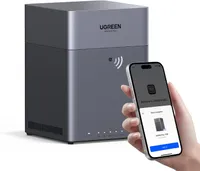
For my setup, I’m trying out one from UGreen, the NASync DH4300 Plus, which has space for up to four hard drives; that should be plenty for me and my family’s needs for a while. It’s a model a few of my colleagues here at Tom’s Guide have used and really like, so what better endorsement is that?
UGreen’s app also has a few extra features, such as the ability to recognize faces and other objects, so you can more easily search through all of your photos. It also acts as a media server, and can output 4K video (albeit at just 60Hz) to your TV via HDMI, or watch it on a streaming device.

The one caveat to all this is that there’s a big upfront cost. The NAS device I’m using costs $439 (though it’s currently on sale for $351). You can also reduce the cost by purchasing a NAS that only has space for two hard drives; UGreen’s model is just $219.
And that price doesn’t include the hard drives, which you have to purchase separately. Thanks to RAMaggedon, those aren’t cheap, either. I settled on two Western Digital 4TB hard drives ($129 each at Western Digital's site), which ultimately cost me about $300 after taxes and shipping.
All in, I’m looking at a total cost of around $700. So how long would it take to pay that off? Some of the best cloud storage services (such as Apple, Google, and Dropbox) charge $10 per month for 2TB of storage; iDrive gives you 5TB of storage for the same amount. So how long will it take me to break even?
| Header Cell - Column 0 | Cost/mo |
Time to pay off (months) |
|---|---|---|
Apple (2TB) |
$10 |
70 |
Google Drive (2TB) |
$10 |
70 |
Dropbox (2TB) |
$10 |
70 |
iDrive (5TB) |
$10 |
70 |
Dropbox (3TB) |
$17 |
41 |
Apple iCloud (6TB) |
$30 |
23 |
It’s not a precise apples-to-apples comparison — I tried to purchase 6TB drives, which would have cost me around $400 total, but they were sold out pretty much everywhere.
For those of you who want to go this route, you’ll find the hardest part of the experience will be purchasing hard drives; there’s just not a lot to go around, especially for capacities lower than 8TB.
So, it looks like it’ll take me about two years to recoup the cost of my purchase, which isn’t nothing, but I went into this knowing it was a long-term investment. And, if you're tired of paying monthly fees, it could be worth it for you, too.

Follow Tom's Guide on Google News and add us as a preferred source to get our up-to-date news, analysis, and reviews in your feeds.
More from Tom's Guide