
I added this monitor light bar to my desk and it’s a game-changer — now 36% off for Prime Day
Add a bit of light to your desk setup with this awesome accessory now at its lowest price ever
Here at Tom’s Guide our expert editors are committed to bringing you the best news, reviews and guides to help you stay informed and ahead of the curve!
You are now subscribed
Your newsletter sign-up was successful
Want to add more newsletters?
Daily (Mon-Sun)
Tom's Guide Daily
Sign up to get the latest updates on all of your favorite content! From cutting-edge tech news and the hottest streaming buzz to unbeatable deals on the best products and in-depth reviews, we’ve got you covered.
Weekly on Thursday
Tom's AI Guide
Be AI savvy with your weekly newsletter summing up all the biggest AI news you need to know. Plus, analysis from our AI editor and tips on how to use the latest AI tools!
Weekly on Friday
Tom's iGuide
Unlock the vast world of Apple news straight to your inbox. With coverage on everything from exciting product launches to essential software updates, this is your go-to source for the latest updates on all the best Apple content.
Weekly on Monday
Tom's Streaming Guide
Our weekly newsletter is expertly crafted to immerse you in the world of streaming. Stay updated on the latest releases and our top recommendations across your favorite streaming platforms.
Join the club
Get full access to premium articles, exclusive features and a growing list of member rewards.
I’m always on the hunt for new accessories to make my own work from home setup even better and out of all the ones I’ve tested so far, this monitor light bar made the most immediate difference.
Right now, you can get the Diirglus Computer Monitor Light Bar for just $31 on Amazon. Not only is this its lowest price ever, this deal is also for the wireless version that comes with a small, circular puck that lets you dim or turn up the light as well as switch between three different modes.
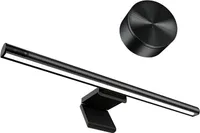
Diirglus Computer Monitor Light Bar: was $49 now $31 @ Amazon
Lowest price yet! This home office accessory adds some much needed light by attaching to the top of your monitor. In addition to touch controls on the light itself, you can also control it using the included wireless dial. This monitor light bar has three different light modes and is powered by a USB-C cable.
There are a lot of other great monitor light bars on Amazon, but I chose this one specifically for its cheaper price and sleek design. The aluminum alloy lamp mounts easily to one of the best monitors, and you don’t have to worry about glare on your display since it shines down and illuminates the area around your keyboard and mouse.
Since the Diirglus Computer Monitor Light Bar has a detachable cable, you can use any USB-C cable you want to power it. In fact, if you have a monitor with USB ports at the back (like on my Samsung M7 Smart Monitor) you can actually power this device from it—with the added benefit that the light turns on when it does.
This monitor light bar lets you cycle between white light (6000K), mixed light (4200K) or warm light (3000K). I particularly really like the white light mode, especially for working at night.
If you go with the more expensive version, you also get a dial with adhesive on its underside so that it stays in place on your desk. You can turn the dial to increase or lower the monitor light bar’s brightness, and there’s also a button on the top that lets you quickly cycle between its different light modes.
There are other, more expensive monitor light bars out there with extra features that might be worth upgrading to in the future. However, at just $32 on Prime Day, this is the perfect way to test one out and see if you like it first.

Get instant access to breaking news, the hottest reviews, great deals and helpful tips.

Anthony Spadafora is the managing editor for security and home office furniture at Tom’s Guide where he covers everything from data breaches to password managers and the best way to cover your whole home or business with Wi-Fi. He also reviews standing desks, office chairs and other home office accessories with a penchant for building desk setups. Before joining the team, Anthony wrote for ITProPortal while living in Korea and later for TechRadar Pro after moving back to the US. Based in Houston, Texas, when he’s not writing Anthony can be found tinkering with PCs and game consoles, managing cables and upgrading his smart home.

