




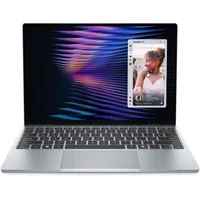
The $699 Dell XPS 13 (2026) is the best budget Windows laptop ever and a serious rival to the similarly priced MacBook Neo. Dell’s machine packs in many premium features and proves that the best budget laptops don’t have to feel cheap or have poor performance and battery life.
I’ve tested the entry-level model featuring an Intel Core 5 “Wildcat Lake” CPU, 8GB of RAM and 512GB of SSD storage. Like other configurations of this laptop, my test unit has a sturdy aluminum chassis and a vivid 2.5K display. It’s also the lightest XPS laptop ever, even lighter than the MacBook Air M5! As I said in my Dell XPS 13 (2026) review, it proves you don’t have to sacrifice quality for an affordable notebook.
Now that I’ve spent two weeks with the Dell XPS 13, I wanted to dig deeper into what I like (and what I don’t) about Dell’s affordable laptop. Here's what I think!
Dell XPS 13 (2026): What I like
Ultraportable design

I travel a lot for work, so I prefer having the lightest laptop possible when I'm out and about. The 13-inch MacBook Air has long been my go-to when attending events like CES since it’s so thin and light. Now, after taking the Dell XPS 13 back and forth between my apartment and the office, I’ve found another ultraportable laptop that I barely feel in my backpack.
The MacBook Neo proved that a budget laptop can still look and feel premium, and the XPS 13 is following suit. The CNC aluminum chassis is a feature that can’t be overstated, as similarly priced laptops usually have cheap plastic builds that are offensive to the eyes and hands. The XPS 13 feels as sturdy and looks as good as a MacBook Air, which is definitely a huge compliment.
I also like that this lower-end XPS has design features that more expensive Dell XPS 14 and Dell XPS 16 lack. The first is that there’s a lip on the laptop lid. That might not sound like a big deal, but if you’ve ever struggled to open an XPS laptop, you’re going to sing with joy. Secondly, the keyboard deck has a traditional design, with evenly spaced keys rather than the cramped, lattice-less layout of the aforementioned XPS models. These touches make an already great laptop design even better.
While there is one design aspect I’m not enamored with (more on that soon), the XPS 13 is overall a lovely-looking laptop that’s tailor-made for travel.
Lovely display

You don’t often get quality displays on budget laptops, but Dell bucks that trend with the bright, colorful panel on the XPS 13. And for good measure, it has touchscreen support, which is something the MacBook Neo lacks entirely. Though I’ve seen better laptop screens, this is one of the best notebook panels in this price range.
| Header Cell - Column 0 | Dell XPS 13 (2026) |
MacBook Neo |
|---|---|---|
Nits (brightness) |
398 (SDR) | 420 (HDR) |
452 (SDR) | 480 (HDR) |
sRGB |
105% |
110% |
DCI-P3 |
74.7% |
78% |
Delta-E |
0.23 |
0.22 |
Naturally, you’ll get a better image from an OLED panel, but the XPS 13’s display still delivers lifelike colors and solid HDR brightness. I watched a lot of YouTube videos on this laptop, and I was never disappointed by how anything looked. The 2560 x 1600 resolution on the 13.4-inch panel ensures everything appears sharp and clear. Websites are also very readable thanks to the resolution.
Now, to touch on the touch panel (no pun intended, I swear!), this is something I appreciate even if it’s not a feature I normally use. Don’t get me wrong, having a touchscreen laptop can make you more productive because you’re not limited to just the keyboard and touchpad. However, since I’m so used to non-touchscreen laptops, I often forget whether that feature is available. Still, it’s a nice bonus, especially for this price.
Strong performance and battery life

To be clear, the XPS 13 is a productivity laptop and isn’t designed for heavy workloads. If you want to edit 4K videos or play graphically demanding games, this isn't the laptop for you. However, if you just want an ultraportable machine for surfing the web, watching videos, and simple word processing, you won’t be disappointed.
| Header Cell - Column 0 | Dell XPS 13 (2026) |
MacBook Neo |
|---|---|---|
Geekbench 6 (single/multi-core) |
2684 / 7952 |
3535 / 8920 |
Handbrake (mins:secs) |
9:57 |
10:38 |
Blackmagic SSD test (write/read) |
1440 / 1585 |
3714 / 5026 |
As I mentioned in my review, the XPS 13 handled my typical workload, which usually includes 10-15 open Chrome tabs and the occasional YouTube video, without an issue. Pages started loading slower when I had 20-25 Chrome tabs, but that is admittedly more than usual even for me. Still, this is impressive performance given the XPS 13’s 8GB of RAM and Wildcat Lake chip.
| Row 0 - Cell 0 | Time (hours:mins) |
Dell XPS 13 (2026) |
14:29 |
MacBook Neo |
13:26 |
Then there’s battery life, which averaged 14 hours and 26 minutes in our battery test. During my time with the laptop, it always lasted a full 8-hour workday and still had some juice left (around 30-35% battery life) for me to wind down with some YouTube videos. Your mileage will vary depending on your workload, but it’s safe to say you’ll get more than all-day battery life here.
Dell XPS 13 (2026): What I don't like
In my review, I noted that the XPS 13’s webcam was my least favorite thing about the laptop. While I’m still not a fan of it, the webcam does a decent enough job for web calls, so long as you don’t expect to look your best.
After spending more time with the XPS 13, another thing that I only briefly touched on has become a larger, though not game-breaking, issue—the lack of a headphone jack.
I didn’t realize how much I needed a 3.5mm headphone jack until I was forced to go without one. At home, this isn’t a problem since I live by myself, but in the office, I don’t want to disrupt my colleagues if I have to watch a video or engage in a call. I’ve gotten used to using one of the best wireless headsets when using the XPS 13, but I do miss that 3.5mm headphone jack.
Dell XPS 13 (2026): Two weeks later
I’m not being hyperbolic when I say the Dell XPS 13 (2026) is the best budget Windows laptop right now. Along with the MacBook Neo, I’ve already begun recommending it to folks looking for a lightweight and durable everyday work laptop that delivers excellent performance and battery life. The fact that it starts at $699 just makes that recommendation easier.
Dell delivered a true winner with the new XPS 13. Unless you’re married to the Apple ecosystem and would prefer a MacBook Neo, Dell’s laptop is seriously worth considering and comes with my highest recommendation.

Follow Tom's Guide on Google News and add us as a preferred source to get our up-to-date news, analysis, and reviews in your feeds.
More from Tom's Guide

