




I don’t generally pay much attention to a laptop’s touchpad. Unless they’re small or off-center, a touchpad on one laptop is about the same as on another. That’s not the case with the Acer Swift 16 AI, which Acer says has the world’s largest haptic touchpad. Given how unusual this is, I had to write about it before delivering my full review of the laptop.
Measuring 6.9 by 4.3 inches, the Swift 16 AI’s touchpad instantly stands out the moment you open the laptop. The reason for its unusual size is that you can draw on it with the included stylus. The touchpad even has a 16:10 aspect ratio to align with the screen’s size. While that’s useful if you’re an artist, those who only use a laptop for writing might find the touchpad's size a hindrance.
My full review of the Acer Swift 16 AI will be ready soon, but for now, I’ll detail what it’s like using such a ginormous touchpad.
Super-sized touchpad
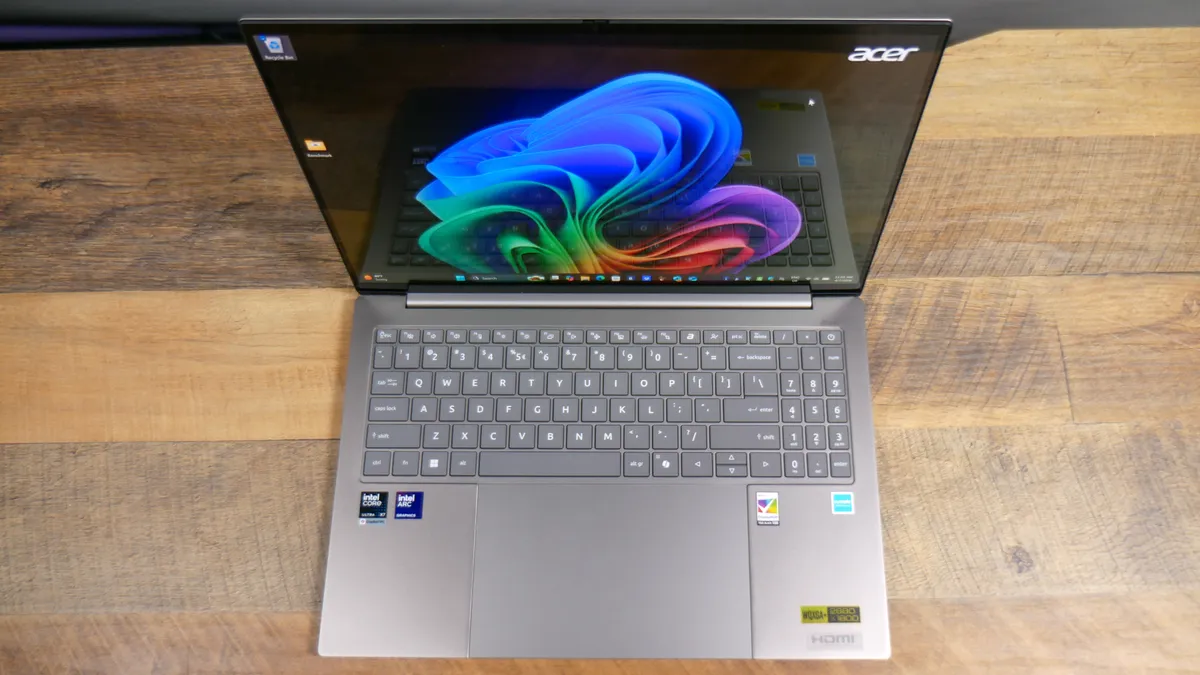
As I mentioned above, the Swift 16 AI’s touchpad is a huge 6.9 x 4.3 inches. It’s so large that I can place my iPhone 16 Pro Max (6.4 x 3.0 x 0.32 inches) on top of it horizontally and still have room to spare. The iPad Mini 7 is larger at 7.6 x 5.3 x 0.2 inches, but the fact that I’m even comparing a touchpad’s size to a tablet says it all. This touchpad is gigantic.
The touchpad is very responsive and never failed to register any of my gestures. I have big hands, so it is admittedly nice using a touchpad that doesn’t feel cramped. While I still prefer a MacBook’s Force Touch pad since it feels sturdier, the touchpad here is satisfying to use.

Typing on the Swift 16 AI takes some getting used to due to the touchpad’s size. There’s no getting around it, your palm will make contact with the touchpad. I found palm rejection generally good, but I did make accidental gestures if I moved my palm too low when I wasn't typing. This could be a deal breaker for some, and it’s certainly something I’d rather not have to account for when typing.

The touchpad’s size can be beneficial for artists since you can draw on it with the included stylus. I need to spend more time writing by hand or drawing on the touchpad, but it works well enough — though I’d rather draw on something like the iPad Air with the Apple Pencil since you get a bigger canvas and a more comfortable digital pen (respectively).
And as I said in the intro, the touchpad’s 16:10 aspect ratio means the stylus generally lands where you intend it to on the screen, though it's not always precise. Interestingly enough, the stylus only works on the touchpad and not on the touchscreen.
The actual keyboard itself is quite good, featuring thick, responsive keycaps with satisfying travel distance. It has a full keyboard, but the number keys on the right-hand side are much smaller than the majority of the keys. This could be bad if you rely on the number pad, but if you’re like me and rarely use it, you’ll appreciate how unintrusive the number pad is.
What about the rest of the laptop?

Massive touchpad aside, the Acer Swift 16 AI is an excellent Windows laptop.
At 3.4 pounds, it weighs just a hair more than the 3.3-pound 15-inch MacBook Air M5. However, it feels lighter compared to Apple’s denser laptop. Because it’s so light, I’m able to take Acer’s notebook from my apartment to the office and back without a problem. I can’t overestimate how light this laptop feels in your hands.
The other star feature is the 16-inch OLED touchscreen, with its 16:10 aspect ratio, sharp 2880 x 1800 resolution, and smooth 120Hz refresh rate. It delivers bright and colorful images that make your favorite videos and movies look fantastic. HDR brightness is close to 600 nits, which also helps the overall picture quality.
Thanks to its Intel Core Ultra 7X 358H “Panther Lake” chip, the Swift 16 AI has incredible performance, with multi-core performance comparable to the M5-powered MacBook Air. It lasted a little over 12 hours in our battery test, which is solid for a Windows laptop. You can even play modern games like Cyberpunk 2077, so long as you enable XeSS for smoother performance.
Outlook
Laptops can feel very same-y, which is why I applaud Acer for including such an unconventional haptic touchpad on the Swift 16 AI. Sure, this is a feature that will be truly useful for a small portion of customers, but there’s no denying that the touchpad helps this notebook stand out. It’s too large for me, but it might be right for others.
That said, those are my initial thoughts, and they might change by the time my full review of the Acer Swift 16 AI is live. So make sure you don't miss out on that. Who knows, maybe this gargantuan haptic feedback will win me over!

Follow Tom's Guide on Google News and add us as a preferred source to get our up-to-date news, analysis, and reviews in your feeds. Subscribe to Tom's Guide on YouTube and follow us on TikTok.
More from Tom's Guide

