







You probably know that most people think the iPad is the best tablet. In many ways, this is still true. It has some of the best performance of any tablet, is easy to use and has plenty of accessibility options (and parental controls for little ones).
Apple's iPad Air M4 tops this guide as the best performance-to-price offering of Apple's tablets. However, with Apple having just increased the prices of several iPads due to the RAM shortage, the balance isn't where it was when we first reviewed it.
If you're looking for an Android alternative to the iPad, the Google Pixel Tablet is a great place to start. It's the cleanest Android experience around, and also acts as a handy smart home hub, even if it doesn't match the extreme power of, say, the iPad Pro M5.
But whether you're looking for something to act as a larger second screen, a more budget-friendly pick, or a productivity workhorse, I've rounded up the best tablets we've tested that are actually worth your money right now.

Over six years ago, I was happily writing up articles and reviews on my iPad Air with a Magic Keyboard to build my career in tech, and my passion for tablets has stuck. These have always been my trusty digital companions for working while travelling or simply catching up with shows on long-haul flights, and the power these slates pack these days is outstanding. So, with my team of tablet experts, I'm here to help you find a tablet that suits your needs with our top recommendations.
The best tablets you can buy right now
Why you can trust Tom's Guide Our writers and editors spend hours analyzing and reviewing products, services, and apps to help find what's best for you. Find out more about how we test, analyze, and rate.
The best tablet overall


Was it really a surprise? The iPad Air M4 now takes the top spot as the best tablet for most, even if the only real upgrades here are improved performance, 12GB RAM and Wi-Fi 7 connectivity. But the real win here is that it's all for the same price as its M3 predecessor.
It brings over everything we adored about Apple's previous Air tablets, from its gorgeous 11- and 13-inch Liquid Retina displays with bright, crisp visuals and colors to its just under 10-hour battery life. That also means the same lightweight, portable design that's comfortable to hold for hours on end.
But the might of its M4 chip delivers greater performance, and it's wild to think that it nearly matches a full-on MacBook Air. That means it can breeze through multitasking and some heavy-duty tasks, like video editing and AAA gaming (for what's available on iPadOS).
With the upgraded 12GB memory and faster connectivity with Wi-Fi 7, the iPad Air M4 now stands as the tablet for most. All that for the same price? Even better. If you already have an M3 iPad Air, or even an M2, and only use tablets to browse the web, use apps and watch shows, the performance they offer is already way more than enough, so it won't be worth the upgrade. And it's a shame we're still not seeing Face ID and a more affordable Magic Keyboard.
Still, for most people looking for a tablet that can handle it all, and for the same price, the iPad Air M4 stands triumphant.
- Read our full iPad Air M4 review
The best budget tablet


To be frank, the Apple iPad (2025) is not the cheapest tablet you can find. There are plenty of cheaper tablets out there, mostly running Android, but the latest model of Apple's flagship tablet is the best value right now.
Like with the iPad Air M4, the physical design is familiar, just a little lighter and with a more entry-level chip powering the whole thing. It'll handle daily tasks with ease, but if you're into video editing or gaming, it might struggle a bit.
The main advantage it has over cheaper Android tablets is Apple's ecosystem: a well-stocked App Store, better battery life and excellent parental controls, which is a huge plus if you're thinking of this as a family tablet.
And despite being several hundred dollars less than some other iPad models, our testing showed that the entry-level iPad actually has a slightly brighter screen than the iPad mini 7 and lasts longer on a full charge than either the iPad Air M3 or the iPad mini 7. So while the hardware isn't as powerful, it never really feels that way.
The display isn't as vivid or immersive as you'd find on a tablet with an OLED screen, but for a daily driver that won't break the bank, I think it's absolutely a compromise worth taking.
- Read our full Apple iPad 2025 review
The best Android tablet
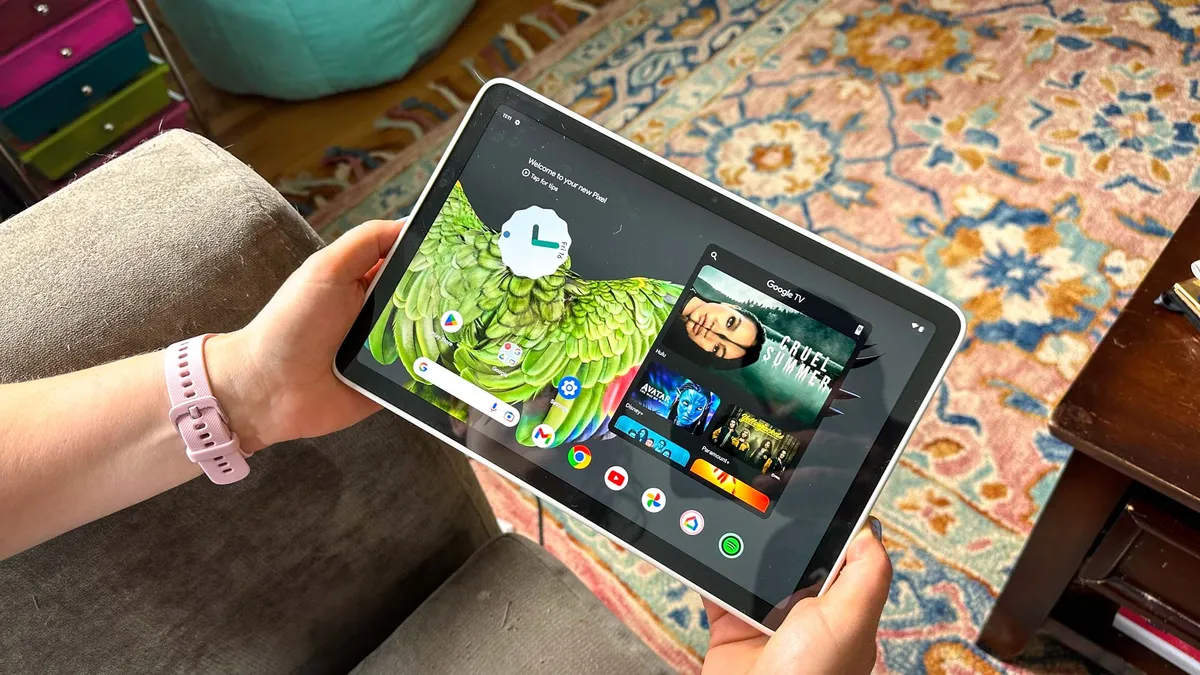
Yes, the iPad has become synonymous with tablets, but the Google Pixel Tablet carves out its own niche with a bundled charging dock and seamless Android integration — two things you won’t find on any iPad. But let's be upfront: while the Pixel is practical and well-equipped on the accessory front, it doesn't match the iPad Air M4 in either speed or display brightness.
What you do get is a true Android experience, complete with access to the full Play Store, Google’s services and straightforward syncing with your other devices. The Pixel Tablet runs on Google’s Tensor G2 processor, which is perfectly capable of everyday multitasking and media — even if it can’t keep pace with Apple’s latest chips. For Android-first buyers, this means apps, messaging and cloud services all work as you’d expect, and the included dock adds a layer of flexibility whether you’re streaming, video calling or controlling smart home gear.
Battery life is another practical win. In our tests, the Pixel Tablet clocked 11 hours and 56 minutes — enough to get through a day of streaming or work without stress. The display is a mixed bag: its Delta-E color accuracy came in at a near-perfect 0.05, so colors look true and media pops. But the screen isn’t the brightest in its class. That said, we found the tablet sat comfortably on its fabric-covered charging base at a slight angle, making it easy to see from the couch.
If you care about sound, the Pixel’s built-in speakers will surprise. Movies, music, and games all had impressive clarity and volume, making it a great pick for entertainment.
Ultimately, the Pixel Tablet is the sensible Android pick for buyers who want solid value, a useful included dock and tight integration with the Google ecosystem. You won’t get the premium performance or expansive accessory ecosystem of an iPad, but for most Android fans looking for a practical, well-rounded tablet, the Pixel delivers exactly what’s needed.
- Read our full Google Pixel Tablet review
The best budget Android tablet

Under $250 for a very capable tablet? It doesn't get much more budget than this. The Motorola MotoPad (2026) is the iPad alternative to get if you care about practical essentials, like its smooth, high-resolution (2560 x 1600) 11-inch display bursting with color, lightweight, one-pound design and long-lasting battery life.
Think of it as the budget machine made to stream your shows. Not only will you get formidable specs for the price, but its crisp LCD panel and strong quad-speaker system make it a reliable streaming companion for binging your way through Netflix shows or YouTube videos on the couch or on the go.
Speaking of, when it comes to battery life, the MotoPad delivers real-world endurance that’s more than enough for daily use. In our testing, we saw 10 hours and 31 minutes of web browsing on Wi-Fi, which is enough to handle a full workday or a long flight without needing a charger. That kind of staying power makes the MotoPad a smart pick if you’re watching your spending but still want to get things done.
Choosing the MotoPad also means trading some performance and ecosystem polish for savings. The MediaTek Dimensity 6300 chip is fine for web browsing, email and video, but don’t expect the snappy multitasking or creative muscle you’d get from Apple's iPad. And while the MotoPad is cheaper than most, it can't match the smoothness of iPadOS. For casual tasks, the MotoPad holds up, but if gaming is a priority, you’ll want to look elsewhere.
If you want a lightweight, affordable tablet for streaming, reading or getting through a day on the go, the MotoPad fits the bill. It's no powerhouse, but for the price, it’s made for buyers who want to keep things simple and mobile.
- Read our full Motorola MotoPad (2026) review
The best Windows tablet

The Microsoft Surface Pro 11 is more a laptop without a keyboard than a tablet, but it's easily the best tablet if you want to run Windows 11 on a more portable device. Like Apple's devices, it benefits from a tight integration between the Microsoft-powered hardware and software, coupled with some impressive Snapdragon chips.
The other advantage over many other tablets is that, because this is essentially a laptop, you get the kind of configuration options you'd find on a laptop, too. So you can choose the base-level model, or upgrade the RAM, storage and display.
However, my main word of caution is that this is not a mobile device like the others. It runs a full Windows 11 operating system, and that also means desktop applications instead of mobile apps. If you need this for work or for a specific app, great! But Windows desktop apps mostly aren't optimized for tablets or touchscreens.
Microsoft talks up the Copilot AI features — even going so far as to market devices as "Copilot ready" — but I wouldn't buy any tablet on the basis of these lacklustre additions. Not only are most of the Copilot (and Apple Intelligence on iPad) features underbaked, I wouldn't ever recommend buying a product on the 'promise' of future software.
But Windows existed long before AI gimmicks, so if it's a powerful desktop experience you're after on a portable device (which you can accessorize with a folio keyboard), the Surface Pro 11 is the one that should be top of your list.
- Read our full Microsoft Surface Pro 11 review
The best Samsung tablet

Samsung is a master at delivering amazing Android tablets to rival Apple's iPads, and the Samsung Galaxy Tab S10 FE Plus is the perfect example. With its stunning, spacious 13.1-inch display, decent performance and premium design, along with its long software support, this is one of Samsung's finest offerings — especially for its value-first price.
What you’re getting is a 13.1-inch LCD panel rather than an OLED, so while contrast can’t quite match Samsung’s top-tier Ultra line, visuals still look lively and, crucially for this slot, you get the S Pen stylus included at no extra cost. That’s a win for anyone who wants to draw, annotate or mark up documents without shelling out for accessories — a real productivity boost if you lean on pen-driven workflows.
Battery life is another clear highlight. On our battery test, the Tab S10 FE Plus lasted an impressive 15 hours and 43 minutes. That’s enough to get you through a full workday of reading, video calls and note-taking, and it means you can travel without constantly worrying about your next charge.
Performance is where trade-offs appear. The Tab S10 FE Plus isn’t built for high-fidelity gaming or anything beyond basic productivity — typing, web browsing, and spreadsheets are fine, but when we tried playing a demanding game like Ex Astris, the tablet struggled to keep up. It's not a powerhouse, but it's more than enough for everyday tasks.
Samsung’s promise of seven years of full update support stands out in the tablet space and gives peace of mind if you want your device to last. Most Android competitors don’t come close to that level of long-term support. For Android-first buyers who want a big, accurate screen, bundled pen, and the reassurance of software longevity, this is the Samsung tablet to get — just be sure you’re not chasing top-tier performance or the lightest device possible.
The best tablet for note-taking

The ReMarkable Paper Pro looks like one of the best Kindle e-readers, but it comfortably finds its place as one of the best tablets, thanks to its interactive e-paper display. It's not a tablet like the rest here, but it knows its strengths — reading, writing, sketching and note-taking.
If that's what you need, there's probably no better option. The display is designed to replicate the feel of pen on paper, which is very different from writing on a tablet like the Samsung Galaxy Tab S10 FE Plus, where the stylus-on-glass feel is a bit slipperier.
Of course, while it excels at some things, there are compromises. E-paper displays take longer to change or refresh, in their power-saving Etch-a-Sketch kind of way. But to compensate, the tablet has more than 4,000 levels of pressure sensitivity, which is why you get such a 'real' experience when writing or drawing on the screen.
Although I've included it here, I'd probably think of the Paper Pro more like a digital notebook; great for quick reminders, sketches, notes and reading, but it's not a laptop-style device like the Surface Pro 11 or an entertainment tablet like the iPad.
So long as you know that going in, and don't expect it to come with all those features, it really excels, especially when you pair the color display with the keyboard cover. If you think it's a bit on the pricey side for what's on offer, the ReMarkable Paper Pro Move is very similar, but a third less in a smaller, more portable form.
- Read our full ReMarkable Paper Pro review
The best tablet for power users

The iPad Pro M5 is currently the most powerful (and most expensive) tablet in Apple's lineup. If you want a portable device for entertainment, it's probably overkill, but for a mobile-first laptop replacement, it's excellent.
It managed to last almost 13 hours between charges in our tests, which is in part thanks to the efficiency of the M5 chip, currently one of the most powerful in Apple's roster. That's also why you get near-instantaneous feedback on the tablet when you touch the display, open an app or give a command.
The OLED display does look incredible, making it ideal for watching movies and editing videos or photos, with either the 11-inch or 13-inch version of the tablet. And if you want to use the iPad Pro in direct sunlight, you can upgrade the display with a glass coating to reduce reflections.
Where the iPad Pro M5 comes a bit unstuck is the price. The configuration we tested would set you back $2,000, more than many of the best MacBooks. If the laptop alternative is more expensive than the iPad, it's hard to explain why you should buy the iPad over a MacBook.
Of course, the main reason you would is that it's what you want. After all, the key to any of these devices is to choose something that you find easy and fun to use. Otherwise, your powerful tablet will end up in a drawer somewhere, and that'd be a shame when the iPad Pro M5 has a lot to offer for power users.
- Read our full iPad Pro M5 review
Also tested
Not every device we test can be "The Best" tablet. But many come close. If you're after some more options, these are the tablets that didn't quite make the cut, but I still think these are good options if you need them.
How to choose the best tablet for you

Ultimately, choosing the best tablet is going to come down to what devices you already own. Use a lot of Apple products? Then you'll want an iPad. Samsung phone owner? Stick with a Galaxy tablet. Prefer Android over iPadOS? Choose the Google Pixel Tablet or the Motorola MotoPad for affordability.
Of course, there is more nuance to it, but it's a big factor. If you're used to a Windows laptop, then the Surface Pro 11 is going to feel familiar and easier to use. But once you've settled on a platform, you then need to look at what you want to use it for.
If you travel or you're away from power outlets a lot, battery life will be key. But if you want to game, then performance is your biggest concern. There are devices that sit comfortably in the middle (like the iPad Air M4), but often you need to pick: performance or battery.
Many people like tablets because they're a useful second device for car journeys or entertaining kids. In that case, you want to be sure the tablet you're choosing has good parental controls so you can lock down the device in the way you feel comfortable with.
How we test the best tablets

We put every tablet we review through a raft of custom tests, looking at power consumption, performance and battery life. The process differs slightly between operating systems, but we aim for consistency to make it easier for you to compare models and brands.
Plus, since manufacturers love to talk about how vivid the new display on their latest tablet is, we actually check that. We use professional-grade colorimeters to measure how bright the screen can get on every tablet we test, as well as how well it displays colors in the sRGB and DCI-P3 color gamuts.
Once the technical tests are complete, we start using them just as you would. We browse the internet, check emails, play games and watch movies and YouTube videos. It's one thing to see how they perform in ideal conditions, but we want to know what you really get in everyday usage.
At a minimum, we put them through their paces like this for a week to get a realistic sense of how they perform and feel day-to-day. Where we can, we keep hold of the tablets even after our review is published so that we can get some long-term testing notes to update our reviews and buying guides, like this one.
