Tom's Guide Verdict
The iPad Air M4 retains all of what we loved about the M3 iPad Air, but now has a speedier processor and Wi-Fi 7 — all while maintaining its same price. Our same criticisms remain, but that doesn't prevent this from being the best tablet for most people.
Reasons to buy
- +
Great design
- +
More performance per watt over last year
- +
Excellent display
- +
Price same as previous version
Reasons to avoid
- -
No FaceID
- -
Stagnant battery life
- -
Pricey keyboard
Why you can trust Tom's Guide Our writers and editors spend hours analyzing and reviewing products, services, and apps to help find what's best for you. Find out more about how we test, analyze, and rate.
If it ain’t broke, why fix it? Like many other 2026 releases (see the iPhone 17e and Google Pixel 10a), this year’s update to the iPad Air is largely iterative. Apple has updated the processor to an M4 chip, and it has upgraded its wireless chip to Wi-Fi 7, but everything else is pretty much the same: same cameras, same design, same display, even the same battery life.
In fact, a lot of the iPad Air’s specs are nearly the same as the iPad Air 4, which came out six years ago. It has the same resolution display, has the same dimensions, the same rear camera, and weighs just as much. However, Apple has kept its starting price the same for all that time, and increased the starting storage capacity to 128GB (along with some other improvements).
All that being said, is this still the best tablet for most people? I would say yes, but is this the best Apple device for $599? That’s another question entirely.
What’s new

Two things have changed between this year’s model and last. The 2026 iPad Air is now powered by Apple’s M4 processor. The tablet also has Apple’s new networking chips: The N1, which has Wi-Fi 7, Bluetooth 6, and Thread networking; and on models with cellular connectivity, the C1X, which delivers 5G (sub‑6 GHz) with 4x4 MIMO and Gigabit LTE with 4x4 MIMO.
Obviously, network connectivity will vary greatly on a number of factors, but on Verizon’s 5G network with four bars of service, I was able to download a 2.98GB video file in 1 minute and 25 seconds.
How much does it cost?
The iPad Air M4 is available for preorder, and goes on sale on March 11, 2026. The base model 11-inch iPad Air costs $599 and comes with 128GB of storage. The starting price for the 13-inch Air is $799, also with 128GB of storage. Both models can be configured with up to 1TB of disk space, and you can get them in one of four colors: space gray, blue, purple, and starlight.
| Row 0 - Cell 0 | 11-inch iPad Air (Wi-Fi) |
13-inch iPad Air (Wi-Fi) |
128GB |
$599 |
$799 |
256GB |
$699 |
$899 |
512GB |
$899 |
$1,099 |
1TB |
$1,099 |
$1,299 |
If you want cellular connectivity, add an extra $150 to each of these prices.
Apple sent us an 11-inch Air with 1TB of storage and cellular connectivity, which boosts the price to $1,249. At that point, I would advise springing for a laptop or an iPad Pro.
Then of course, there’s the accessories. An Apple Pencil will set you back $79, while the Apple Pencil Pro costs $129. The Magic Keyboard for the iPad Air costs $269. At least you get free engraving.
What I like
Classic — if aging — design


I wouldn't go so far to say that the Air's design has calcified, but if you go back several generations, you'll see little has changed from year to year. The M4 Air has the same design as the Air Apple released back in 2020. To be sure, it's a great look — thin, light, and a nice slim bezel all the way around.
Despite the “Air” moniker, there’s not much difference in weight or thickness between this and the regular iPad. The Air measures 9.74 x 7.02 x 0.24 inches and weighs 1.02 pounds, while the 11-inch iPad measures 9.79 x 7.07 x 0.28 inches and weighs 1.05 pounds. Ironically, the 11-inch iPad Pro is the lightest and thinnest of the lot, at 0.98 pounds and 0.21 inches. It does have a larger footprint of 9.88 x 6.99 inches, though.
Still, this is a very comfortable tablet to hold for extended periods of time.
Beautiful Display

Watching movies, TV shows, and YouTube clips on the Air’s display was a delight. Like last year’s version, the M4 iPad Air has a bright, crisp, and colorful Retina screen that made everything just pop. For example, when I watched “K Pop Demon Hunters” on Netflix, Rumi, Mira, and Zoey all looked, well, golden on the display.
It’s exactly the same, with a resolution of 2360 x 1640, and a rated brightness of 500 nits. In our lab tests, we measured a top brightness of 489 nits (also nearly the same as last year), which is pretty close.
On our other display tests, the Air’s screen was able to display 116% of the sRGB color gamut, and 82.3% of the DCI-P3 gamut (more is better). It’s Delta-E score of 0.28 (where numbers closer to 0 are better) also show that the colors it displays are very close to accurate.
Interestingly, the Air’s results are nearly identical to those of the iPad Pro M5, which has an OLED display.
| Row 0 - Cell 0 | iPad Air M4 11-inch (2026) |
iPad Air 11-inch M3 (2025) |
iPad Air M1 (2022) |
iPad Air 4 (2020) |
Delta-E |
0.28 |
not tested |
0.29 |
0.17 |
sRGB |
116.2 |
not tested |
111.8 |
102.9 |
DCI-P3 |
82.3 |
not tested |
79.2% |
72.9 |
Brightness |
489 |
485 |
484 |
440 |
Multitasking prowess
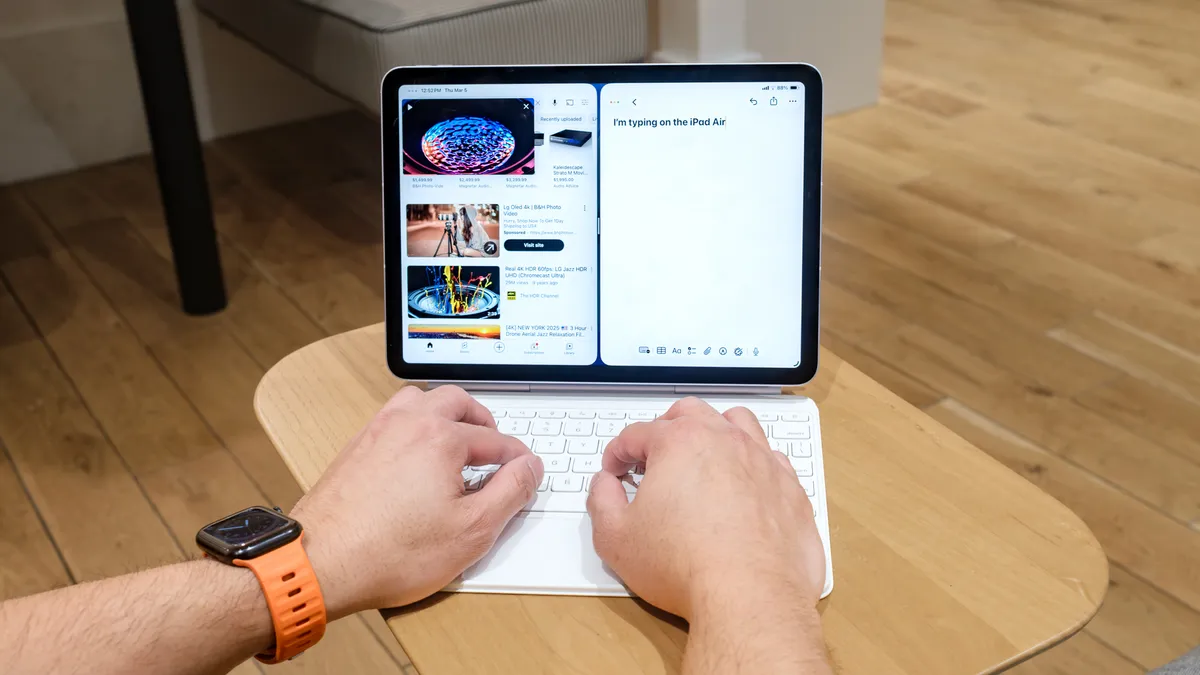
It’s not quite a desktop experience, but it’s close. One of the new features of iPadOS 26 is the ability to have multiple apps open in resizable windows, which you can move about the screen.
While the 11-inch iPad Air I tested is a bit small for true multitasking, it was nice to be able to make multiple apps open side-by-side, and to be able to move and resize each window as I liked.
Now powered by an M4 chip, the iPad Air is modestly faster than last year’s iPad Air M3. On our benchmark tests, it scored appreciably faster, both in single- and multicore, as well as in frame rate tests. The most notable difference you’ll see is if you go back a couple of generations; the M4 iPad scored nearly two times higher than the M1 Air on our Geekbench test.
Are you going to notice the difference in everyday use? Probably not, unless you’re planning to do some pretty intense video editing, but if that’s your plan, the more powerful iPad Pro might be more your speed.
| Row 0 - Cell 0 | iPad Air M4 11-inch (2026) |
iPad Air 11-inch M3 (2025) |
iPad Air M1 (2022) |
iPad Air 4 (2020) |
Geekbench 6 (single) |
3745 |
3042 |
1707 (Geekbench 5) |
1591 (Geekbench 5) |
Geekbench 6 (multi) |
13342 |
11804 |
7,151 (Geekbench 5) |
4,262 (Geekbench 5) |
Wild Life Extreme Unlimited |
40.3 |
34.80 |
28.67 |
n/a |
Wild Life Unlimited |
189.3 |
156.83 |
107.6 |
53 |
Good cameras
Both the front and rear cameras on the iPad Air have a resolution of 12MP, though the front-facing camera has a much wider field of view, so as to take advantage of Center Stage, which can automatically track and frame you during FaceTime calls. It’s a handy feature to have, especially if you’re trying to cram several people into the shot. The rear camera lets you choose from a regular shot, square, or panorama. There’s no Portrait mode, however.


Photos from both cameras were pleasing, but not spectacular. The front camera did a good job of keeping my face properly exposed, even with a bright light source behind my head. The rear camera also adequately pulled up the details and colors of a shelf full of books, though, as with any photo, zooming in too far quickly resulted in a loss of definition. However, pictures from both cameras exhibited a good deal of graininess at full size.

What I didn't like
No FaceID
You can unlock the iPad Air using TouchID on its power button, but just like last year, Apple has reserved FaceID for its iPad Pro models. It’s a small annoyance, but doesn’t feel like this is so much of a premium feature as to limit it to the company’s highest-end tablets.
Pricey accessories

I used the Magic Folio Keyboard to type parts of this review, and while it’s a little cramped compared to a laptop’s keyboard, the keys were plenty snappy and responsive, and within minutes I was typing at or near my regular rate. The touchpad was also very accurate, and I never had an instance where my cursor ended up where it shouldn’t have been. For the price, though, I wish the keys were backlit. And, $269 is a lot to ask, especially when you can find compatible third-party options for half as much.
Battery life is exactly the same — and less than its predecessors
I get that the Air delivers better performance per watt than the previous model, but I would have liked just a little more endurance. To be sure, its battery life of 9 hours and 44 minutes, as tested, is great for an 11-inch tablet, but a touch more wouldn’t hurt, especially considering the M1 and the iPad 4 were both able to break the 10-hour mark on our tests.
| Row 0 - Cell 0 | iPad Air M4 11-inch (2026) |
iPad Air 11-inch M3 (2025) |
iPad Air M1 (2022) |
iPad Air 4 (2020) |
Battery life |
9:44:29 |
9:41:12 |
10:09 |
10:29 |
Charge after 30 mins |
27% |
24% |
25% |
25% |
Bottom line

The M4 iPad Air is a modest upgrade over last year’s model, but when you make one of the best tablets there is, and there’s no real challenger, then maybe each new year doesn’t need to see a completely new reinvention.
If you have an older iPad — say, from the M1 generation or before — and you see its battery life taking a big hit, then you might want to consider an upgrade, though that model also supports iPadOS 26. The M4 Air also has a Center Stage camera, which the M1 series lacks.
The question I suspect many will have is whether they should buy the iPad Air or spring for the Macbook Neo, which is $250 less when you factor in the cost of the Air’s keyboard. While the Air has a touchscreen and is more portable, its value proposition when compared to Apple’s laptops is now a lot more questionable if you’re looking for an inexpensive productivity device.
Yes, the iPad Air is the best Apple tablet for the masses, but it may have just been superseded by the Neo as the best cheap Apple product for getting stuff done.