




If you're still rocking a non-smart TV, then one of the best streaming devices will give you access to a much wider range of content than you're likely used to. Netflix, Amazon Prime, and more, all on your big living room TV for more movie nights, binging marathons and sports events, all thanks to a little stick that plugs into the back of your TV.
Even for smart TV users they're a great option, with improved user interfaces and other features. For most people, the best option is the Roku Streaming Stick Plus. It costs less than fifty bucks and features excellent picture quality and a clean, simple user interface.
Thanks to Gemini AI inclusion, the Google TV streamer takes the second spot on the list. It's a joy to use, with a simple OS and extra features that make it easier to find your favorite shows and movies.
Here are the best streaming devices for your TV that you can buy today.
The best streaming devices you can find today
Why you can trust Tom's Guide Our writers and editors spend hours analyzing and reviewing products, services, and apps to help find what's best for you. Find out more about how we test, analyze, and rate.
Best overall


Roku's streaming devices have topped this list for a long time, and the latest Roku Streaming Stick Plus is only going to cement the brand's place at the top of the tree. The Streaming Stick Plus has loads of features that make it the best option around right now, from fantastic 4K streaming to a simple, slick UI.
This compact wonder brings powerful streaming without taking up loads of room behind your TV. Roku's user interface is amongst the best around, making searching through your favorite streaming services a breeze. The Roku remote that comes with it isn't the fanciest, but it's well laid out and simple to use — even if it doesn't have voice control.
The most important part, of course, is how good it makes your TV shows look. And, despite its lower price, we're happy to report that the 4K output is excellent. We combined it with a Samsung S90D OLED TV, and it looked about as spectacular as you might expect.
Roku has slipped in some funky extras as well. We really like the screensavers — called Backdrops — that play when you're not using the TV. It avoids image retention and burn-in, which is a bonus, but it also makes what could be a big, black rectangle in your room something that actually adds to the decor.
The biggest drawback is the pesky ads. Make sure you turn off the video autoplay, lest you be bombarded by irritating, noisy videos on startup. The ads are otherwise relatively easy to ignore.
Despite the annoying ads, the Roku Streaming Stick Plus is an excellent streamer.
- Read our full Roku Streaming Stick Plus review
The best Live TV streaming device
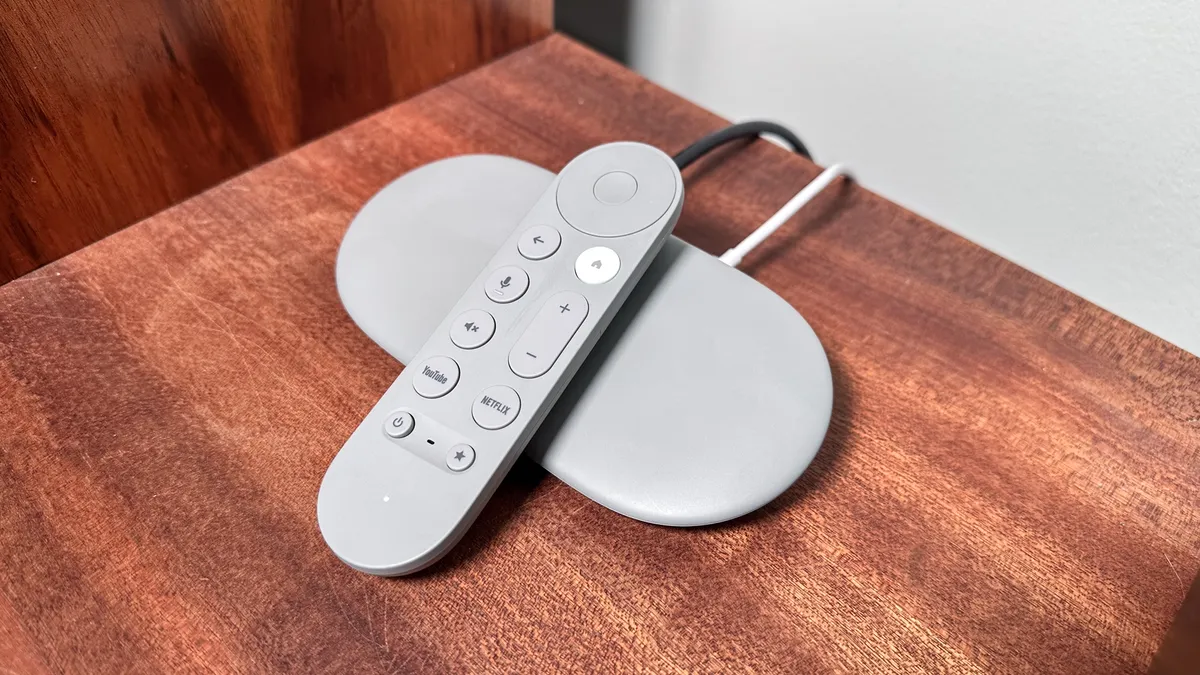
The Google TV Streamer is a huge improvement over the old Google Chromecast. Similar functionalities and OS navigation remain — live TV integration, tons of free content, plus several various broadcast TV services to choose from (YouTube TV, Sling and Philo).
But now, it also packs 4K UHD streaming with support for HDR and Dolby Vision for excellent picture quality, and Dolby Atmos for immersive sound. And with Google TV, you have support for the over 6,500 Android TV apps.
That's not all, as the TV Streamer has a slew of smart home integrations that makes it stand out. Directly from your TV, you can now monitor and control all your smart home devices.
We were able to view live streams from our various home security cameras and video doorbells, and also see which lights were still on — and dim them, too. You can even check the temperature on your smart thermostat. It's a step up from what other streaming devices offer and will make smart home enthusiasts gush the world over.
As with most newer TV models,. Google has also incorporated its Gemini AI into the TV Streamer. This will do a variety of tasks, like providing simple summaries of whatever content is on-screen and pull in reviews from both critics and the general public — for better or worse.
You can also use Gemini to create screensavers. Think of (almost) anything and speak it into the remote, and Gemini will create it for you, to amusing (or horrifying) effect.
Yes, the Google TV Streamer costs $99 — twice that of the Chromecast with Google TV — but the upgrades will keep it relevant for years to come.
- Read our full Google TV Streamer review
The best streaming device for Apple users


The Apple TV 4K is priced at a premium most might not be willing to invest in, but it's not among the best streaming devices for nothing. It offers some of the most robust features (made all the better for Apple device users).
The A15 Bionic system-on-chip super-charges the Apple TV 4K, delivering incredibly fast load times, beating even the latest Fire TV Cube and Roku Ultra on loading Netflix, YouTube, Disney Plus and Spotify.
The Apple TV 4K also has support for HDR10+ (though this only works if your TV supports it), and the remote has USB-C charging, meaning you can kiss goodbye to all your Lightning wires.
Smart home enthusiasts will also be excited for the inclusion of a Thread support for Matter, which was just added on the new Google TV Streamer. One of the best reasons to get the Apple TV 4K is tvOS, which remains one of the cleanest interfaces out there.
- Read our full Apple TV 4K (2022) review
Best for Alexa users

Amazon's Fire Stick line might be the most popular streaming device option out there, but there are some key weaknesses to the product that let it fall to the bottom of our list.
Still, if you're an Alexa user with Amazon devices scattered around your house, you can do a whole lot worse than the relatively affordable Fire Stick 4K Select. We found the image quality from the streaming was good, and the setup was incredibly easy compared to some of the other options out there.
The AI features are the standout, letting you search more easily for your favorite content. Of course, it also melds with the rest of the Amazon ecosystem well, which is why we've said it's best for Alexa users.
But we can't recommend it with as much gusto as some of the other options. The restrictive HDR and audio options are disappointing, and the Vega operating system it runs on is half-baked and often irritating. The lack of WiFi 6 is a shame too, although we didn't have any wireless connection issues while using the device.
Overall, the Fire Stick 4K Select is fine if you're already invested in Amazon's family. For everyone else, you're better off with one of the other options above.
- Read our full Fire Stick 4K Select review
How we test the best streaming devices
We test streaming players by looking at both the content they can provide (most are very similar at this point) and how they deliver said content. Any streaming player worth its salt can load a 4K stream, but only a good one possesses straightforward navigation, robust search features and a wide variety of content to suit all tastes.
The first thing we evaluate is the setup, to see how quick and simple it is. From there, we take the user interface for a spin to see what content gets highlighted, what gets hidden, and how easy it is to navigate to our favorite channels.
As live TV service integration becomes a bigger feature in streaming devices, we look at how these sticks and boxes can place your favorites within closer touch.
We'll also watch a few different shows on a variety of channels to gauge the quality of the video and audio, to make sure they look good regardless of if you have one of the best TVs or not. That said? Check out our guide to the best cheap TV deals if you need a discount.
After that, it's onto the extra features, like gaming, voice search and screen mirroring. These factors don't weigh quite as heavily toward the final score, but they're nice to have if they work well, and extremely distracting if they don't.
How to choose the best streaming device for you
Figuring the right streaming device for your needs is pretty easy. While everyone should start with the Roku Streaming Stick 4K, your mileage may vary. If your budget is tight, the Roku Express 4K Plus can bring a lot of content to your TV without adding the clutter of a remote.
If you're trying to stabilize your connection, the Roku Ultra and Apple TV 4K make that process super easy with their dedicated Ethernet cables. But if you're a performance first type, and watch a lot of 4K UHD content, the Nvidia Shield TV or Apple TV 4K is where you should start.
Lastly, folks who already treat Alexa like a member of the family should consider the 3rd Gen. Fire TV Cube, which makes controlling your entertainment as easy as talking. That being said, it's quite expensive, and the Roku Streaming Stick 4K Plus remote also supports voice commands, you just have to click the microphone button, whereas the Fire TV Cube is hands-free.
If you like the Amazon ecosystem and want a cheaper device, consider the Fire TV Stick. Amazon just launched its brand new iteration in the Fire TV Stick HD, which we also tested, and it too could serves as a proper upgrade for those who love its ecosystem.

