




AI laptops are everywhere today, and if you're here to find out what the best one is for your needs, good news! You're spoilt for choice. But the trickiest part is finding out what you need AI for.
This comes down to figuring out what AI work you want to do with it. Over the past few years, our team of computing and AI experts has tested systems of all sizes and found that AI laptops fall into two categories:
- A laptop that can run an AI model locally: With free-to-use models like OpenAI's GPT-oss models or Hermes Agent available to download and use locally on your own system, laptops with incredibly powerful chips and graphics, along with plenty of RAM, are critical to making them run.
- A laptop offloading day-to-day AI tasks onto an NPU: In the Apple world, it's called a Neural Engine. But for everyone else, it's the NPU — a subsection of the processor in a lot of consumer laptops today that handles the tasks you may not even realize use AI, like blurring the webcam background or live video transcription.
These days, the best AI laptops strike a balance by offering both of these capabilities, so rest assured, these machines will make the most of AI to power through workflows, give your games an uplift and more.
Right now, our top recommendation is the Microsoft Surface Laptop Ultra, packing the AI-focused Nvidia RTX Spark N1X. This is capable of running up to a 200-billion-parameter AI model in sleek, portable laptops, and has reached a new level of handling local AI tasks. Prefer a creator-focused machine? The Asus ProArt P16 with RTX Spark offers amazing performance with a gorgeous OLED touchscreen.
But there's more, like the reliable MacBook Pro with PROLED XDR Display (as well as the MacBook Pro M6), and yes, even Snapdragon X2 laptops like the Lenovo IdeaPad Slim 5x have arrived, and they have plenty to show off. For more AI laptops as they come in, we'll keep you updated with the latest news. You can find out what our tests mean.
Whatever you're looking to use AI for, here are the AI laptops not to miss out on.

I'll be honest. I didn't see any true benefit of AI coming to laptops once it first started to show up on the machines I've tested. But that was a few years ago now, and the tools on offer have seen huge leaps in performance. It's coming to a point where PCs can perform far more efficiently thanks to the help of AI. There's even more that it's capable of today, and if you're looking to benefit from its various use cases, there's a system on this list that will suit your needs.
The best AI laptops you can buy today
Why you can trust Tom's Guide Our writers and editors spend hours analyzing and reviewing products, services, and apps to help find what's best for you. Find out more about how we test, analyze, and rate.
The best AI laptop overall


Why is this the best overall AI laptop?
The Microsoft Surface Laptop Ultra immediately stands out for its Nvidia RTX Spark GPU, which sets a new bar for AI and graphics performance in a portable 15-inch chassis. If you're after a laptop that can run large local models and handle everyday AI-accelerated tasks without missing a beat, this is the Windows machine we kept reaching for.
Microsoft Surface Laptop Ultra: AI performance
Microsoft Surface Laptop Ultra
Performance Results
Slide through to see each Geekbench benchmark
Geekbench 7 (single-core)
| Product | Value |
|---|---|
| Microsoft Surface Laptop Ultra (Nvidia RTX Spark N1X) | 2604 |

Microsoft Surface Laptop Ultra: Analyzing the numbers
Under the hood, the RTX Spark delivers a level of GPU power that isn't just theoretical. In our hands-on testing, we directly compared it to an RTX 5060 Ti 16GB desktop GPU. While it didn't surpass the desktop card (which draws far more power), the Spark came impressively close — a real feat for a thin-and-light laptop and a sign this machine is built for serious creative workloads as well as AI.
AI token generation is where the Surface Laptop Ultra puts most competitors in the rearview mirror. It breezed past Apple's M5 Pro, the AMD Ryzen AI Max 395+, and even demolished Intel's Core Ultra X9 in industry expert tests. For buyers who want a laptop that won't feel outdated as AI workloads grow in complexity and size, this performance headroom is a huge win.
That being said, battery life is a notable trade-off compared to its rivals, coming in at over 10 hours. It will last a full workday, but you'll want to keep a charger handy. Either way, the Microsoft Surface Laptop Ultra's portability and balanced power make it the best all-around pick for demanding AI users.
- Read our full Microsoft Surface Laptop Ultra review
The best value AI laptop


Why is this the best value AI laptop?
Now packing the might of the latest Snapdragon X2 Plus chipset, the Lenovo IdeaPad Slim 5x not only delivers greater AI performance to power through AI agents, multimodal content generation and more, but it also comes at a value-first price that's well below $1,000. Throw in the sharp, bright 15-inch FHD+ (1920 x 1200) touchscreen and a long battery life of 15 hours (thanks to that 80 TOPS Hexagon NPU taking the pressure off), and you've got yourself a reliable yet affordable AI machine.
Lenovo IdeaPad Slim 5x: AI performance
Lenovo IdeaPad Slim 5x AI Performance Results
Slide through to see each benchmark
Geekbench AI CPU (Quantized Score)
| Product | Value |
|---|---|
| Lenovo IdeaPad Slim 5x (Qualcomm Snapdraogn X2 Plus) | 7726 |
Lenovo IdeaPad Slim 5x: Analyzing the numbers
The Lenovo IdeaPad Slim 5x has hugely benefited from the Snapdragon X2 Plus chip inside, as you'll be surprised to find it beats the likes of Apple's M5 chip when it comes to raw AI performance (not when it comes to GPU-intensive tasks, though). And in our benchmark tests, we found its background AI features and performance punchy enough for real-world use.
Along with AI working in the background to summarize documents, boosting webcam quality (which is needed, as we found its 1080p camera to be grainy) or taking full advantage of Copilot features, expect its AI power to help out with light photo and video editing, content generation and running autonomous AI agents.
All that for just $900? The IdeaPad Slim 5x shows that Lenovo knows how to bring value to a laptop. Just watch out for its subpar speakers.
- Read our full Lenovo IdeaPad Slim 5x review
The best AI laptop for power users

Why is this the best AI laptop for power users?
Yes, it's a gaming laptop (and it comes with an equally large gaming laptop price). But with RTX 5090, Nvidia went in hard on improving AI performance. Pair that with the Intel Core Ultra 9 275HX, a huge total wattage being pumped through these internals and impressive thermal management, the Asus ROG Strix Scar 18 is a clear favorite for AI power users.
Asus ROG Strix Scar 18: AI performance
Asus ROG Strix Scar 18 AI Performance Results
Slide through to see each benchmark
Geekbench AI CPU (Quantized Score)
| Product | Value |
|---|---|
| Asus ROG Strix Scar 18 (Intel Core Ultra 9 275HX) | 9724 |
Asus ROG Strix Scar 18: Analyzing the numbers
While an NPU handles everyday AI tasks well enough, I’ve found that you really need the raw power of a GPU to push things further. With the Intel Core Ultra 9 275HX paired with the RTX 5090 in this machine, I’m getting an incredible amount of AI processing capability — 1,837 TOPS, to be exact.
That kind of performance means I can breeze through demanding creative AI tasks, like complex text masking in Adobe Premiere Pro, and even train my own AI models if I want to. The sheer parallel processing power here makes this setup an absolute beast for anything AI-related.
- Read our full Asus ROG Strix Scar 18 review
The best AI laptop for casual users

Why is this the best AI laptop for casual users?
The Lenovo Googlebook 15 is best suited for casual users who want everyday AI tools that just work, thanks to its genuinely helpful features like Magic Pointer and Rambler, and a standout 15.3-inch OLED display. In practical use, these AI extras feel like an extension of the OS rather than flashy add-ons, which is a distinction that makes a real difference if you’re looking for seamless productivity boosts without the learning curve or bloat. If you're in the Android ecosystem and want to make full use of Gemini AI, this is the laptop to grab.
Lenovo Googlebook 15: AI performance
Lenovo Googlebook 15 AI Performance Results
Slide through to see each Geekbench AI benchmark
Geekbench AI CPU (Quantized Score)
| Product | Value |
|---|---|
| Lenovo Googlebook 15 (Intel Core Ultra 5 325) | 1931 |
Lenovo Googlebook 15: Analyzing the numbers
Performance is dialed in for the tasks that matter. With the Intel Core Ultra 5 325 chip and 16GB of RAM, we worked across eight Chrome tabs and several Android apps without hitting any slowdowns or lag. For the casual AI user, that means smart features like note summarization or webcam enhancements kick in without bogging down your system.
On paper, this isn't exactly the most powerful laptop out there, but using a combination of on-device AI and cloud-based AI models means you can put Gemini to good use, from asking anything via the Magic Pointer (although shaking the cursor to do this is a tad annoying) to quickly summarizing emails and the like. The battery life in our battery test came in at 10 hours and 25 minutes, which is fine for a workday, but notably less than other value-first competitors. Still, it's enough to power through a day, even if you'll want to keep a charger handy
If you want a laptop that’s built for the kind of smart, unobtrusive AI you’ll actually use on a casual basis, and you’re willing to excuse the early bugs of Googlebook OS, the Lenovo Googlebook 15 is the clear choice for casual buyers.
- Read our full Lenovo Googlebook 15 review
The best AI laptop for creators

Why is this the best AI laptop for creators?
The Asus ProArt P16 with Nvidia RTX Spark may just be the best creator laptop you can get right now, as it's a powerhouse defined by its 20-core RTX Spark N1X CPU and a massive 6144-core GPU. Not only does it make short work of even the most demanding local AI workloads, but it also comes with plenty of creative-focused features, including a 16-inch UHD+ (3840 x 2400) OLED touchscreen boasting a 120Hz refresh rate. For accurate, sharp colors and details while editing photos, videos or 3D designs, this machine soars.
Asus ProArt P16: Performance
Asus ProArt P16 Performance Results
Slide through to see each Geekbench benchmark
Geekbench 7 (single-core)
| Product | Value |
|---|---|
| Asus ProArt P16 (Nvidia RTX Spark N1X) | 2704 |
Asus ProArt P16: Analyzing the numbers
In our hands-on testing, this hardware combination translated into highly responsive performance for everything from running complex language models to 3D creative tasks and gaming. If you want a Windows laptop that can tackle heavyweight AI and creative workflows with confidence, the ProArt P16 delivers.
With support for up to 128GB of DDR5X RAM, the P16 is clearly aimed at professionals and enthusiasts who need to manipulate large models, datasets or multiple high-memory applications without slowdowns. For graphic design, game development and more, the AI power under the hood means you can take full advantage of Adobe's creative suite and beyond with AI support in apps.
It's got fine battery life at over 12 hours, but know that this can get loud and hot when put under heavy loads, whether that be gaming or heavy-duty AI workloads. Otherwise, for anyone who wants a top-tier Windows laptop with real AI muscle, generous memory and a premium display for creative workflows, the ProArt P16 sets the new standard in AI laptops.
- Read our full Asus ProArt P16 (RTX Spark) review
The best AI Macbook
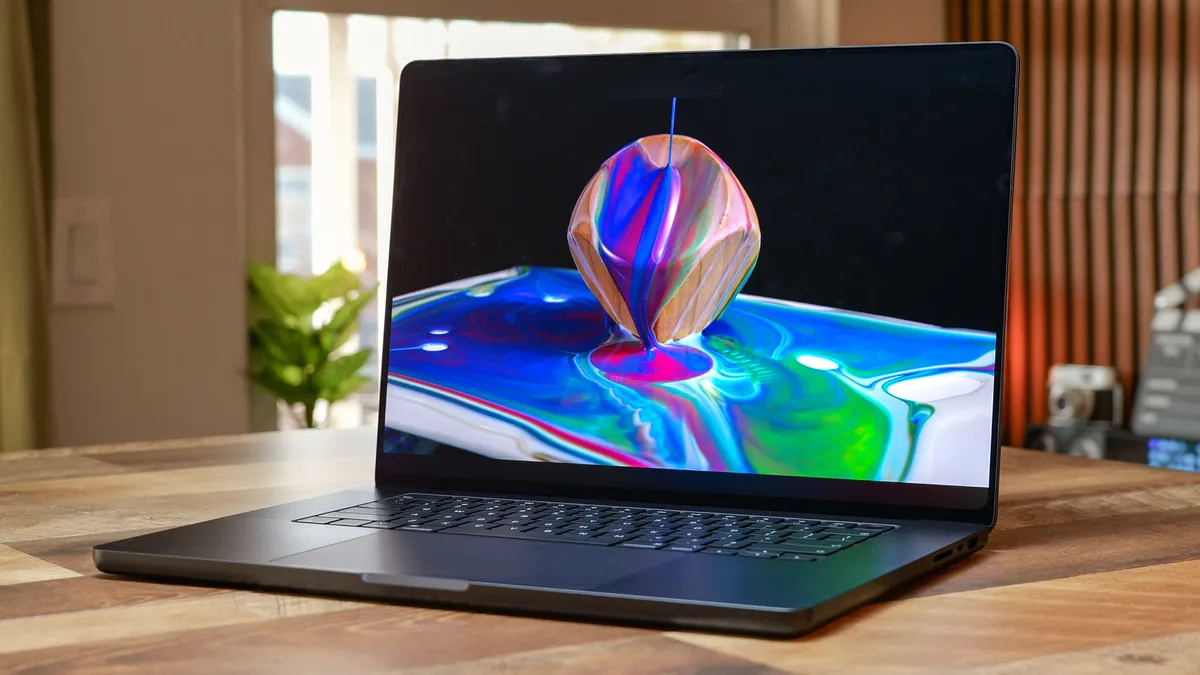
Why is this the best AI MacBook?
Whether you get the incredibly fast M5 Pro or the powerful M5 Max chip, the MacBook Pro with PROLED XDR Display is a marvel in both design and performance. We've already seen how Apple's mighty chips perform when it comes to AI tasks, but the OLED touchscreen, thinner design and incredible battery life make this a no-brainer for anyone who wants the ultimate MacBook for AI workloads.
MacBook Pro with PROLED XDR: AI performance
Apple MacBook Pro with PROLED XDR Display
AI Performance Results
Slide through to see each Geekbench AI benchmark
Geekbench AI CPU (Quantized Score)
| Product | Value |
|---|---|
| Apple MacBook Pro with PROLED XDR Display (M5 Max) | 8024 |
MacBook Pro with PROLED XDR: Analyzing the numbers
Digging into the numbers, both the 14- and 16-inch PROLED models we tested (with M5 Pro and M5 Max, respectively) delivered amazingly high Geekbench AI scores, confirming their muscle for AI and demanding creative tasks. Both variants now start with 24GB of RAM, which is enough for running complex AI models locally, like the 32-billion-parameter Qwen2.5 coder LLM or massive Final Cut Pro projects. However, the 16-inch can be configured with up to 128GB for those pushing the absolute limits.
The PROLED XDR touchscreen steals the show, as it's one of the best displays we've tested on a laptop. Expect sharp, bright visuals with a flood of accurate colors. Portability hasn’t been sacrificed for power either, as the new 14- and 16-inch Pros are 0.5 and 0.7 pounds lighter than their predecessors.
Yes, you’re paying a premium for this blend of performance, display and Apple ecosystem polish. That being said, if you want the best MacBook for uncompromised creative work, high-end AI and battery life, the PROLED model is quite a win. Of course, if you're just fine with the usual MacBook Pro display, then the more affordable MacBook Pro M6, or M5 Pro/M5 Max models, will do the trick, too.
- Read our full MacBook Pro M5 Pro review
The best 2-in-1 AI laptop
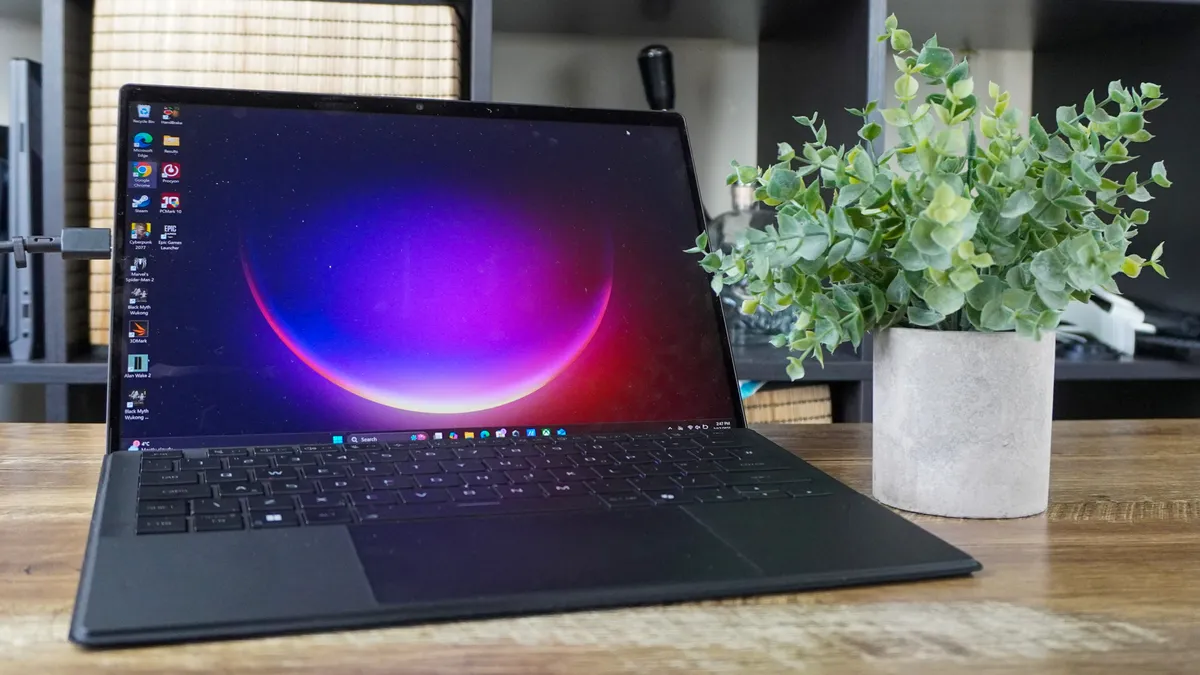
Why is this the best 2-in-1 AI laptop?
The Asus ROG Flow Z13 isn't just a breakthrough in gaming with that monster integrated graphics on the AMD Ryzen AI Max+ 395 chip. As the name suggests, it's also a mini marvel for running massive local AI models, too. And it's all packed into a slim, lightweight 2-in-1 design that you can take anywhere with you. There's even a special ROG Flow Z13 Kojima Edition (with the highest specs) for all you Death Stranding fans.
Asus ROG Flow Z13: AI performance
Asus ROG Flow Z13-KJP AI Performance Results
Slide through to see each benchmark
Geekbench AI CPU (Quantized Score)
| Product | Value |
|---|---|
| Asus ROG Flow Z13-KJP (AMD Ryzen AI Max 395) | 10792 |
Asus ROG Flow Z13: Analyzing the numbers
The Asus ROG Flow Z13 perfectly bridges that gap between casual and pro AI users — coming with all the Copilot+ PC features that run efficiently off the built-in NPU, but also having the raw horsepower to run anything up to OpenAI's GPT-OSS 120B model. As we found with the ROG Flow Z13-KJP Edition, the highest configuration offers even more AI-powered potential.
It's a seriously impressive feat, but it will cost you. At a minimum of $2,099, this is a pricey system to buy. But to get the model that will support massive LLMs, you'll have to shell out over $3,000 for the option with 128GB of shared system memory.
That being said, if you've been looking to localize your AI, this has been our favorite low-profile way to go.
- Read our full Asus ROG Flow Z13 review
Also tested
We've tested hundreds of laptops, and over the past couple of years, many have come with plenty of AI power. Not all make the cut for this list, though, but that doesn't mean they're not worth looking at. So, here's more to check out.






What's coming next

As AI continues to evolve at an accelerated pace, the hardware continues to catch up. We're now seeing a new wave of laptops geared towards AI, and we're here to update you on what's coming.
- We've finally tested the latest RTX Spark laptops and Googlebooks, and they live up to their promise of being AI powerhouses (in different ways, of course). As you can see in this guide, with the Microsoft Surface Laptop Ultra, Asus ProArt P16 and Lenovo Googlebook 15, we recommend these as the best AI laptops around right now. However, these won't be for everyone, so it's a good idea to read our reviews to know the use cases they offer.
- Apple's MacBook Pro M6 and MacBook Pro with PROLED XDR Display (M5 Pro and M5 Max) have arrived, and it's hardly surprising that these still deliver some of the best performance you can get, especially for AI tasks. We recommend these as the best around right now, but be warned: they cost a lot.
Best AI Laptop: Frequently Asked Questions

What laptop specs do I need to run AI models locally?
For local AI models, you'll need a laptop that comes with a minimum of 16GB of RAM and a dedicated GPU with at least 8GB of VRAM, or a processor with GPU cores (like an Apple M5 or Intel Panther Lake chip). Having 32GB of RAM is recommended, but it isn't essnetial to run local AI tasks.
Laptops need to have a standard level of memory and graphics performance for the specific model you want to run. Smaller models and everyday AI features can run on modest hardware, but larger language models and generative image or video workloads benefit from powerful integrated graphics or a discrete GPU, plus ample system memory or VRAM.
How much RAM do I need for local AI and LLMs?
The right amount of RAM depends on the size of the local model, but more memory gives you more scope to run larger models and work with longer prompts. System memory is particularly important on laptops with integrated graphics or Apple silicon, where AI workloads can draw from shared or unified memory.
For lightweight experimentation, a modest configuration will be enough, whereas demanding local LLMs need substantially more headroom. Treat memory as a key buying decision, and check the requirements of the models you expect to use. As with the Microsoft Surface Laptop Ultra, Asus ProArt P16 and Asus ROG Flow Z13 at their highest spec, you can get configurations with 128GB of RAM, but that will be very expensive. However, 16GB of RAM is still enough to run small and quantized local AI models.
Is a GPU or an NPU more important for AI on a laptop?
Neither a GPU or NPU is more important, but both help with different needs. A GPU is generally more important for demanding local generative AI work, while an NPU is designed to handle efficient everyday features such as webcam effects, transcription and background assistance. It's also great for prolonging battery life. The useful component depends on what you plan to do.
Can a Chromebook run AI tools?
Yes, a Chromebook can run many AI tools, especially web-based and cloud services, but it is not the best choice for demanding local AI models. A Chromebook can suit document assistance, image tools and online chatbots, but choose a Windows laptop or MacBook if you need to run sizeable models locally or use AI software with more demanding system requirements.
However, Googlebooks are built for Gemini AI, making them far better suited than the best Chromebooks. These run on Googlebook OS, a new Android-based desktop operating system, and come with Gemini built-in to run local AI tasks.
How we test AI laptops

To choose the best laptops for AI, we put each one through its paces with some brutal testing. Let me explain all the tests you saw above.
- Geekbench AI CPU test (Quantized score): The CPU's main purpose is more generalized towards keeping your laptop running smoothly. But as AI becomes more and more fundamental to the entire system, it's important that these cores are ready to handle machine learning applications. The Quantized score is the mean result of how well the device performed across a whole set of AI tests.
- Geekbench AI GPU test (Quantized score): For the more advanced generative side of things, like video editing, the Geekbench AI GPU test puts the graphics card (or integrated graphics) to the test to see how performant it is for all the parallel tasks that need to be completed in machine learning.
- Geekbench AI NPU test (Quantized score): Whether it's the Neural Engine on a MacBook or the NPU on a Windows laptop, this part of a chip is purpose-built to handle AI tasks and offload that pressure on the CPU. The faster this is, the better your system will be at those day-to-day AI tasks like webcam picture improvement.
There is one exception, though. Chromebooks do not have AI benchmarking tests available, and since all of their AI tasks are completed entirely on the cloud, the main thing to consider is Wi-Fi speed here.
